Category Archives: CS@Worcester

The Uml digram


The blog
post, UML Diagrams – Everything You Need to Know to Improve Team Collaboration,
provides a clear explanation of Unified Modeling Language(UML) Diagram, its
usage and types ending with how it helps to visualize the project. Starting
off, the blog covers the usage of UML diagrams, continuing with its key uses,
forward design, modeling before coding to plan a system, and backward design, modeling
after coding to document a finished system. Also, it covers the thirteen UML diagram
types and what each type shows and describes what each type represents and how
it contributes to visualizing processes effectively.

I chose this
article as it summarizes clearly what the UML diagram, its usage, how the UML
diagram can be used to collaborate with other teammates. First was that since
the class, I felt that I needed to understand UML diagrams better as I still
did not get what use does it has. The fact that it emphasizes UML diagram as
white board for building and analyzing the system the team gave me some reason
for understanding more about UML diagram. Not only that, but the article also
clearly goes in-depth about the UML diagram that goes way in depth compared to
the course of behavioral and structural diagrams and how they can fit together
in real-world workflows. Overall, this blog clarified how UML diagrams support
collaboration as a visual tools to help team members to see and discuss system
structures and behaviors. It made me view UML not just as an academic
requirement but as a practical communication tool that can strengthen teamwork
in future software projects.

           After
looking at the article and learning more about UML diagram, I felt like even
though it might not be perfect, that I might have to use it for future use. When
coding I have something on my mind to create, but when trying to explain it or comment
on the structure of the code. Sometimes others don’t understand or sometimes I cannot
remember why I did that later. Not only that, but the rough draft of the
structure can also be used when talking with other teammates because I cannot
do everything by myself and we need to see the same picture, and I think UML diagram
will be the virtual whiteboard for it.  


https://www.bluescape.com/resource-library/uml-diagrams-everything-you-need-to-know-to-improve-team-collaboration

From the blog Sung Jin's CS Devlopemnt Blog by Unknown and used with permission of the author. All other rights reserved by the author.

The Uml digram


The blog
post, UML Diagrams – Everything You Need to Know to Improve Team Collaboration,
provides a clear explanation of Unified Modeling Language(UML) Diagram, its
usage and types ending with how it helps to visualize the project. Starting
off, the blog covers the usage of UML diagrams, continuing with its key uses,
forward design, modeling before coding to plan a system, and backward design, modeling
after coding to document a finished system. Also, it covers the thirteen UML diagram
types and what each type shows and describes what each type represents and how
it contributes to visualizing processes effectively.

I chose this
article as it summarizes clearly what the UML diagram, its usage, how the UML
diagram can be used to collaborate with other teammates. First was that since
the class, I felt that I needed to understand UML diagrams better as I still
did not get what use does it has. The fact that it emphasizes UML diagram as
white board for building and analyzing the system the team gave me some reason
for understanding more about UML diagram. Not only that, but the article also
clearly goes in-depth about the UML diagram that goes way in depth compared to
the course of behavioral and structural diagrams and how they can fit together
in real-world workflows. Overall, this blog clarified how UML diagrams support
collaboration as a visual tools to help team members to see and discuss system
structures and behaviors. It made me view UML not just as an academic
requirement but as a practical communication tool that can strengthen teamwork
in future software projects.

           After
looking at the article and learning more about UML diagram, I felt like even
though it might not be perfect, that I might have to use it for future use. When
coding I have something on my mind to create, but when trying to explain it or comment
on the structure of the code. Sometimes others don’t understand or sometimes I cannot
remember why I did that later. Not only that, but the rough draft of the
structure can also be used when talking with other teammates because I cannot
do everything by myself and we need to see the same picture, and I think UML diagram
will be the virtual whiteboard for it.  


https://www.bluescape.com/resource-library/uml-diagrams-everything-you-need-to-know-to-improve-team-collaboration

From the blog Sung Jin's CS Devlopemnt Blog by Unknown and used with permission of the author. All other rights reserved by the author.

The Uml digram


The blog
post, UML Diagrams – Everything You Need to Know to Improve Team Collaboration,
provides a clear explanation of Unified Modeling Language(UML) Diagram, its
usage and types ending with how it helps to visualize the project. Starting
off, the blog covers the usage of UML diagrams, continuing with its key uses,
forward design, modeling before coding to plan a system, and backward design, modeling
after coding to document a finished system. Also, it covers the thirteen UML diagram
types and what each type shows and describes what each type represents and how
it contributes to visualizing processes effectively.

I chose this
article as it summarizes clearly what the UML diagram, its usage, how the UML
diagram can be used to collaborate with other teammates. First was that since
the class, I felt that I needed to understand UML diagrams better as I still
did not get what use does it has. The fact that it emphasizes UML diagram as
white board for building and analyzing the system the team gave me some reason
for understanding more about UML diagram. Not only that, but the article also
clearly goes in-depth about the UML diagram that goes way in depth compared to
the course of behavioral and structural diagrams and how they can fit together
in real-world workflows. Overall, this blog clarified how UML diagrams support
collaboration as a visual tools to help team members to see and discuss system
structures and behaviors. It made me view UML not just as an academic
requirement but as a practical communication tool that can strengthen teamwork
in future software projects.

           After
looking at the article and learning more about UML diagram, I felt like even
though it might not be perfect, that I might have to use it for future use. When
coding I have something on my mind to create, but when trying to explain it or comment
on the structure of the code. Sometimes others don’t understand or sometimes I cannot
remember why I did that later. Not only that, but the rough draft of the
structure can also be used when talking with other teammates because I cannot
do everything by myself and we need to see the same picture, and I think UML diagram
will be the virtual whiteboard for it.  


https://www.bluescape.com/resource-library/uml-diagrams-everything-you-need-to-know-to-improve-team-collaboration

From the blog Sung Jin's CS Devlopemnt Blog by Unknown and used with permission of the author. All other rights reserved by the author.

The Uml digram


The blog
post, UML Diagrams – Everything You Need to Know to Improve Team Collaboration,
provides a clear explanation of Unified Modeling Language(UML) Diagram, its
usage and types ending with how it helps to visualize the project. Starting
off, the blog covers the usage of UML diagrams, continuing with its key uses,
forward design, modeling before coding to plan a system, and backward design, modeling
after coding to document a finished system. Also, it covers the thirteen UML diagram
types and what each type shows and describes what each type represents and how
it contributes to visualizing processes effectively.

I chose this
article as it summarizes clearly what the UML diagram, its usage, how the UML
diagram can be used to collaborate with other teammates. First was that since
the class, I felt that I needed to understand UML diagrams better as I still
did not get what use does it has. The fact that it emphasizes UML diagram as
white board for building and analyzing the system the team gave me some reason
for understanding more about UML diagram. Not only that, but the article also
clearly goes in-depth about the UML diagram that goes way in depth compared to
the course of behavioral and structural diagrams and how they can fit together
in real-world workflows. Overall, this blog clarified how UML diagrams support
collaboration as a visual tools to help team members to see and discuss system
structures and behaviors. It made me view UML not just as an academic
requirement but as a practical communication tool that can strengthen teamwork
in future software projects.

           After
looking at the article and learning more about UML diagram, I felt like even
though it might not be perfect, that I might have to use it for future use. When
coding I have something on my mind to create, but when trying to explain it or comment
on the structure of the code. Sometimes others don’t understand or sometimes I cannot
remember why I did that later. Not only that, but the rough draft of the
structure can also be used when talking with other teammates because I cannot
do everything by myself and we need to see the same picture, and I think UML diagram
will be the virtual whiteboard for it.  


https://www.bluescape.com/resource-library/uml-diagrams-everything-you-need-to-know-to-improve-team-collaboration

From the blog Sung Jin's CS Devlopemnt Blog by Unknown and used with permission of the author. All other rights reserved by the author.

The Uml digram


The blog
post, UML Diagrams – Everything You Need to Know to Improve Team Collaboration,
provides a clear explanation of Unified Modeling Language(UML) Diagram, its
usage and types ending with how it helps to visualize the project. Starting
off, the blog covers the usage of UML diagrams, continuing with its key uses,
forward design, modeling before coding to plan a system, and backward design, modeling
after coding to document a finished system. Also, it covers the thirteen UML diagram
types and what each type shows and describes what each type represents and how
it contributes to visualizing processes effectively.

I chose this
article as it summarizes clearly what the UML diagram, its usage, how the UML
diagram can be used to collaborate with other teammates. First was that since
the class, I felt that I needed to understand UML diagrams better as I still
did not get what use does it has. The fact that it emphasizes UML diagram as
white board for building and analyzing the system the team gave me some reason
for understanding more about UML diagram. Not only that, but the article also
clearly goes in-depth about the UML diagram that goes way in depth compared to
the course of behavioral and structural diagrams and how they can fit together
in real-world workflows. Overall, this blog clarified how UML diagrams support
collaboration as a visual tools to help team members to see and discuss system
structures and behaviors. It made me view UML not just as an academic
requirement but as a practical communication tool that can strengthen teamwork
in future software projects.

           After
looking at the article and learning more about UML diagram, I felt like even
though it might not be perfect, that I might have to use it for future use. When
coding I have something on my mind to create, but when trying to explain it or comment
on the structure of the code. Sometimes others don’t understand or sometimes I cannot
remember why I did that later. Not only that, but the rough draft of the
structure can also be used when talking with other teammates because I cannot
do everything by myself and we need to see the same picture, and I think UML diagram
will be the virtual whiteboard for it.  


https://www.bluescape.com/resource-library/uml-diagrams-everything-you-need-to-know-to-improve-team-collaboration

From the blog Sung Jin's CS Devlopemnt Blog by Unknown and used with permission of the author. All other rights reserved by the author.

The Uml digram


The blog
post, UML Diagrams – Everything You Need to Know to Improve Team Collaboration,
provides a clear explanation of Unified Modeling Language(UML) Diagram, its
usage and types ending with how it helps to visualize the project. Starting
off, the blog covers the usage of UML diagrams, continuing with its key uses,
forward design, modeling before coding to plan a system, and backward design, modeling
after coding to document a finished system. Also, it covers the thirteen UML diagram
types and what each type shows and describes what each type represents and how
it contributes to visualizing processes effectively.

I chose this
article as it summarizes clearly what the UML diagram, its usage, how the UML
diagram can be used to collaborate with other teammates. First was that since
the class, I felt that I needed to understand UML diagrams better as I still
did not get what use does it has. The fact that it emphasizes UML diagram as
white board for building and analyzing the system the team gave me some reason
for understanding more about UML diagram. Not only that, but the article also
clearly goes in-depth about the UML diagram that goes way in depth compared to
the course of behavioral and structural diagrams and how they can fit together
in real-world workflows. Overall, this blog clarified how UML diagrams support
collaboration as a visual tools to help team members to see and discuss system
structures and behaviors. It made me view UML not just as an academic
requirement but as a practical communication tool that can strengthen teamwork
in future software projects.

           After
looking at the article and learning more about UML diagram, I felt like even
though it might not be perfect, that I might have to use it for future use. When
coding I have something on my mind to create, but when trying to explain it or comment
on the structure of the code. Sometimes others don’t understand or sometimes I cannot
remember why I did that later. Not only that, but the rough draft of the
structure can also be used when talking with other teammates because I cannot
do everything by myself and we need to see the same picture, and I think UML diagram
will be the virtual whiteboard for it.  


https://www.bluescape.com/resource-library/uml-diagrams-everything-you-need-to-know-to-improve-team-collaboration

From the blog Sung Jin's CS Devlopemnt Blog by Unknown and used with permission of the author. All other rights reserved by the author.

The Uml digram


The blog
post, UML Diagrams – Everything You Need to Know to Improve Team Collaboration,
provides a clear explanation of Unified Modeling Language(UML) Diagram, its
usage and types ending with how it helps to visualize the project. Starting
off, the blog covers the usage of UML diagrams, continuing with its key uses,
forward design, modeling before coding to plan a system, and backward design, modeling
after coding to document a finished system. Also, it covers the thirteen UML diagram
types and what each type shows and describes what each type represents and how
it contributes to visualizing processes effectively.

I chose this
article as it summarizes clearly what the UML diagram, its usage, how the UML
diagram can be used to collaborate with other teammates. First was that since
the class, I felt that I needed to understand UML diagrams better as I still
did not get what use does it has. The fact that it emphasizes UML diagram as
white board for building and analyzing the system the team gave me some reason
for understanding more about UML diagram. Not only that, but the article also
clearly goes in-depth about the UML diagram that goes way in depth compared to
the course of behavioral and structural diagrams and how they can fit together
in real-world workflows. Overall, this blog clarified how UML diagrams support
collaboration as a visual tools to help team members to see and discuss system
structures and behaviors. It made me view UML not just as an academic
requirement but as a practical communication tool that can strengthen teamwork
in future software projects.

           After
looking at the article and learning more about UML diagram, I felt like even
though it might not be perfect, that I might have to use it for future use. When
coding I have something on my mind to create, but when trying to explain it or comment
on the structure of the code. Sometimes others don’t understand or sometimes I cannot
remember why I did that later. Not only that, but the rough draft of the
structure can also be used when talking with other teammates because I cannot
do everything by myself and we need to see the same picture, and I think UML diagram
will be the virtual whiteboard for it.  


https://www.bluescape.com/resource-library/uml-diagrams-everything-you-need-to-know-to-improve-team-collaboration

From the blog Sung Jin's CS Devlopemnt Blog by Unknown and used with permission of the author. All other rights reserved by the author.

The Uml digram


The blog
post, UML Diagrams – Everything You Need to Know to Improve Team Collaboration,
provides a clear explanation of Unified Modeling Language(UML) Diagram, its
usage and types ending with how it helps to visualize the project. Starting
off, the blog covers the usage of UML diagrams, continuing with its key uses,
forward design, modeling before coding to plan a system, and backward design, modeling
after coding to document a finished system. Also, it covers the thirteen UML diagram
types and what each type shows and describes what each type represents and how
it contributes to visualizing processes effectively.

I chose this
article as it summarizes clearly what the UML diagram, its usage, how the UML
diagram can be used to collaborate with other teammates. First was that since
the class, I felt that I needed to understand UML diagrams better as I still
did not get what use does it has. The fact that it emphasizes UML diagram as
white board for building and analyzing the system the team gave me some reason
for understanding more about UML diagram. Not only that, but the article also
clearly goes in-depth about the UML diagram that goes way in depth compared to
the course of behavioral and structural diagrams and how they can fit together
in real-world workflows. Overall, this blog clarified how UML diagrams support
collaboration as a visual tools to help team members to see and discuss system
structures and behaviors. It made me view UML not just as an academic
requirement but as a practical communication tool that can strengthen teamwork
in future software projects.

           After
looking at the article and learning more about UML diagram, I felt like even
though it might not be perfect, that I might have to use it for future use. When
coding I have something on my mind to create, but when trying to explain it or comment
on the structure of the code. Sometimes others don’t understand or sometimes I cannot
remember why I did that later. Not only that, but the rough draft of the
structure can also be used when talking with other teammates because I cannot
do everything by myself and we need to see the same picture, and I think UML diagram
will be the virtual whiteboard for it.  


https://www.bluescape.com/resource-library/uml-diagrams-everything-you-need-to-know-to-improve-team-collaboration

From the blog Sung Jin's CS Devlopemnt Blog by Unknown and used with permission of the author. All other rights reserved by the author.
The Uml digram


The blog
post, UML Diagrams – Everything You Need to Know to Improve Team Collaboration,
provides a clear explanation of Unified Modeling Language(UML) Diagram, its
usage and types ending with how it helps to visualize the project. Starting
off, the blog covers the usage of UML diagrams, continuing with its key uses,
forward design, modeling before coding to plan a system, and backward design, modeling
after coding to document a finished system. Also, it covers the thirteen UML diagram
types and what each type shows and describes what each type represents and how
it contributes to visualizing processes effectively.

I chose this
article as it summarizes clearly what the UML diagram, its usage, how the UML
diagram can be used to collaborate with other teammates. First was that since
the class, I felt that I needed to understand UML diagrams better as I still
did not get what use does it has. The fact that it emphasizes UML diagram as
white board for building and analyzing the system the team gave me some reason
for understanding more about UML diagram. Not only that, but the article also
clearly goes in-depth about the UML diagram that goes way in depth compared to
the course of behavioral and structural diagrams and how they can fit together
in real-world workflows. Overall, this blog clarified how UML diagrams support
collaboration as a visual tools to help team members to see and discuss system
structures and behaviors. It made me view UML not just as an academic
requirement but as a practical communication tool that can strengthen teamwork
in future software projects.

           After
looking at the article and learning more about UML diagram, I felt like even
though it might not be perfect, that I might have to use it for future use. When
coding I have something on my mind to create, but when trying to explain it or comment
on the structure of the code. Sometimes others don’t understand or sometimes I cannot
remember why I did that later. Not only that, but the rough draft of the
structure can also be used when talking with other teammates because I cannot
do everything by myself and we need to see the same picture, and I think UML diagram
will be the virtual whiteboard for it.  


https://www.bluescape.com/resource-library/uml-diagrams-everything-you-need-to-know-to-improve-team-collaboration

From the blog Sung Jin's CS Devlopemnt Blog by Unknown and used with permission of the author. All other rights reserved by the author.

Blog Post for Quarter 1

October 5th, 2025

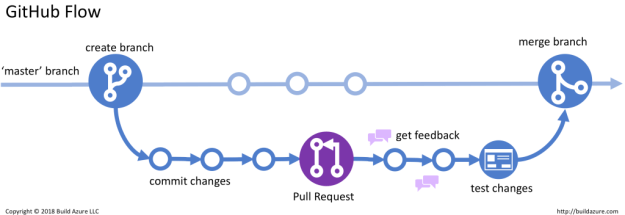
Recently, I’ve been working on using Git. This came in the form of using a little bit of GitHub, a little bit of GitLab, and the textbook made to help instruct me on how to use them. I began to learn the basics of repositories, and how to make edits and pull requests.

For example, I am now able to create a fork from a repository, create a remote origin, a clone of that onto my local device, make edits using Visual Studio Code, stage those edits, commit those edits, push those edits back to my remote origin, then establish a pull request. And a little bit more. So far, this Quarter of my class has been pretty interesting. I will note how the public changes and such are very interesting to me. I don’t usually like being in public places often because I assume I should be competent before doing anything in public, but oh well.

For the blog post I selected, I wanted to know just a smidge more about Git, since I was learning about it. (This will be linked below at the bottom of this post.) It mostly discusses the future plans for Git and potential for AI.

Honestly, there isn’t much for me to really do from this. I just note how AI appears to be Git stuff I currently use, so that’s mildly interesting. Though, I found it interesting that Git, much like I, is currently developing. It’s fun to think about how I learn and improve as a person that other things in the world are doing the same. While they are wildly different contexts, I find it cool. Everything is always changing and such. Even as I learn, I make notes that aren’t in the textbook to myself. Git will probably always get things added by various different people as well.

It encourages and intimidates me in some way. It’s very cool that by the time I “get caught up” it’ll be better than what I’m currently using, but at the same time, what if everything I learned becomes redundant? Though, for me, I was always a person to enjoy experiences, and I never really liked the idea of a limit. If anything, it is just more “fun” for me. There’s more to learn and I’ll never be caught up. My experiences will lead to my growth, so when the time comes, I’ll be much more suited to using the new tools that arrive.

https://github.blog/open-source/whats-next-for-git-20-years-in-the-community-is-still-pushing-forward/

From the blog CS@Worcester – Ryan's Blog Maybe. by Ryan N and used with permission of the author. All other rights reserved by the author.