Category Archives: Week 7

DRY/WET

What is DRY code? I’ve heard the term before in some tutorials but never knew the meaning behind the phrase. I figured if I keep seeing it, it must be important. After searching around the web for a bit, I finally found a great article on what DRY/WET code is on softwareyoga. The article explains what DRY/WET means, the advantages of DRY code, and the precautions to take when considering this principle. DRY code means “Don’t Repeat Yourself” and WET means “Write Every Time”. Obviously, DRY is the one everyone should wish to achieve for most cases. The advantages that the article goes through are maintainability, readability, reuse, cost, and testing.

DRY helps make code more readable because logic is not repeated throughout multiple classes. Instead methods/functions are called and what is likely hundreds of lines of code is represented by a few function calls. Readers of the code base can find the logic, read it once, and understand how it functions. Then when they see it implemented, they do not need to double check that the logic is the same. If code is WET, the logic will be re-written entirely, forcing readers to ensure nothing is different in each implementation.

Reuse and Cost go well together as reuse lowers the cost of development. When reuse is the goal/option, cost is inherently lowered. These go along with maintainability as reuse means that the code is properly maintained. If code can be reused, this means that small changes to the logic are less likely to cause problems. There would also be less time spent refactoring code in the future if previous implementations are written with DRY in mind. This means that less time, and developers are needed to maintain a long-lasting codebase.

Testing is simple, if the source code is written DRY, writing the tests DRY only makes sense. This also makes tests easier to write, and easier to change in the future.

The cautions for DRY expressed in the article are rather self-explanatory. One of the pre-cautions is to not over-DRY your code. Basically, this means to only use DRY when it makes sense to use DRY. If the code doesn’t need to take advantages of what DRY offers, it likely doesn’t need to be written with DRY in mind.

DRY is a great principle to follow when writing code. It teaches good practice and can be applied to most of the design patterns that we are learning. Most of the design patterns build upon each other and do so to keep code DRY. Implementations are written without rewriting logic and instead only require simple method calls. I hope to keep my code DRY in the future. If I do so, I will find it much easier in the long run to both add to, and learn from my previous projects.

Here is the link to the original article: https://www.softwareyoga.com/is-your-code-dry-or-wet/

From the blog CS@Worcester – Learning Software Development by sburke4747 and used with permission of the author. All other rights reserved by the author.

Closer Look: Given-When-Then

Last week I wrote a blog highlighting some of the things you can do to produce cleaner test code. This week I want to dive into one of those tips and explain it a little further so that you can use it in your code as well. This tip refers to the structure of test code to make it easier to read and understand, leading to easier maintenance. The blog I used as a reference is found here:  https://blog.codecentric.de/en/2017/09/given-when-then-in-junit-tests/

I chose this blog because it highlights how to name test cases and how to prepare test objects for your test cases which is important in J-unit testing, especially when you are working on a team and need to leave clean test code so that others understand the purpose of them.

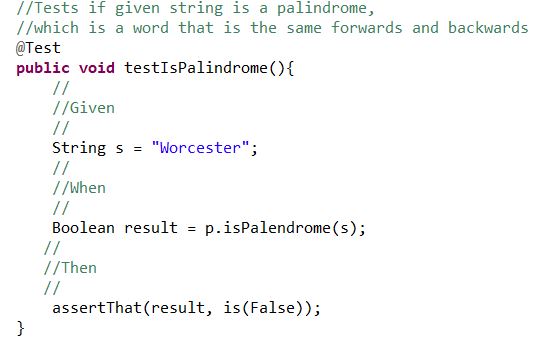
Getting started, JUnit testing can be confusing to look at if you don’t understand Java code in general. However, our goal should be that people who don’t code should still understand what our test is doing. In order to achieve this, we need to start with proper documentation of JUnit test code. Your code should have a header comment that explains exactly what your code is testing for. Like so:

isPalindromeTest

Next you want to split up the test method into a more readable fashion. This is where the Given-When-Then tip shines:

ispl

This way you can easily read what is going on with the test. This can still be improved drastically. The test name is testIsPalindrome(), this is not acceptable as it doesn’t actually tell you what the test is doing. Try to summarize the purpose of the test in the test name.

better.JPG

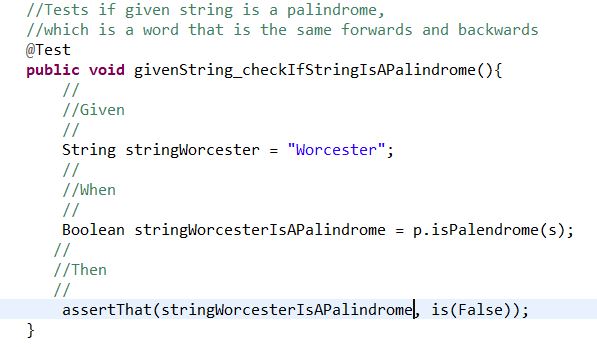
This is a better name for our test method for obvious reasons. But our test case still uses String s for the string we are checking and our variable result is just as vague. The following example is a much more readable test case than our beginning product:

betterbetter

When we use names that actually refer to what is happening, it makes the entire test case easier to read. Again, this is important when writing JUnit test cases because you must be able to work together as a team and leave behind proper documentation which will prevent others from getting confused when reading your code. Notice how you can read the assert line almost as if it was saying “Assert that the string Worcester is not a palindrome.”  If you can write test code that is as black and white as this then you shouldn’t have a problem when working with a team or even referring back to old code.


From the blog CS@Worcester – Rookey Mistake by Shane Rookey and used with permission of the author. All other rights reserved by the author.

Refactoring

Link to blog: https://www.versionone.com/agile-101/agile-software-programming-best-practices/refactoring/

In this blog, it explains the breakdown about code refactoring. The aspects that this blog covers are the definition of refactoring, code hygiene, specific “refactorings”, refactoring to patterns, the flow of refactoring, and refactoring automation in IDE’s.

The author of the blog states that code refactoring ” is the process of clarifying and simplifying the design of existing code, without changing its behavior.” This basically means that you are just editing the code to make it look and work better without changing its features it implements. They also note that every time we change code without refactoring it, it cause the code to rot and gets worse every time we do so. Rot takes several forms such as having unhealthy dependencies between classes or packages, bad allocation of class responsibilities, excessive responsibilities per method or class, and duplicate code. The main purpose of refactoring is that it prevents rot, which makes the code easy to maintain and extend. Extending the code and refactoring it go hand in hand.

Code Hygiene

Code hygiene is another term that the author of this blog uses to understand the concept of keeping code clean or having “clean code.” In his blog, he provides the metaphorical use of the kitchen environment and that cleaning up the “dishes, the pots, the kitchen itself…” keeps the kitchen as a whole clean. The main message is that keeping our code clean is crucial when refactoring.

Specific Refactorings

Specific refactoring methods are useful such as “Extract method” which extracts a block of code from one method, and creates a new method for it.” Each refactoring method converts a section of code, whether it be a block, a method or a class.

Refactoring to Patterns

The author of the blog references Joshua Kerievsky’s book Refactoring to Patterns. He states that patterns are often over-used, and often introduced too early into systems. He also introduces concepts of refactoring “toward” a pattern, describing how many design patterns have several different implementations, or depths of implementation.

The Flow of Refactoring

The author outlines the simple process of refactoring first by doing automated tests. Next, the coder will refactor by making the smallest discrete change that will allow the code to compile, run, and function. Then the coder will make changes to the code. After the refactoring process is done and all the tests run perfectly fine, it is necessary to remove all of the redundant, smelly code.

Refactoring Automation in IDE’s

This section of the blog illustrates different IDE’s that support automated refactoring . The author talks about the Java IDE Eclipse, which has a built-in automated refactoring support as well as other IDE’s. The overall point is to know that automatically refactoring code is a lot easier to do than to do it by hand.

This blog overall clearly identifies the important points of refactoring code. The author of the blog showed the main importance of refactoring by highlighting that refactoring prevents smelly, rotting code, which no developer ever wants to have. I chose this blog because I wanted to see what else that refactoring does to structures of code. One thing new that I learned was that a lot of IDE’s have built-in automated refactoring support, which I’ve never noticed. Refactoring is an important topic for me to understand because in the future as well as for the rest of the code that I’ll write, it’ll be more efficient to refactor the code especially when designing video games.

From the blog CS@Worcester – Ricky Phan by Ricky Phan CS Worcester and used with permission of the author. All other rights reserved by the author.
Unit-Test Smells: What To Look Out For

In this blog post, Erik Dietrich talks about unit-test smells. Like code smells, it’s an indicator of something that just isn’t right and could lead to big problems when debugging.

1. Tests Are Difficult to Write This is usually because the code you are testing is confusing or not “clean”. The solution to this problem is to have clean testable code.

2. You Do Weird Things to Get at the Code Under Test The author notes the overuse of things like reflection schemes to invoke and test private methods and using the “Internals Visible To” attribute to expose test methods, this makes things complicated and your unit-tests brittle because you lose the flexibility of the methods by testing the internal details. Testing this way is an indicator that you could be creating iceberg classes, or encapsulating too much all in one place.

3. Excessive Mocking Important concept used to speed up unit-testing but using it excessively can indicate design problems.

4. Context Logic in Production Code, the author notes the code below:

public static void SaveToDatabase(Customer customerToWrite)
{
    if (AreWeTesting)
        WriteWithMockDatabase(customerToWrite);
    else
        Write(customerToWrite);
}

and see’s this as context logic because “your production code becomes aware of the context in which it is used. This makes your code really brittle, and, frankly, it adds clutter.”

5. Slow Running Tests Slow tests lead to those tests not being run as much as other tests, this can also indicate you’re doing something wrong like accessing a database or writing a file. It could also be an indication of an inefficient piece of code.

6. Intermittent Test Failures There may be cases when a test fails once in a blue moon, the author advises not ignoring the anomaly, but to figure out exactly when and why it fails.

The reason I selected this resource is because it has interesting information from someone who works with various organizations doing unit-testing. The author seems to have a lot of experience in the field of software testing and knows the in-and-outs and dos-and-donts when it comes to unit-testing. I learned some good tips on what unit-test smells to look out for when unit-testing software. Tests that are hard to write, test where you have to bypass and invoke private methods to test, excessive mocking, using context logic in production code, slow running tests, and intermittent test failures. A lot of this information will benefit me, as it is good practice when writing good unit-tests. I expect to use this information in my professional career as a reminder to write clean testable code and write unit-tests with these smells in mind.

The post Unit-Test Smells: What To Look Out For appeared first on code friendly.

From the blog CS@Worcester – code friendly by erik and used with permission of the author. All other rights reserved by the author.

Blog #3

Sof Qual Ass & Tes

From the blog CS@Worcester – BenLag's Blog by benlagblog and used with permission of the author. All other rights reserved by the author.

Post #9

Today, I will be summarizing an interesting article I found on www.softwaretestinghelp.com about software quality assurance and how to prevent defects in a timely fashion.  The article, entitled “Defect Prevention Methods and Techniques”, was last updated in October 2017, but the author is not credited.  I selected this article as a topic for a blog post because I found it interesting how it provided a definition to “quality assurance” as well as methods and techniques on how to prevent software defects during development.

The article begins by differentiating between quality assurance and quality control; quality assurance activities are targeted toward preventing and identifying defects while quality control activities are targeted toward finding defects after they’ve already happened.  The reason that the emphasis of this article is on quality assurance and defect prevention is because, according to the article, defects found during the testing phase or after release are costlier to find and fix.  Preventing defects motivates the staff and makes them more aware, improves customer satisfaction, increases reliability/manageability, and enhances continuous process improvement.  Taking measures to prevent defects, early on,not only improves the quality of the finished product but also helps companies achieve the highest Capability Maturity Model Integration Level (CMMI).

The process of preventing defects begins after implementation is complete and is comprised of four main stages:

Review and Inspection – Review of all work products
Walkthrough – Comare the system to its prototype
Defect Logging and Documentation – Key information; arguments/parameters that can be used to support the analysis of defects
Root Cause Analysis – Identifying the root cause of problems and prioritizing problem resolution for maximum impact

This process often requires the involvement of three critical groups within an organization, each with their own sets of roles and responsibilities;

Managers are responsible for:

  • Support in the form of resources, training, and tools
  • Definitions of appropriate policy and procedure
  • Promotion of discussion, distribution, and changes

Testers are responsible for:

  • Maintenance of the defect database
  • Planning implementation of changes

Clients are responsible for:

  • Providing feedback

The article concludes by emphasizing the importance of defect prevention and its effect on the final product.  I believe that actively participating in a process of avoiding defects  before the final stages and release of a product is good practice and should be followed just like any other beneficial development strategy.  The article certainly contributed to my repertoire of development techniques and I think I will refer to these concepts in the future.


From the blog CS@Worcester – by Ryan Marcelonis and used with permission of the author. All other rights reserved by the author.

Practical Application of Adapter Method

This week I chose to write about the adapter method because it is a great tool to have when working with incompatible interfaces and will help me in the future by creating more of an understanding about different types of frameworks. Since we are learning about 3 different design patterns, I figured adapter would be an interesting topic because can be compared to the porting of programs or video games to different types of hardware/ interfaces. Let’s first start off by talking about what the Adapter Pattern is. The adapter pattern works to allow two incompatible interfaces either work together or use attributes of one another. One example is a memory card reader in a laptop. When a memory card is plugged into the card reader so that the laptop can interpret the data. This article talks about how media devices can be adapted to play different formats.

This article explains the difficulties of porting or adapting a video game to other platforms because of the middle-ware or libraries that need to be used. For example, let’s say one game is built for a PC, however down the road the developers would like to adapt it to work on mobile phones or tablets. One struggle of this is that some developer tools are often built with closed sourced tools. This means that the game would need to be rebuilt from the ground-up because the libraries and tools needed are locked. Some game development tools are aware of this and actually include tools to directly adapt the libraries from one platform for another. Some optimization is still necessary by the developer, however it makes it so that these games and programs can run across multiple platforms. The reason I believe developers would want to make their products available across multiple platforms is because they want to maximize profits by adding more groups of users to their potentially interest list.

Performance is also an issue, sometimes it is more than code that can hinder the game. The actual hardware can greatly impact an adaptation of the game due to the fact of how it was built for another hardware architecture. The article says “The number one showstopper in game porting is the usage of closed-source tools, engines or libraries. Game developers should be aware of the technical decisions they are making, and how they will later affect portability of their game.”. This can create great issues and slow down for development time, especially if a deadline needs to be met.

One more important take from the article is language choice. From the article, “Is it going to properly compile in all platforms? Will it perform well? Beware of “too new” languages with super features (for example C++11) that might not be completely supported in all platforms (as we have painfully realized).” As we can see, there are many factors in adaptation of different types of software, and if we can create our programs with future adaptations in mind, adapter implementation can be organized in such a way to make the process easier.


Article: https://www.gamasutra.com/view/news/222363/What_exactly_goes_into_porting_a_video_game_BlitWorks_explains.php


From the blog CS@Worcester – Amir Adelinia's Computer Science Blog by aadelinia1 and used with permission of the author. All other rights reserved by the author.

Post #9

From the blog CS@Worcester – by Ryan Marcelonis and used with permission of the author. All other rights reserved by the author.

Observer Design Pattern

We have an assignment coming up where we have to choose a particular design pattern and write a tutorial about it. I chose the Observer Design Pattern because the whole concept, a “Subject” notifying its “Observers” of changes, looked quite useful to me in real-life situations. To learn more about this pattern, I found a great multimedia article entitled Observer Design Pattern Tutorial by Derek Banas.

Derek states that the observer pattern is comprised of a Subject and Observers. Based on his explanations, I feel this a great design to use when we need objects to continuously receive updates when something changes, such as another object. He uses the stock market as an example, where the Subject is the “publisher” sending information of various stocks to the Observers (“subscribers”). The Observers can choose which stocks to view and if any of these are updated by the Subject (“publisher”), the Observers are notified. Using this scenario as an example was helpful to me because it helped validate the “real-life” necessity and importance of this design.

Derek provides a video giving a step-by-step procedure of how to translate his “stock market” example into an “observer pattern” code implementation. I found it very easy to follow and his explanations of the code very informative. Based on his explanations, I will give my interpretation of the related classes created and used within his code:

Subject is an interface that handles registering, unregistering and notifying observers of any changes.  StockGrabber is a concrete class that implements Subject’s given methods, along with ways to set and update a few example stock prices.

Observer is an interface that provides an update method which is called whenever the Subject changes. StockObserver is a concrete class implementing Observer. It allows the ability to assign each observer with a unique ID as they are created. Furthermore, the constructor keeps track of the total number of observers. This allows the Subject to know how many “subscribers” (Observers) it has, and what stocks they are subscribed to. The importance of this is that the Subject (“publisher”) must know which observers it should send updates to when necessary, and what updates it should send.

Finally, there is a main class GetTheStock that puts the above classes to use in such a way that we can see what the Observer pattern code is doing.

I have a few ideas of how I could implement my own version of the Observer pattern. Right now I am thinking of using this design pattern to keep track of the creation and updates of blog entries. For example, perhaps I will have a “BlogPublisherSubject” notify each “SubscriberObserver” whenever a blog entry has been updated.

Based on what I have learned reading Derek’s article and watching his provided video, I feel I have a solid understanding of the Observer pattern, which will surely help me in my upcoming project. I am confident that I will frequently implement this design pattern during my professional career as well.

From the blog CS@Worcester – Jason Knowles by Jason Knowles and used with permission of the author. All other rights reserved by the author.

Thoughts on “Top Ten Factors to Consider When Choosing a Testing Technique”.

In this article, Manoj Verma describes (in his own words) “an exhaustive list of factors to consider” in the choice of testing technique.

But let’s back up a bit.

I chose this article to write about (and this topic) because in our work last week we were tasked with testing a small play problem; and shortly after starting I realized that for all of my practice with different testing methods, I didn’t know where to begin.  So when I went to write my weekly blog post, that’s where I looked.

Verma’s list of factors is as follows:

  1. Risk assessment — how tolerant to failure is the product?
  2. Client requirements — did the client specify a testing technique?
  3. Time/budget constraints — how long do we have to test?  How much money can we spend on testing?
  4. Industry guidelines — does the product need to fit into some kind of regulation? Which ones?
  5. Documentation — does documentation for the product exist?  Does it contain testing history?  Does it contain logical constructions such as decision tables or state graphs?
  6. Objective of test — what are we testing for?  What does the product need to do, or need to never do?
  7. Software development lifecycle — how is the development process managed?
  8. Models used to develop the system — how was the software system built?  Are there logical models that can be adapted into testing techniques or cases?
  9. Tester experience — how experienced is the tester?  How accurate is their assessment likely to be?
  10. Flexibility — does the devlopment process model involve a lot of flexibility?

Verma also concludes that choosing the right technique “is not child’s play”.  It isn’t easy, and he doesn’t offer hard metrics, but his guidelines serve as a way for me to ask myself a series of questions and discover the method that may work the best.

My search for answers, as it turns out, did not give me any that are truly satisfying.  It led me to more questions.  Software testing in general can be seen as the act of asking questions of both the design and implementation.  It seems natural that software testing techniques and methods should also be subject to questioning; in fact, software testers should subject themselves to similar questions.

So what can I take away from this?  How can it help me move past the brand-new-problem paralysis?  That I should start by asking questions of the problem I’ve been presented with, and of myself and my own testing experience.

Article link.

From the blog CS@Worcester – orscsblog by orscsblog and used with permission of the author. All other rights reserved by the author.