
Christian Shadis, CS-443 Self-Directed Blog Post #4
For students like me with limited experience writing JUnit tests, it becomes easy to get lost in the repetition of “Setup, Exercise, Verify” and not realize that a simple, understandable feature of JUnit testing, annotations, can be used to improve the functionality and efficiency of your JUnit Test Suites. In this post I will explain the uses five JUnit 5 annotations and demonstrate them. The following annotations will be explained:
1. @BeforeEach
2. @AfterEach
3. @BeforeAll
4. @ParameterizedTest
5. @RepeatingTest
We begin with an extremely simple Java class “Book” and its similarly simple counterpart “BookTest”. See the code for the two classes below.
public class Book {

    private int pages;
    private String author;
    private int pubYear;

    public Book(int pages, String author, int pubYear){
        this.pages = pages;
        this.author = author;
        this.pubYear = pubYear;
    }

    public int getPages(){ return this.pages; }
    public String getAuthor(){ return this.author; }
    public int getPubYear(){ return this.pubYear; }

    public void setPages(int pages){ this.pages = pages; }
    public void setAuthor(String author){ this.author = author; }
    public void setPubYear(int pubYear){ this.pubYear = pubYear; }
}
import static org.junit.jupiter.api.Assertions.*;
import org.junit.jupiter.api.BeforeEach;
import org.junit.jupiter.api.Test;
public class BookTest {
@Test
void testConstructor(){
Book book1 = new Book(100, "John Doe", 1999);
boolean result = book1 instanceof Book;
assertTrue(result);
}
@Test
void testGetPages(){
Book book1 = new Book(100, "John Doe", 1999);
int result = book1.getPages();
assertEquals(result, 100);
}
@Test
void testGetAuthor(){
Book book1 = new Book(100, "John Doe", 1999);
String result = book1.getAuthor();
assertEquals(result, "John Doe");
}
@Test
void testGetPubYear(){
Book book1 = new Book(100, "John Doe", 1999);
int result = book1.getPubYear();
assertEquals(result, 1999);
}
@Test
void testSetPages(){
Book book1 = new Book(100, "John Doe", 1999);
book1.setPages(150);
assertEquals(book1.getPages(), 150);
}
@Test
void testSetAuthor(){
Book book1 = new Book(100, "John Doe", 1999);
book1.setAuthor("Jane Smith");
assertEquals(book1.getAuthor(), "Jane Smith");
}
@Test
void testSetPubYear(){
Book book1 = new Book(100, "John Doe", 1999);
book1.setPubYear(2001);
assertEquals(book1.getPubYear(), 2001);
}
}@BeforeEach
The first annotation we will look at is @BeforeEach. This annotation is used for repetitive code that is executed during each test case. If you examined BookTest closely, you might have noticed that the first line of every test case is identical. This makes our suite the perfect candidate to use @BeforeEach. In order to implement, we must create a setUp test method, and put book1 as an instance variable – this way, scope does not become a nuisance. See the revised BookTest.java file below.
import static org.junit.jupiter.api.Assertions.*;
import org.junit.jupiter.api.BeforeEach;
import org.junit.jupiter.api.Test;

public class BookTest {

    Book book1;

    @BeforeEach
    void setUp(){
        book1 = new Book(100, "John Doe", 1999);
    }

    @Test
    void testConstructor(){
        boolean result = book1 instanceof Book;
        assertTrue(result);
    }

    @Test
    void testGetPages(){
        int result = book1.getPages();
        assertEquals(result, 100);
    }

    @Test
    void testGetAuthor(){
        String result = book1.getAuthor();
        assertEquals(result, "John Doe");
    }

    @Test
    void testGetPubYear(){
        int result = book1.getPubYear();
        assertEquals(result, 1999);
    }

    @Test
    void testSetPages(){
        book1.setPages(150);
        assertEquals(book1.getPages(), 150);
    }

    @Test
    void testSetAuthor(){
        book1.setAuthor("Jane Smith");
        assertEquals(book1.getAuthor(), "Jane Smith");
    }

    @Test
    void testSetPubYear(){
        book1.setPubYear(2001);
        assertEquals(book1.getPubYear(), 2001);
    }
}
@AfterEach
Analogous to @BeforeEach, @AfterEach will execute following each test case. There is no obvious implementation in our code, but I will demonstrate its use nonetheless. We can use @AfterEach to update a count variable indicating how many tests are run. We add a print statement to our setup method to print the test number, and add count as an instance variable, initialized to 0. @AfterEach will allow us to increment the count after each test case is run. Create a method tearDown() with the @AfterEach annotation, and add “count++;” as the body. The count declaration must also be revised to a public static modifier. The new instance variables, setUp(), and tearDown() methods are shown below.
public class BookTest {

    Book book1;
    private static int count = 0;


    @BeforeEach
    void setUp(){
        book1 = new Book(100, "John Doe", 1999);
        System.out.println("Running test " + count);
    }

    @AfterEach
    void tearDown(){
        count++;
    }
.
.
.
}
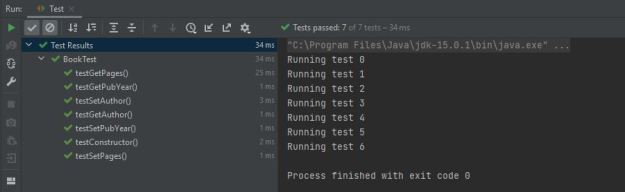
We now have methods that execute before and after every single test case.
@BeforeAll
@BeforeAll is used as an initialization method that executes before any other method. It is the first method in BookTest that will be run. We can use it in this example to instantiate our count variable to 0, and leave just the variable declaration with the instance variables. See the modified instance variables and new init() method below.
public class BookTest {

    private static int count;
    Book book1;

    @BeforeAll //runs first
    public static void init(){
        System.out.println("BeforeAll running: count set to 0.");
        count = 0;
    }
.
.
.
}
@ParameterizedTest
This annotation is useful for running test cases with multiple inputs. For example, imagine the developer of BookTest is unsure whether testSetAuthor() will pass when multi-word strings are passed as arguments. This scenario is the perfect situation to use a parameterized test. When using @ParameterizedTest, however, one must be sure to specify the source of the arguments, which is accomplished using the annotation @ValueSource. See the example below.
@ParameterizedTest
@ValueSource(strings = {"Jane", "Jane Smith"})
void testSetAuthor(String str){
    book1.setAuthor(str);
    assertEquals(book1.getAuthor(), str);
}
@RepeatedTest
This annotation is used for when tests need to be run multiple times. For example, if we wanted to run testGetAuthor three times, we would use this annotation. When using @RepeatingTest, we must pass a parameter value which determines the number of repetitions, and name which names each repetition. See the example below.
@RepeatedTest(value = 3, name = "Repetition {currentRepetition}")
    void testGetAuthor(){
        String result = book1.getAuthor();
        assertEquals(result, "John Doe");
    }
Summary
We have now taken an extremely simple JUnit 5 test suite and used five different annotations to make the suite a bit more complex and comprehensive. There are many more annotations, all of which can be found in the JUnit documentation here. We can now run tests multiple times, create setup and teardown methods, and parameterize tests to run them with multiple argument inputs.
Works Cited:
Stefan Bechtold, S. (n.d.). JUnit 5 user guide. Retrieved April 21, 2021, from https://junit.org/junit5/docs/current/user-guide/
Appendix: Full Book and BookTest code
public class Book {

    private int pages;
    private String author;
    private int pubYear;

    public Book(int pages, String author, int pubYear){
        this.pages = pages;
        this.author = author;
        this.pubYear = pubYear;
    }

    public int getPages(){ return this.pages; }
    public String getAuthor(){ return this.author; }
    public int getPubYear(){ return this.pubYear; }

    public void setPages(int pages){ this.pages = pages; }
    public void setAuthor(String author){ this.author = author; }
    public void setPubYear(int pubYear){ this.pubYear = pubYear; }
}
import static org.junit.jupiter.api.Assertions.*;
import org.junit.jupiter.api.*;
import org.junit.jupiter.params.ParameterizedTest;
import org.junit.jupiter.params.provider.ValueSource;
public class BookTest {
private static int count;
Book book1;
@BeforeAll
public static void init(){
System.out.println("BeforeAll running: count set to 0.");
count = 0;
}
@BeforeEach
void setUp(){
book1 = new Book(100, "John Doe", 1999);
System.out.println("Running test " + count);
}
@AfterEach
void tearDown(){
count = count + 1;
}
@Test
void testConstructor(){
boolean result = book1 instanceof Book;
assertTrue(result);
}
@Test
void testGetPages(){
int result = book1.getPages();
assertEquals(result, 100);
}
@RepeatedTest(value = 3, name = "Repetition {currentRepetition}")
void testGetAuthor(){
String result = book1.getAuthor();
assertEquals(result, "John Doe");
}
@Test
void testGetPubYear(){
int result = book1.getPubYear();
assertEquals(result, 1999);
}
@Test
void testSetPages(){
book1.setPages(150);
assertEquals(book1.getPages(), 150);
}
@ParameterizedTest
@ValueSource(strings = {"Jane", "Jane Smith"})
void testSetAuthor(String str){
book1.setAuthor(str);
assertEquals(book1.getAuthor(), str);
}
@Test
void testSetPubYear(){
book1.setPubYear(2001);
assertEquals(book1.getPubYear(), 2001);
}
}
From the blog CS@Worcester – Christian Shadis' Blog by ctshadis and used with permission of the author. All other rights reserved by the author.

