Give up Unit Testing? Uncle Bob Says No

Over the past few weeks reading about unit testing, I’ve come across a few articles and blogs claiming that unit testing is not the most efficient way to ensure code accuracy and quality. I’ve been under the impression that unit testing is always a good idea, so I wanted to read about Robert Martin aka Uncle Bob’s input regarding this subject. He is a reputable computer programmer and the author of the well-received book “Clean Coder.” The following is a brief summary, along with my personal takeaways, from one of Bob’s blogs entitled First-Class Tests.

Bob is critiquing a TechBeacon blog where the author is condemning unit testing as bad practice. It seems to me that the TechBeacon blog author has claimed to “give up” unit testing for something that he calls “system testing.” But Bob insists that the TechBeacon author is not only running his tests in an inefficient way, but using improper terminology as well.

Bob gives a few definitions of different types of testing, some of which seem to contradict the views of the TechBeacon blog author. First, he explains that unit tests are written to ensure that the code is doing what the programmer intends it to do. Bob then gives his definition of system testing, stating it is not what the TechBeacon author believes it to be. System testing, according to Bob, are “plumbing” tests to ensure the internal workings of the entire integrated system is working as expected. This is in contradiction to the TechBeacon blog who claims he is running “system tests.” Bob claims what is actually being run here is “user-interface to database” functional tests, which are, in actuality, slow unit tests. I agree with Bob’s terminology here; it seems to coincide with what we’ve learned in class regarding unit testing thus far, some of which I’ve discussed in some of my previous blogs.

I believe the main point that Bob is trying to get across is that it seems many people tend to have the wrong idea of what unit testing is. If someone is writing unit tests that rely too heavily on outside resources, for example, it can slow down and hinder the whole purpose of testing software. It can make unit testing seem inefficient, when in actuality is the result of badly written unit tests. He stresses that programmers should not be trying to think of ways to circumvent unit testing. Instead, we should find ways to write unit tests as efficient, clean, and self-sufficent as possible.

I truly enjoyed reading Bob’s blog regarding his opinion on unit testing. I found it both amusing and informative. Bob leaves us with a final thought; we ought to treat our unit tests as “first-class citizens.” I will strive to do this throughout my professional career based on the advice he has given in his blog: I will avoid coupling unit tests with outside resources and make great efforts to always keep my unit test code “clean” and up-to-date.

From the blog CS@Worcester – Jason Knowles by Jason Knowles and used with permission of the author. All other rights reserved by the author.

Decision table

Source: http://www.softwaretestingmaterial.com/decision-table-test-design-technique/

This week I decided to write about Decision tables.  I found a great blog called Software testing materials.  They had a blog post called Decision Table Test Case Design Technique. Written by Rajkumar. In this blog he talks about decision table test case. This test technique is appropriate for functionalities which has logical relationship between inputs. In designable they deal with many different combinations of situations, inputs, and test and they would give you examples of what kind of output would be expected with the inputs. Here he gives a few examples of decision tables. In the examples he gives conditions to be able to transfer money. Conditions are account already approved, one time password matched, sufficient money in account. Then according to if each one is true or false it would do an action such as. Transfer money, show a message as “insufficient amount”, block the transaction in case of suspicions transaction. Then according to if one of the conditions are false it would do action 2 or 3 but if everything is true it would transfer the money. A much simpler decision table test that he gives is the case of entering a username and password. The conditions are Valid user ID and Valid Password. The actions that would be given is Home page or Show a message as “invalid user credentials” if any time the username or the password is False it would show the message for invalid user credentials. But if both are true then it would go to the home page.

I like this blog because it breaks down how decision tables work.  Raikumar gives very easy and understandable examples of how each of the decision table work. He explains it step by step that anyone who has no knowledge about decision tables would be able to understand what a decision table is. I would use this blog for future homework or even use this information to show future students are learning about decision tables to show them how they are used and made. I think that decision tables can be used in everyday life not in just computer science but in making choices for everyday life big and small.

From the blog CS@Worcester – The Road of CS by Henry_Tang_blog and used with permission of the author. All other rights reserved by the author.

Design Patterns

Source: http://www.bambielli.com/posts/2017-04-02-decorator/

This week I am writing about Decorator design pattern. I found a blog by Brian Ambielli called Design Patterns: Decorator. Here he talks about decorator and how it works. Decorator patterns allow us to extend object with added functionality at runtime. It allows developers the power to compose objects that are purpose driven for the current demands for their users. He talks how decorators can be thought of as super types where they are wrappers around the object they are decorating. They can be used and passed in a program in place of the original wrapped object. He gives us an example using pizza as the topic where you can make a pizza either a deep dish or thin crust pizza and gives us choices of what kind of topping you want the toppings are wrapped by a decorator that allows the user to choose either the pepperoni topping or cheese topping. With this blog, he even talks about the downside of the decorator. Some of the limitations that the decorator pattern has is that the code relies on the type of concrete implementation that you are wrapping. With decorators, they often have numerous small classes that are each responsible for one behavior modification. This makes code hard to read and understand.


What I like about this blog is that is has a very good example of how decorator design patterns work and they even give us the code to even test it with. With this we can even test and mess around with decorator designs. In the blog he talks about when you should even use decorator design patterns and this is very helpful for people who want to try and test out these design patters in their own code. I also like how he doesn’t just talk about the good of decorator design patterns he talks about the bad about it. So we know which kind of design patters would work for different situations. What I would do this this blog is that I think I would read up more about different deign patterns and try and test it out with some of the code I write seeing which ones I like the best.

From the blog CS@Worcester – The Road of CS by Henry_Tang_blog and used with permission of the author. All other rights reserved by the author.

Coding Blocks – Source Control- Episode 3


In this episode of coding blocks Allen Underwood, Michael Outlaw, Joe Zack addressed an issue in software construction that often makes or break a project/Team. Source control and management. I personally found this topic very crucial because of a programming project I was able to contribute to with a couple of my friends. Initially, we were just using Google drive to update and track project chances but as many newer version were created, it became a mess to try and track which update did what and how stable is that version. We eventually resulted to utilizing Gitlab. It was here that I found the importance of source control team working. We were able to section of parts of the project and distribute among ourselves also, it was easy to modify and make changes because we always know a Standard version of the project existed should we break the original pull. In this podcast episode, the authors made known of another major reason why implementing source control was effective. By implementing source control, many branches be worked on at the same time. This way, problems and bugs can be resolved and fixed faster. Also construction was made a little easy as people could work independently on building various parts of the software. Again by pushing after every working build, the programmer is able to leave a stable version with an attached commit message which help the next person to touch the code understand what that build accomplishes or does.

Best Practice Tip: Ensure that you only push back working code that passed the compilation test.

Another topic the authors addressed was the issue of missing path that often occurs with source control software development. They made emphasis that having a consistent naming convention is recommended for best practices because some programs and software requires you to switch between operating system and since that means different file systems, having a standard naming convention for packages and file paths makes it easier on who ever works on the program to make edits and changes as needed.

         While addressing source control, another major topic to talk about is pull requests. It serves as another layer of verification and “code review”. Having push requests allows you to submit to a specific branch and get you work evaluated before pushing back to the main repository. This way leaders and managers can verify that code written is correct and fits the required standards and specifications.

LINK

https://player.fm/series/coding-blocks-software-and-web-programming-security-best-practices-microsoft-net/episode-3-source-control-etiquette


From the blog CS@Worcester – Le Blog Spot by Abranti3 Dada Kay and used with permission of the author. All other rights reserved by the author.

10/30/17 Software Design

Workshop on Software Architecture for Agile Development

This blog was found from this site. Hayim Makabee, the blogger did a workshop software architect for agile development. At the workshop he did a presentation on Adaptable Design Up Front in an agile project. He explained how much adaptability should be done on a project. The topic was explained with different software architect with different software programs developed over the years. There were also exercises that further explained the definition and the evolution of different design systems. The blogger included pictures and the slideshow from the presentation. I quickly went through the presentation. The first slide after the title slide shows where he worked over the years. Some of the companies he’s worked for includes IBM, Yahoo and many more. Part one of the presentation was on Architecture and agile. In this part he explains the different approaches in the context of agile, the approach of Adaptable Design Up Front, guideline on how to use it in practice and examples of it in the real world. Part two was about manifesto for adaptability. This included lean startup, minimum viable product, manifesto for adaptable software development, SOA principles and micro service practices.

This was a short blog to read. Luckily there was a slideshow to look at. This was again interesting to read. As I went through the slides I noticed he included a design pattern for part one of the presentation. I gave a brief summary of the slideshow and mentions the topics that the blogger talks about. The slideshow goes through it with more detail and explains everything mentioned in the topic. The slideshow also includes many pictures and examples used for the real world. Everything explained in the slideshow had pictures or diagrams making it easy to understand.  The pictures from the workshop show the group working on an activity. The activity ha the audience create a taxi ordering app with design patterns. This activity helped explain the definition and evolution of design of a software. This blog showed me how useful design patterns and software design can be used in the real world. From the picture the group looks like they are learning from the slideshow and enjoyed the worksop overall. I would have found the workshop interesting if was there. His list of job credentials at the beginning of the slideshow sort of gave me an idea of where to  look for a job in the future.

From the blog CS@Worcester – My Blog by rens14 and used with permission of the author. All other rights reserved by the author.

DRY/WET

What is DRY code? I’ve heard the term before in some tutorials but never knew the meaning behind the phrase. I figured if I keep seeing it, it must be important. After searching around the web for a bit, I finally found a great article on what DRY/WET code is on softwareyoga. The article explains what DRY/WET means, the advantages of DRY code, and the precautions to take when considering this principle. DRY code means “Don’t Repeat Yourself” and WET means “Write Every Time”. Obviously, DRY is the one everyone should wish to achieve for most cases. The advantages that the article goes through are maintainability, readability, reuse, cost, and testing.

DRY helps make code more readable because logic is not repeated throughout multiple classes. Instead methods/functions are called and what is likely hundreds of lines of code is represented by a few function calls. Readers of the code base can find the logic, read it once, and understand how it functions. Then when they see it implemented, they do not need to double check that the logic is the same. If code is WET, the logic will be re-written entirely, forcing readers to ensure nothing is different in each implementation.

Reuse and Cost go well together as reuse lowers the cost of development. When reuse is the goal/option, cost is inherently lowered. These go along with maintainability as reuse means that the code is properly maintained. If code can be reused, this means that small changes to the logic are less likely to cause problems. There would also be less time spent refactoring code in the future if previous implementations are written with DRY in mind. This means that less time, and developers are needed to maintain a long-lasting codebase.

Testing is simple, if the source code is written DRY, writing the tests DRY only makes sense. This also makes tests easier to write, and easier to change in the future.

The cautions for DRY expressed in the article are rather self-explanatory. One of the pre-cautions is to not over-DRY your code. Basically, this means to only use DRY when it makes sense to use DRY. If the code doesn’t need to take advantages of what DRY offers, it likely doesn’t need to be written with DRY in mind.

DRY is a great principle to follow when writing code. It teaches good practice and can be applied to most of the design patterns that we are learning. Most of the design patterns build upon each other and do so to keep code DRY. Implementations are written without rewriting logic and instead only require simple method calls. I hope to keep my code DRY in the future. If I do so, I will find it much easier in the long run to both add to, and learn from my previous projects.

Here is the link to the original article: https://www.softwareyoga.com/is-your-code-dry-or-wet/

From the blog CS@Worcester – Learning Software Development by sburke4747 and used with permission of the author. All other rights reserved by the author.
Closer Look: Given-When-Then

Last week I wrote a blog highlighting some of the things you can do to produce cleaner test code. This week I want to dive into one of those tips and explain it a little further so that you can use it in your code as well. This tip refers to the structure of test code to make it easier to read and understand, leading to easier maintenance. The blog I used as a reference is found here:  https://blog.codecentric.de/en/2017/09/given-when-then-in-junit-tests/

I chose this blog because it highlights how to name test cases and how to prepare test objects for your test cases which is important in J-unit testing, especially when you are working on a team and need to leave clean test code so that others understand the purpose of them.

Getting started, JUnit testing can be confusing to look at if you don’t understand Java code in general. However, our goal should be that people who don’t code should still understand what our test is doing. In order to achieve this, we need to start with proper documentation of JUnit test code. Your code should have a header comment that explains exactly what your code is testing for. Like so:

isPalindromeTest

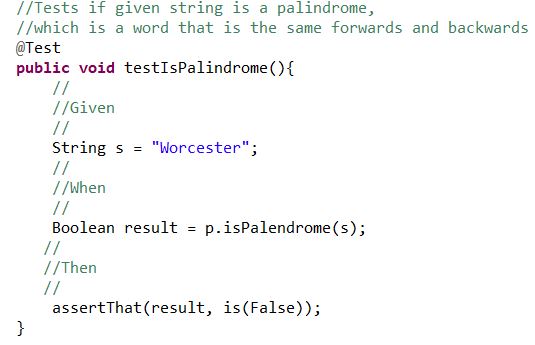
Next you want to split up the test method into a more readable fashion. This is where the Given-When-Then tip shines:

ispl

This way you can easily read what is going on with the test. This can still be improved drastically. The test name is testIsPalindrome(), this is not acceptable as it doesn’t actually tell you what the test is doing. Try to summarize the purpose of the test in the test name.

better.JPG

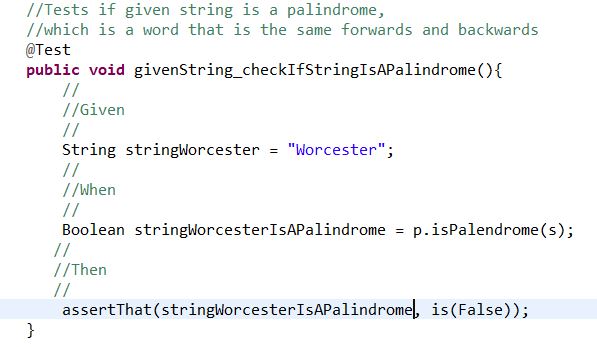
This is a better name for our test method for obvious reasons. But our test case still uses String s for the string we are checking and our variable result is just as vague. The following example is a much more readable test case than our beginning product:

betterbetter

When we use names that actually refer to what is happening, it makes the entire test case easier to read. Again, this is important when writing JUnit test cases because you must be able to work together as a team and leave behind proper documentation which will prevent others from getting confused when reading your code. Notice how you can read the assert line almost as if it was saying “Assert that the string Worcester is not a palindrome.”  If you can write test code that is as black and white as this then you shouldn’t have a problem when working with a team or even referring back to old code.


From the blog CS@Worcester – Rookey Mistake by Shane Rookey and used with permission of the author. All other rights reserved by the author.

Refactoring

Link to blog: https://www.versionone.com/agile-101/agile-software-programming-best-practices/refactoring/

In this blog, it explains the breakdown about code refactoring. The aspects that this blog covers are the definition of refactoring, code hygiene, specific “refactorings”, refactoring to patterns, the flow of refactoring, and refactoring automation in IDE’s.

The author of the blog states that code refactoring ” is the process of clarifying and simplifying the design of existing code, without changing its behavior.” This basically means that you are just editing the code to make it look and work better without changing its features it implements. They also note that every time we change code without refactoring it, it cause the code to rot and gets worse every time we do so. Rot takes several forms such as having unhealthy dependencies between classes or packages, bad allocation of class responsibilities, excessive responsibilities per method or class, and duplicate code. The main purpose of refactoring is that it prevents rot, which makes the code easy to maintain and extend. Extending the code and refactoring it go hand in hand.

Code Hygiene

Code hygiene is another term that the author of this blog uses to understand the concept of keeping code clean or having “clean code.” In his blog, he provides the metaphorical use of the kitchen environment and that cleaning up the “dishes, the pots, the kitchen itself…” keeps the kitchen as a whole clean. The main message is that keeping our code clean is crucial when refactoring.

Specific Refactorings

Specific refactoring methods are useful such as “Extract method” which extracts a block of code from one method, and creates a new method for it.” Each refactoring method converts a section of code, whether it be a block, a method or a class.

Refactoring to Patterns

The author of the blog references Joshua Kerievsky’s book Refactoring to Patterns. He states that patterns are often over-used, and often introduced too early into systems. He also introduces concepts of refactoring “toward” a pattern, describing how many design patterns have several different implementations, or depths of implementation.

The Flow of Refactoring

The author outlines the simple process of refactoring first by doing automated tests. Next, the coder will refactor by making the smallest discrete change that will allow the code to compile, run, and function. Then the coder will make changes to the code. After the refactoring process is done and all the tests run perfectly fine, it is necessary to remove all of the redundant, smelly code.

Refactoring Automation in IDE’s

This section of the blog illustrates different IDE’s that support automated refactoring . The author talks about the Java IDE Eclipse, which has a built-in automated refactoring support as well as other IDE’s. The overall point is to know that automatically refactoring code is a lot easier to do than to do it by hand.

This blog overall clearly identifies the important points of refactoring code. The author of the blog showed the main importance of refactoring by highlighting that refactoring prevents smelly, rotting code, which no developer ever wants to have. I chose this blog because I wanted to see what else that refactoring does to structures of code. One thing new that I learned was that a lot of IDE’s have built-in automated refactoring support, which I’ve never noticed. Refactoring is an important topic for me to understand because in the future as well as for the rest of the code that I’ll write, it’ll be more efficient to refactor the code especially when designing video games.

From the blog CS@Worcester – Ricky Phan by Ricky Phan CS Worcester and used with permission of the author. All other rights reserved by the author.
Unit-Test Smells: What To Look Out For

In this blog post, Erik Dietrich talks about unit-test smells. Like code smells, it’s an indicator of something that just isn’t right and could lead to big problems when debugging.

1. Tests Are Difficult to Write This is usually because the code you are testing is confusing or not “clean”. The solution to this problem is to have clean testable code.

2. You Do Weird Things to Get at the Code Under Test The author notes the overuse of things like reflection schemes to invoke and test private methods and using the “Internals Visible To” attribute to expose test methods, this makes things complicated and your unit-tests brittle because you lose the flexibility of the methods by testing the internal details. Testing this way is an indicator that you could be creating iceberg classes, or encapsulating too much all in one place.

3. Excessive Mocking Important concept used to speed up unit-testing but using it excessively can indicate design problems.

4. Context Logic in Production Code, the author notes the code below:

public static void SaveToDatabase(Customer customerToWrite)
{
    if (AreWeTesting)
        WriteWithMockDatabase(customerToWrite);
    else
        Write(customerToWrite);
}

and see’s this as context logic because “your production code becomes aware of the context in which it is used. This makes your code really brittle, and, frankly, it adds clutter.”

5. Slow Running Tests Slow tests lead to those tests not being run as much as other tests, this can also indicate you’re doing something wrong like accessing a database or writing a file. It could also be an indication of an inefficient piece of code.

6. Intermittent Test Failures There may be cases when a test fails once in a blue moon, the author advises not ignoring the anomaly, but to figure out exactly when and why it fails.

The reason I selected this resource is because it has interesting information from someone who works with various organizations doing unit-testing. The author seems to have a lot of experience in the field of software testing and knows the in-and-outs and dos-and-donts when it comes to unit-testing. I learned some good tips on what unit-test smells to look out for when unit-testing software. Tests that are hard to write, test where you have to bypass and invoke private methods to test, excessive mocking, using context logic in production code, slow running tests, and intermittent test failures. A lot of this information will benefit me, as it is good practice when writing good unit-tests. I expect to use this information in my professional career as a reminder to write clean testable code and write unit-tests with these smells in mind.

The post Unit-Test Smells: What To Look Out For appeared first on code friendly.

From the blog CS@Worcester – code friendly by erik and used with permission of the author. All other rights reserved by the author.

Blog #3

Sof Qual Ass & Tes

From the blog CS@Worcester – BenLag's Blog by benlagblog and used with permission of the author. All other rights reserved by the author.