Qualities of a Great Software Tester

As I was perusing the various blogs about testing on softwaretestinghelp.com I stumbled across a blog titled “7 Qualities of Highly Effective Testers”. Seeing as I am currently taking a course on software testing I figured it might provide some useful information. The blog followed suit with what I expected; with talking point about meticulous attention to detail and whatnot, but that is not to say the article wasn’t useful. In fact, I found it to be quite useful because it justified why these seven qualities are needed.

The seven qualities discussed were: curiosity, attention to detail, imagination, logical thinking, ability to focus, discipline, and constructive communication. Having some experience testing software at my internship, a couple of these really stood out to me. Curiosity/imagination (I feel that these go hand in hand) were the first ones. Under these topics they discuss how a good tester will think of every possible scenario. This includes things like behavior that you normally wouldn’t expect a user to perform or potential flaws in the deepest, darkest corners of your code that you would never expect to be exploited. If you don’t expect it to happen, it probably will. One example they gave is “what will happen if I click on the ‘submit’ key and then hit the ‘escape’ key?”. When testing you must make sure you cover everything across the board even if you think the chances of the scenario playing out are less than zero. I can tell you a lot of the problems we have found with the product we are building at work have come from a “let just try this for the fun of it” comment while testing.

Attention to detail is the next one that stood out. To me this means that a good tester will take note of even the smallest flaws. If the tester feels that it due to his/her own mistake or some external circumstance that normally wouldn’t be there, the issue still needs to be noted. Because what if it is not? What if it has been a recurring issue, but because it is so minor other people running tests have chalked it up to the reason you think it is? Everything, no matter how minor it seems, need to be tested and recorded.

The last one that really stood out was constructive communication. Nobody wants to hear that their product doesn’t work as it should. In the case that someone other than the developer is running the test, the tester needs to be able to communicate with the proper sources to explain the issue without making seems like they are trashing the product. There needs to be a good relationship between the testers and engineers/developers.

After reading this I feel a lot of what was discussed it true and these skills are critical if you are going to be a highly effective tester.

Link:

http://www.softwaretestinghelp.com/7-qualities-of-highly-effective-testers/


From the blog CS@Worcester – README by Matthew Foley and used with permission of the author. All other rights reserved by the author.
The Future of Testing Taking An Interesting Turn

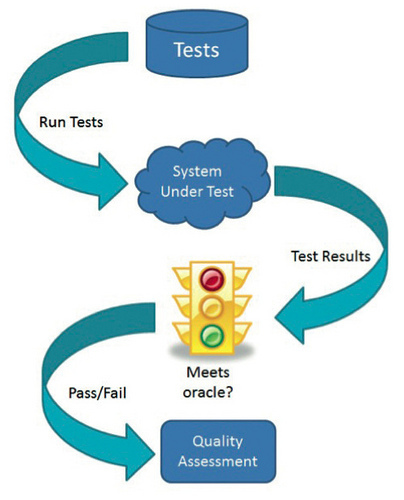
So, I was reading a blog called Awesome Testing the other day, (really clever name, I know, it’s what caught my attention) and I saw a whole section of pages titled “TestOps”. Intrigued, I ventured further by reading the posts, which led me to the initial blog post that coined the term, by Seth Elliot. The short and sweet of it is that originally testing can be represented by this diagram:

software_testing_model

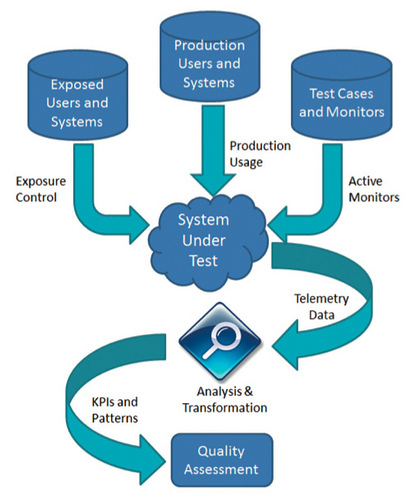
The tests are created, they are run on the system, the results are obtained, the results are checked against the ‘oracle’, and an assessment is completed. However, the interesting thing is the current trend in software products. The most popular products now a days are not simple programs, but are actually services. Facebook, Amazon, Twitter, etc. With this new change, testing becomes a bit more different. Big Data concepts are used, new features are tested with exposure control and monitors. This becomes the new model:

model

The testing system becomes a whole architecture testers are serviced with maintaining and using. This whole post was incredibly interesting to me. As someone new to Software Testing, my experience up until now has been discrete test cases and suites. With TestOps however, testing becomes a whole new beast. Using Big Data techniques to test how well a service is doing, not just if it runs correctly was a definite surprise. As someone who is currently dipping their toes into Big Data as I take a Software Quality Assurance course, I didn’t expect the areas to meet like this.

The final paragraphs of the post describing how this development is also blurring the lines between tester and developer is exciting. There was the worry in the back of my head, that software testing and development were two divided areas. That one had to choose one or the other. But knowing how much they will intermingle in the present and future helps alleviate this to a great extent.

It also makes a large amount of sense. As the software being tested becomes much more dynamic, testing must as well. Not just testing if software is working, but working well is quite the interesting distinction that requires more complicated solutions. These tests will require a process similar to software development to create. Choosing the right kind of Architecture, using tools similar to software process management tools to cut down on the time QA requires to make new tests or change existing ones, and the continuous updates and integration.

The incredibly interesting blog post can be found here: https://dojo.ministryoftesting.com/lessons/the-future-of-software-testing-part-two

The original blog post that sent me to it: http://www.awesome-testing.com/2016/07/testops-missing-piece-of-puzzle.html

From the blog CS@Worcester – Fu's Faulty Functions by fymeri and used with permission of the author. All other rights reserved by the author.

B1: Dangers Of The IoT

Gregory Falco: Protecting Urban Infrastructure Against Cyberterrorism

         This article from MIT shows the story of Gregory Falco who is a PhD student that works with urban planning and computer science. The article talks about the IoT (Internet of Things) where everyday objects are embedded with the basic functions of communications to other devices through the internet. Falco works with getting this project off the ground and around the world to other countries so that everyone can have the positive effects of this technology. He says it will help solve their problems with sustainability issues and social problems. However, there were concerns with security of this new system as it is possible for new technology to be susceptible to hacking. Falco continues to explain in the article that IoT devices usually have little to no real security software as they only have small amounts of memory and low-power processors. This can become a “gate” for hackers to exploit bigger systems as they may all be linked on one network. Falco is working on the industrial controls and embedded systems within the IoT such as automatic switches. He goes into detail of all the dangers this hack could create for a variety of people. IoT devices can control anything from subway switches to insulin pumps which puts a large number of people at risk.

            I chose this specific article because it was really interesting that as technology gets to be smaller, we are running into roadblocks like this. This is a very important roadblock because it shows that we need to develop technology to meet these needs faster or many people could lose lives. I found it was interesting how hackers can exploit the smallest flaw in a system to extract dangerous information. I think that the resource was quite interesting and made me more aware to the dangers of having little no security on devices. I feel that technology needs to have some sort of real security behind it as we are constantly relying on for our life functions such as water grids and electric grids. I learned quite a bit on this material from how much technology is taking over our lives to how insecure and manipulated it can get. This helped show me the side of hacking where even small flaws within a system can be used to hack into a much bigger system. It can be important to learn this sort of material because it really shows you to be careful when designing programs and working with networks to make sure that you know what data to keep private vs public. If you give the user access to public data, they can use it to break the system and cause a lot of damage to the program.

From the blog CS@Worcester – Student To Scholar by kumarcomputerscience and used with permission of the author. All other rights reserved by the author.

The Importance of Patterns in DDD

In this post, Jan Stenberg describes a conference in Amsterdam lead by Cyrille Martraire, Founder of the Paris Software. Martraire stresses the importance of knowing and evolving design patterns. Noting a few examples,

“…Exceptional Value which makes it possible to write code as a business domain statement by removing all need for special case handling like dealing with illegal or zero values. Another pattern that he has found particularly interesting is Diagnostic Query, a pattern which suggests that an object should be able to describe how it reached its current state, a diagnostic ability that replaces the need for logging and debugging. A Money object with a value of 100 EUR could then describe that the amount came from adding a certain amount of GBP with an amount of USD.”

In reference to modeling domain concepts and their relationships, Martraire found these patterns to be very useful:

Composite for composing objects into tree structures and letting a client treat individual objects and compositions uniformly.
Interpreter for evaluating sentences in a language.
Flyweight that uses sharing to support large numbers of fine-grained objects.
Strategy for separating algorithms themselves from their usage.

Martraire says that learning and implementing new and sometimes more simple design patterns will help you apply them in new domains.

The post The Importance of Patterns in DDD appeared first on code friendly.

From the blog CS@Worcester – code friendly by erik and used with permission of the author. All other rights reserved by the author.

Unified Modeling Language (UML)

We’ve been discussing this in class for the past couple of weeks so I thought this would be a good topic to reflect upon. Unified Modeling Language, or UML, can be described as the graphical representation of a program’s structure. This is useful for documenting relationships of, for instance, objects and classes in a given structure. Furthermore, UML diagrams can provide general descriptions of the intended behavior and purpose of these classes and objects.

I felt it would be useful to learn more about how to make the “ideal” UML diagram, and Bellekens has a good blog in regards to this topic.

GeertBellekens: UML Best Practice: 5 Rules for Better UML Diagrams

The blog is a good read on the subject because it emphasizes the importance of consistency as well as simplicity when designing UML diagrams. Five general “rules” were discussed in Bellekens’ blog. I will summarize these below while simultaneously providing my personal takeaways from each of them.

Less is more.

When designing UML diagrams, it is important to provide the user with information that is clean, easy to follow, and straight to the point. If a diagram has too much going on, it is bound to confuse and overwhelm the user with excessive information.

No crossings.

Bellekens explains that when designing a UML diagram, there is no need for lines to cross when pointing to the various objects within the structure. Instead, enough space should be allocated to prevent this line crossing from happening. If one is unable to find the space to prevent crossing, this is often a good indication that there’s too much going on in the diagram in the first place.

Orthogonality.

While it is possible to make diagonal lines when pointing from one object to another, I feel it does not nearly look as clean as straight lines and right angles. Other than a few minor exceptions, such as pointing to notes, Bellekens suggests to avoid making diagonal lines in UML diagram at all costs.

Parents Up.

In regards to inheritance and other hierarchies, “parents/superclasses” should always be above their “child/subclass” counterparts. This makes sense to me because whenever I think of something such as a UML diagram, I think of a family tree; oldest on top, youngest on bottom.

Tidy Up.

A great closing argument to Bellekens’ five rules of UML diagrams. Maintaining the validity of UML diagrams and keeping them up to date is just as important as designing a solid graphical representation of our programs in the first place. A UML diagram that is outdated and cluttered with unnecessary information can be frustrating to say the least. Furthermore, keeping objects aligned in an orderly way makes UML diagrams easier to follow and pleasing to the eye.

I look forward to learning more about Unified Modeling Language Design in the upcoming weeks – I am sure I will use Bellekens’ tips on creating solid UML diagrams in the near future!

From the blog CS@Worcester – Jason Knowles by Jason Knowles and used with permission of the author. All other rights reserved by the author.

Unified Modeling Language (UML)

We’ve been discussing this in class for the past couple of weeks so I thought this would be a good topic to reflect upon. Unified Modeling Language, or UML, can be described as the graphical representation of a program’s structure. This is useful for documenting relationships of, for instance, objects and classes in a given structure. Furthermore, UML diagrams can provide general descriptions of the intended behavior and purpose of these classes and objects.

I felt it would be useful to learn more about how to make the “ideal” UML diagram, and Bellekens has a good blog in regards to this topic.

GeertBellekens: UML Best Practice: 5 Rules for Better UML Diagrams

The blog is a good read on the subject because it emphasizes the importance of consistency as well as simplicity when designing UML diagrams. Five general “rules” were discussed in Bellekens’ blog. I will summarize these below while simultaneously providing my personal takeaways from each of them.

Less is more.

When designing UML diagrams, it is important to provide the user with information that is clean, easy to follow, and straight to the point. If a diagram has too much going on, it is bound to confuse and overwhelm the user with excessive information.

No crossings.

Bellekens explains that when designing a UML diagram, there is no need for lines to cross when pointing to the various objects within the structure. Instead, enough space should be allocated to prevent this line crossing from happening. If one is unable to find the space to prevent crossing, this is often a good indication that there’s too much going on in the diagram in the first place.

Orthogonality.

While it is possible to make diagonal lines when pointing from one object to another, I feel it does not nearly look as clean as straight lines and right angles. Other than a few minor exceptions, such as pointing to notes, Bellekens suggests to avoid making diagonal lines in UML diagram at all costs.

Parents Up.

In regards to inheritance and other hierarchies, “parents/superclasses” should always be above their “child/subclass” counterparts. This makes sense to me because whenever I think of something such as a UML diagram, I think of a family tree; oldest on top, youngest on bottom.

Tidy Up.

A great closing argument to Bellekens’ five rules of UML diagrams. Maintaining the validity of UML diagrams and keeping them up to date is just as important as designing a solid graphical representation of our programs in the first place. A UML diagram that is outdated and cluttered with unnecessary information can be frustrating to say the least. Furthermore, keeping objects aligned in an orderly way makes UML diagrams easier to follow and pleasing to the eye.

I look forward to learning more about Unified Modeling Language Design in the upcoming weeks – I am sure I will use Bellekens’ tips on creating solid UML diagrams in the near future!

From the blog CS@Worcester – Jason Knowles by Jason Knowles and used with permission of the author. All other rights reserved by the author.

Blog Post #1 – “Unwanted Modeling Language”

https://blog.codinghorror.com/unwanted-modeling-language/

For this week’s blog post, I chose a blog from Codding Horror where the writer, Jeff Atwood discusses his opinion on Universal Modeling Language (UML) and how he thinks that it is not an effective tool for organizing a program.

I picked this blog because we just went over the section on UML in class and why it is an effective tool to use. Since we’re learning it for our course, we are given mainly the positives about UML and how it can help us code. So I think it’s interesting that there is someone out there who has tried UML before and isn’t a fan of it.

Atwood states that his problem with UML is that it can be interpreted as subjective, which he feels doesn’t fit with programming since it is not subjective. Another point the writer brings up is that UML isn’t bidirectional and that if UML changes the code isn’t automatically changed and vice versa. Atwood also believes that UML does not have any advantage over other forms of documentation. However, these are all one person’s opinions. That does not make everything Atwood is saying about UML a fact, but it’s an interesting opinion to read about.

It’s interesting to get another perspective on UML after learning about it in class, and I think that Atwood is valid to feel this way because the same form of documentation is not going to work for everyone. People prefer different ways to document code and will work with what suits them best. Atwood doesn’t speak for everyone when it comes to using UML and his opinions on it aren’t the only opinion. There are many people out there who think that UML is an effective tool to organize.

This blog does not deter me away from using UML because I haven’t tried using it in depth yet so I can’t say if I will find UML effective or not, but from what I read about UML in class, it seems like a helpful modeling tool to make planning code more effective. I may love UML and use it for all of my programs in the future, or I could be like Atwood and prefer something else.


From the blog CS@Worcester – Decode My Life by decodemylifeblog and used with permission of the author. All other rights reserved by the author.

The Business Case for Unit Testing

In this post, Erik Dietrich talks about the importance of making sure developers are well-trained in writing units tests.

“If you have developers writing good unit tests, you’ll develop a nice, robust unit test suite over the course of time. Developers will run this test suite constantly, and they’ll even have the team build to run it in a production-like environment.”

Making sure your units tests are well written and easy for maintainers to understand helps prevent regression, like a developer editing code and breaking functionality elsewhere.

“Testable code is better code, as measured by how easy it is to change that code.”

Writing better unit tests allows for bugs to be caught earlier and increases functionality and modularity, saving businesses money and making you a better developer with a more productive team.

The post The Business Case for Unit Testing appeared first on code friendly.

From the blog CS@Worcester – code friendly by erik and used with permission of the author. All other rights reserved by the author.

Intro To Interoperability Testing

As the Fall semester kicks off and I begin to dive into the curriculum of Software QA and Testing I quickly realized how little I actually know and how in depth testing really needs to be. That being said I want to use my blog posts as an opportunity to learn about different types of testing. That lead me to go with the article “A Simple Guide to Interoperability Testing” written by the team over at ThinkSys. I really had no idea what Interoperability Testing was before I read this so I decided to learn. I also liked that it was written in 2017. I know a lot of software topics have remained the same for decades but there’s something refreshing about reading something that has been published more recently.

First off, interoperability testing is a type of non-functional testing. This means it is testing the way a system operates and the readiness of the system. In the most general sense interoperability is how well a system interacts with other systems and applications. A great example provided is a banking application system (seen below) where a user is transferring money. There is data/info exchange on both sides of the transfer without an interruption of functioning to finish the transaction.

Banking Application Interoperability

The testing of the functionality that takes place to allow a fluent interaction between systems is what interoperability testing really is. It ensures end to end functionality between systems based on protocols and standards. The article covers 5 steps to perform this type of testing. They consist of:

  1. Planning/Strategy: Understand each application that will be interacting in the network
  2.  Mapping/Implementing: Each requirement should have appropriate test cases associated. All test plans and test cases are developed.
  3. Execution: Running all test cases and logging and correcting defects. Also retesting and regression testing after patches have been applied.
  4. Evaluate: Determine what the test results mean and ensure you have complete coverage of requirements.
  5. Review: Document and review the testing approach, outline all test cases and practices so further testing can improve on what has been done.

Some of the challenges that can arise with interoperability testing include the wide range of interactions that can take place between systems, testing multiple system environments can be difficult, and root causes of defects can be harder to track with multiple systems involved.

After reading this article I can definitely see the complexity in interoperability testing. Taking an iterative approach seems like it would be the best method because you can use your results each iteration to create better test cases and more coverage. Trying to tackle all the test cases in one execution would be overwhelming and it would be difficult to have close to full coverage. It seems like interoperability testing would need to take place anytime an application is updated as well to make sure the systems that interact with it are still compatible. Now that I have a general understanding of interoperability testing I am certain it will play a role in future jobs and work I do. With today’s technology, it is rare to have a complete standalone application that doesn’t interact with additional systems.

In conclusion I enjoyed this article because it was simple, to the point, and I was able to retain the information.

From the blog CS@Worcester – Software Development Blog by dcafferky and used with permission of the author. All other rights reserved by the author.

Why Repeatedly Repeating Code is Bad Programming Practice

After a discussion with a friend about the recent eclipse, the subject of the apocalyptic end of the world came up. I was reminded of Y2K, and decided that it may be worth some research, as I was too young at the time to really understand what was truly going on. As a student of computer science, perhaps it would provide me with some important examples of things not to do in my own coding. On a blog post written by Steve Rowe for Microsoft Developer, he shares what he learned from an instructor about the true cause of the Y2K scare, a lack of implementation of the DRY, or the Don’t Repeat Yourself principle. Y2K was caused not by mistakenly representing a four-digit year with too few digits, but by making this error over and over throughout and across multiple files. Unless absolutely necessary, code with identical or near-identical functionality should not be duplicated. Following the DRY principle makes maintaining and repairing code easier and simpler; it is important that those striving to become excellent programmers follow this principle.

While my mistakes are not going to cause the same devastation as the mistakes of the developers that caused the Y2K scare (yet), they have certainly caused me a great deal of frustration while programming for assignments or personal projects. On more than one occasion, I’ve found myself repeatedly trying to remedy a certain piece of code, only to find out later that the error was caused by similar code that was implemented elsewhere. It was this duplicated code that was actually responsible for the error, not the unused or irrelevant piece that I had been wasting time attempting to correct. My failure to follow (or even be aware of) the DRY principle, which I was unfamiliar with before looking over the syllabus for Software Construction, Design and Architecture has resulted in countless hours of wasted time and energy. Any programmer, no matter how good he or she may think they are, could always stand to improve. Not only will following the DRY principle allow your code to be more easily understood by others, it will make writing documentation and performing any maintenance much simpler. Steve Rowe makes an interesting comment before closing his post, stating that, if duplicating code is deemed necessary, “It might not be a bad idea to put a comment in the code to let future maintainers know that there’s similar code elsewhere that they should fix.” If we all attempt to better follow DRY and Rowe’s advice, maybe we can avoid future Y2K-esque scares.

From the blog CS@Worcester – ~/GeorgeMatthew/etc by gmatthew and used with permission of the author. All other rights reserved by the author.