Week 6

In week 6, we talked about Equivalence class testing in class. It is a black box testing technique that allows testers to group input data into sets or classes, making it possible to reduce the number of test cases while achieving comprehensive coverage. This technique is useful when dealing with a large range of input values. The classes resemble the specified requirements and common behavior or attributes of the inputs. Test classes are designed based on each class attribute and one element or input is used from each class for the test execution to validate software functioning. In Equivalence class testing, there are some important features that we need to note. Aside from being a black box testing technique, it restricts the testers to examine the software product externally. It is also used to from groups of test inputs of similar behavior or nature. And finally, test cases are based on classes, which reduces the time and effort required to build a larger number of test cases.

Some examples of equivalence class testing are weak normal equivalence testing, strong normal equivalence testing, weak robust equivalence testing and strong robust equivalence testing. Some pros of using Equivalence class testing is it helps reduce the number of test cases, without compromising the test coverage, it reduces the overall test execution time as it minimized the set of test data, it enables testers to focus on smaller data sets, which increases the probability of uncovering more defects in the software product and it’s used in cases where performing exhaustive testing is difficult. Some cons of using Equivalence class testing is it doesn’t consider the conditions for boundary value, identification of equivalence classes relies heavily on the expertise of testers and testers might assume the output for all input data set is correct, which isn’t the case all the time.

Some difference between equivalence class testing and boundary value analysis is equivalence testing is a black box technique while boundary analysis is portioning/testing. I chose this article because it goes into details talking about Equivalence class testing in depth. In my opinion when we were doing both equivalence class testing and boundary value testing, I found boundary value testing to be easier to use and to understand. However, after reading more on equivalence class testing, I have more understanding of how it works and why it is used a lot. I know I will be able to do assignments that will require using Equivalence class testing now that I have more knowledge on it.

References.

https://www.professionalqa.com/equivalence-class-testing

https://testsigma.com/blog/equivalence-partitioning

From the blog CS@Worcester – Site Title by lynnnsubuga and used with permission of the author. All other rights reserved by the author.

Front End Testing

As my journey to becoming a full stack developer continues, I have begun to encounter the need for front-end testing. When finding an article, I realized that I did not have very much knowledge on what front-end testing entailed or how to implement it into my coding. I found the blog “Front End Testing: A Comprehensive Overview” by Kiruthika Devaraj (https://testsigma.com/blog/front-end-testing/) on my search for information on this topic.

The blog starts off by explaining that front-end testing is focused on the user’s experience. While past experiences have taught me that back-end testing specifically tests the functionality of the code, front-end, also known as the user-facing end of a website, testing has a higher focus on the user’s interactions. The author also delves into eight different types of front-end testing and the elements that make up these different types:

  • Unit Testing is the analysis and testing of the individual components to ensure they each work as intended. 
  • Acceptance Testing involves testing to ensure permissions, such as account accesses, are working properly. 
  • Visual Regression Testing tests for visual changes in the front-end by comparing a reference picture to a baseline image. This can typically create brittle tests that can fail due to the slightest changes in an element’s location on a page.
  • Performance Testing measures an applications stability and responsiveness under different levels of simulated stress and traffic.
  • Accessibility Testing ensures that individuals with visual impairments or other additional needs can still use and access the application to the fullest of their capabilities.
  • End-to-End (E2E) Testing involves testing the application from start to finish while testing all components and systems for how they work together.
  • Integration Testing is when each individual module is tested to ensure it has been implemented correctly.
  • Cross-Browser Testing tests that the application works correctly across multiple browsers and confirms compatibility.

Devarj also provides tips for better front-end testing, the first tip is to always use a testing framework. These frameworks, also called front-end tools, are what actually run the tests. Although countless front-end tools exist, the blog provides information to 3 popular options; Testsigma, Selenium, and Ranorex. Testsigma and Selenium are both open-source front-end testing frameworks that may be worth investigating further, while Ranorexis a commercial framework that may be more than what I am currently looking for. 

Front-End Testing Moving Forward

As I move to implement automated front-end testing into my projects, it is important to remember that the front-end testing is focused on ensuring the project is user-friendly, responsive, and visually appealing by testing the layout, design, and functionality across multiple browsers. Doing so will provide users with the best possible experience.

From the blog CS@Worcester – CS Learning by kbourassa18 and used with permission of the author. All other rights reserved by the author.

Boundary Value Testing

Exploring the Edges: A Deep Dive into Boundary Value Testing


In the realm of software testing, Boundary Value Testing (BVT) emerges as a cornerstone, spotlighting the crucial junctures at the extremities of software modules. This method, celebrated for its strategic focus, eschews the intricacies of internal code to scrutinize the behavior at pivotal points: the minimum, maximum, and nominal value inputs. Its essence captures the high propensity for errors lurking at the fringes, thereby underscoring its indispensability, particularly for modules sprawling with vast input ranges.

BVT transcends mere error detection; it embodies efficiency. By tailoring test cases to boundary conditions — including the crucial spots just above and below the extremes — it ensures a comprehensive examination without the exhaustive effort of covering every conceivable input. This approach not only conserves resources but also sharpens the focus on those areas most likely to be fraught with defects.

The methodology behind BVT is meticulous yet straightforward. It commences with the creation of equivalence partitions, a critical step that segments input data into logically similar groups. Within this framework, the boundaries are meticulously identified, crafting a testing landscape where both valid and invalid inputs undergo rigorous scrutiny. The beauty of BVT lies in its precision — it’s a targeted strike on the software’s most vulnerable fronts.

However, the path of BVT is not devoid of obstacles. Its lens, sharply focused on boundaries, may overlook the vast terrain of non-boundary inputs, a limitation particularly pronounced in Boolean contexts where only two states exist. Moreover, its efficacy is inextricably linked to the adeptness in defining equivalence partitions — a misstep here can skew the entire testing trajectory, transforming a potential asset into a liability.

Yet, the allure of BVT remains undiminished. In the high-stakes arena of software development, it stands as a sentinel at the gates of functionality, guarding against the incursion of boundary-related errors. Its role is pivotal, especially when the clock ticks against the backdrop of tight deadlines and expansive test fields.

BVT is more than a testing technique; it’s a strategic imperative. As software landscapes continue to evolve, the demand for precision, efficiency, and effectiveness in testing methodologies will only escalate. BVT, with its focused approach and proven efficacy, is poised to meet this challenge, proving itself as an invaluable ally in the quest for flawless software. In the hands of skilled testers, armed with a deep understanding and meticulous execution, it transforms from a mere method into a beacon of quality assurance. Boundary Value Testing (BVT) is a key black box testing method targeting software’s extreme limits to identify errors without delving into internal code, focusing on boundary conditions for efficient and effective error detection. It requires meticulous planning and execution, especially in defining equivalence partitions, to ensure testing success.

I read the blog on this link:
https://testgrid.io/blog/boundary-value-testing-explained/

From the blog CS@Worcester – Coding by asejdi and used with permission of the author. All other rights reserved by the author.

‘Sustainable Motivations’ Pattern

The ‘sustainable motivations’ pattern is all about development in the real world and how it can be very challenging as an apprentice to get used to the reality of software development. Development of your own technical skills is very important as you gain more experience working with customers and with a different variety of products. As it is described you may have a different reason which motivates you to continue in your programming job whether it be that you are motivated for the money, motivated to build reputation or motivated by your own enjoyment of programming. THis pattern is a part of the “long road” chapter which is characterized as being a part of the “long road” from apprentice to journeyman to master within the software development field.

The solution to this proposed problem is to not get “trapped by your motivations” and a way to do that is to write down things you are motivated by and be able to separate the things that motivate you from the things that are what others see or think. Motivation is something that is important in any career but software development requires a lot of motivation as times when developing is strenuous or when you have a long project ahead of you.

I find this pattern to be important as I feel that a lot of people struggle to maintain motivation in all careers worldwide, not just software development. So having a strategy to combat low levels of motivation and also try not to burn yourself out by being too motivated is very important. Many situations will present you with long projects where you need to be able to ‘sustain motivation’ this is especially important to software development as many times you will be faced with longer projects which will need your full attention throughout. Reading about this pattern makes me realize that it is ok to not always be fully motivated whether that is because of the length of a project or if it is due to your working environment, you shouldn’t expect to always be fully motivated but you need to be willing to persevere even when a project takes a lot out of you as it will further you within your craft.

From the blog CS@Worcester – Dylan Brown Computer Science by dylanbrowncs and used with permission of the author. All other rights reserved by the author.

Levels of Testing

https://testsigma.com/blog/levels-of-testing/#:~:text=The%20most%20common%20types%20of,system%20testing%2C%20and%20acceptance%20testing.

Different levels of testing software is very important when it comes to quality assurance and each of the different levels is based on different combinations of things that help ensure the best conditions and functionality of your software. The four different levels of testing are as follows: “Unit Test” which tests an individual component, “Integration Test” which tests an integrated component, “system Test” which tests the entire system and “acceptance Test” which tests the final system otherwise known as the final product.

Unit Testing is used to outline the expectations of a program or outline its functionality which in essence makes sure that certain parts of the program function as intended. Integration testing allows you to test groups of functions to make sure that they interact properly with each other which is a step above unit testing. System testing is similar to integration testing as it tests a ‘group’ of functions but this group is now comprised of every part of the program/application. Acceptance testing then tests all functional and non functional aspects of the program in order to ensure proper functionality, security, etc.

I selected the levels of testing as a topic as it directly relates to the types of testing we have been doing in class. We have been testing functionality of different bodies of code so far during this semester and we have used different techniques including but not limited to equivalence class testing, edge case testing, worst case testing, boundary value testing, etc. I would say that most if not all of these testing types would fall under the unit testing level of software testing as we have for the most part testing individual system components being able to learn about the different levels of testing makes me excited to continue on through the levels of testing.

This source was very helpful when it came to learning about the other levels of testing we have not used during class yet and I would recommend this article to any of my fellow students although this article does not go extremely in depth when it comes to the different levels of testing it does give you a good general understanding of each level so that you can go on to learn more without getting confused between the different levels of testing. The diagrams and explanations of the software sequence are valuable resources for a software testing course.

From the blog CS@Worcester – Dylan Brown Computer Science by dylanbrowncs and used with permission of the author. All other rights reserved by the author.

CS-448 Apprenticeship Patterns Chapter 1 Introduction

Chapter 1 of the Apprenticeship Patterns textbook introduces the principles and ideals of software craftsmanship. This is an approach to software development that emphasizes the importance of writing high-quality code and delivering value to customers. Some key aspects of software craftsmanship include quality code, continuous learning, collaboration, focus on customers, and testing/quality assurance. Following these key aspects helps promote professionalism, excellence, and pride in one’s work as a software developer. This textbook draw inspiration from several highly skilled individuals that were interviewed for the book. Their values helped give meaning to what it means to be an apprentice, journeyman, or a master.

Apprentices typically have the attitude that there is always a better/smarter/faster way to do what you just did and what you are currently doing. Apprenticeship is the beginning of the journey as a software craftsman. One of the most important things needed is the ability to learn and grow for yourself, and then attention from your peers and experienced developers will follow. As you progress through the stages of craftsmanship, it is important to retain the knowledge and attributes gained from the previous stages. Journeyman will continue to focus on growth in their craft, but also focus on connections between practitioners, within and outside the team. Traditionally, a journeyman will move from master to master and sharing ideas amongst the various teams. They are focused on building a portfolio of applications that demonstrates the progress in their craft. Their responsibilities are wider than those of an apprentice, which means their failure can do more harm. Mastery still retains the previous knowledge of the other stages but adds the focus of moving the industry forward. It involves taking skill and translating it into a way to enhance the skills of others.

Apprenticeship is the fundamental learning method through practical experience under the guidance of a skilled mentor or master practitioner. It involves a structured training program where individuals work alongside experienced professionals to acquire the knowledge, skills, and competencies to help further their learning. Key characteristics of apprenticeship include hands-on learning, mentorship, structured curriculum, progression, certification, and industry alignment. Overall, apprenticeship offers a valuable pathway for individuals to gain practical experience, develop professional skills, and pursue careers in the desired field.

1. Introduction | Apprenticeship Patterns (oreilly.com)

From the blog CS@Worcester – Jason Lee Computer Science Blog by jlee3811 and used with permission of the author. All other rights reserved by the author.

Testing your Boundaries

Boundary testing is a technique that “involves evaluating data based on boundary values… such as minimums and maximums.” It involves testing the lower and upper limits of a domain of inputs, as well as values just inside and outside those limits. This technique helps improve software quality by detecting defects early in the development process, which ultimately saves time and resources. This is due to the fact that “the number of defects at the boundaries of an input domain tends to be higher than in other areas of the domain.” 

Going back to how it saves time and resources, it helps developers choose more efficient test cases, which cuts down on time and how much they have to do, especially with large sets of data and number of inputs to consider. Furthermore, this technique “allows for a lot of uniformity and the test cases are much smaller” meaning that it can be automated. This would save more time, possibly result in less errors than if a person were to write the test cases, and allow for developers to put their focus on other tests or somewhere else, resulting in increased productivity. 

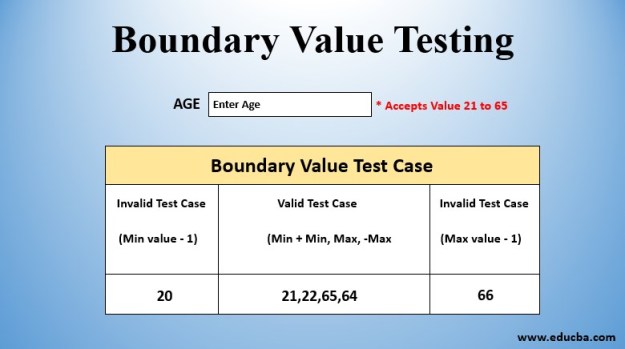
Boundary testing involves determining the input value range, which is whatever values the system accepts. Values inside that range are valid while those outside are invalid. Test cases are then created based on the values at the extreme ends, end values, and values just before and after the end values. For example, with a range of 0 to 100, we test values less than 0 (-50), greater than 100 (150), values around and at 0 and 100 (-1, 1, 99, 101). 

Another example the article shares is one that allows users to create a password. The password has to be 5 digits meaning that the range is 10000 at minimum and 99999 at maximum. Any combination of numbers is valid as long as it is 5 digits long, meaning that 4 digit long and 6 digit long passwords are outside the range and are invalid. 

Boundary testing seems like a very useful testing technique with very little downsides. It’s a black-box testing technique which usually means that testers don’t need extensive knowledge of coding, computer science, or the system at hand. It also seems very easy to do as long as all the necessary knowledge for testing is provided. Seeing as how it can also be easily automated, it may be more efficient to focus on more complex or time-consuming testing techniques while this test is running in the background or on the backburner.

https://www.indeed.com/career-advice/career-development/what-is-boundary-testing

From the blog CS@Worcester – Kyler's Blog by kylerlai and used with permission of the author. All other rights reserved by the author.

Learn how to write unit tests

Hello everyone,

Today I want share a tutorial which explains unit testing with the JUnit 5 framework (JUnit Jupiter). It explains the creation of JUnit 5 tests with the Maven and Gradle build system. After reading it, you will definitely gain something new.

Here is the link:

https://www.vogella.com/tutorials/JUnit/article.html

“JUnit 5 tutorial – Learn how to write unit tests”

By Vogella GmbH

As a new software testing student, I recently stumbled upon the JUnit tutorial on the Vogella website while browsing for some knowledge about software testing. In this blog post, I will share my insights and discuss how this can help This knowledge is applied to our development practices.

This tutorial can be said to be a comprehensive guide that covers various details of JUnit. Including “What is software testing”, “Using Maven in the Eclipse IDE”, “Using the Eclipse IDE for creating and running JUnit test”, “JUnit 5 extensions” and so on. In chapters 1.2 and 1.3 of the article, it demonstrates how to use “assert” to check expected and actual results. Because “assert” is a powerful function, it contains almost all the judgments required by the scenario, so being proficient in the “assert” function is necessary as a software tester. Also, in Chapter 1.5 and 1.6, the article talks about unit tests are created in a separate source folder to keep the test code separate from the real code. This is the problem I started to encounter in HW1, my Gitpod cannot idenify all my Junit5 command. Because my test code and the real code are in the same path. So we should have a main path and a test path, as follows:

src/main/java – for Java classes

src/test/java – for test classes

In Chapter 2 of the article it explains how to use Assertions and assumptions. There are also examples of Testing for exceptions and Testing multiple assertions (grouped assertions) with assertAll, which we need to be proficient in and will use in the following assignments.

import static org.junit.jupiter.api.Assertions.assertThrows;

@Test void exceptionTesting() {

// set up user

Throwable exception = assertThrows(IllegalArgumentException.class, () -> user.setAge(“23”));

assertEquals(“Age must be an Integer.”, exception.getMessage());

}

Anyway, that’s why I recommend this tutorial. As a student who has just started learning software testing, I not only need theoretical knowledge about JUnit, I also need examples and explanations of practical application of this knowledge. This tutorial is exactly what we need, high quality and easy to understand. It left a lasting impression on me and I hope everyone will learn something from this tutorial.

From the blog CS@Worcester – Ty-Blog by Tianyuan Wang and used with permission of the author. All other rights reserved by the author.

Concrete Skills – Building a Solid Foundation

Summary of Concrete Skills:

In the world of software development, it’s easy to get caught up in the latest technologies and trends. However, the Concrete Skills pattern reminds us of the importance of building a solid foundation of fundamental skills.

Key points of the pattern include:

  1. Mastering Fundamentals: Instead of chasing after every shiny new tool or framework, focus on mastering the fundamental skills that underpin software development. This includes things like algorithms, data structures, and design principles.
  2. Practical Application: Don’t just learn theory for the sake of it – apply your knowledge in practical ways. Whether it’s through coding exercises, personal projects, or internships, practical experience is essential for solidifying your skills.
  3. Continuous Improvement: Learning is a lifelong journey, and it’s important to continually strive for improvement. Seek out opportunities for learning and growth, and never become complacent with your current level of skill.
  4. Balanced Learning: While it’s important to focus on concrete skills, don’t neglect other aspects of your development, such as communication skills, teamwork, and domain knowledge.

My Reaction:

The Concrete Skills pattern really struck a chord with me because it reinforced something I’ve been realizing lately: the importance of mastering the basics. In a field that’s constantly evolving, it’s easy to feel overwhelmed by the sheer volume of information out there. However, this pattern reminded me that by focusing on mastering fundamental skills, I can build a strong foundation that will serve me well throughout my career.

One aspect of the pattern that particularly resonated with me is the emphasis on practical application. I’ve always been a hands-on learner, so I appreciate the importance of applying theoretical knowledge in real-world scenarios. Whether it’s through coding challenges or personal projects, I’ve found that practical experience not only reinforces my understanding but also helps me discover new areas for growth.

That being said, I do have a slight disagreement with the pattern when it comes to balancing learning. While I agree that it’s important to focus on concrete skills, I also believe that soft skills such as communication and teamwork are equally important. In today’s collaborative work environment, being able to effectively communicate and collaborate with others is essential for success.

In conclusion, the Concrete Skills pattern has reinforced my belief in the importance of mastering the fundamentals and continually seeking opportunities for growth. By focusing on building a solid foundation of skills, I’m confident that I’ll be well-equipped to tackle whatever challenges come my way in my journey as a software craftsman.

From the blog CS@Worcester – Hieu Tran Blog by Trung Hiếu and used with permission of the author. All other rights reserved by the author.

Exploring Boundary Value Testing and Equivalence Class Testing in JUnit

Software testing is a crucial aspect of the software development lifecycle. Among various testing techniques, Boundary Value Testing and Equivalence Class Testing stand out for their effectiveness in identifying defects early in the development process. In this blog post, we delve into these two techniques and discuss their implementation using JUnit, a popular Java testing framework.

Boundary Value Testing: Boundary Value Testing focuses on testing the boundaries of input ranges. The rationale behind this technique is that bugs often lurk around the edges of acceptable input values. By testing values at the boundaries, we increase the likelihood of uncovering potential defects. For example, if a function accepts input within the range of 1 to 100, we would test values such as 0, 1, 100, and 101.

In JUnit, implementing Boundary Value Testing involves writing test cases that specifically target boundary values. By using assertions to verify the behavior of the function at these critical points, developers can gain confidence in the robustness of their code.

Equivalence Class Testing: Equivalence Class Testing aims to reduce redundancy in test cases by partitioning the input domain into equivalence classes. Each equivalence class represents a set of input values that should produce the same output when processed by the function under test. By selecting representative values from each equivalence class, testers can ensure adequate coverage without testing every possible input value.

In JUnit, implementing Equivalence Class Testing involves creating test cases that cover each equivalence class. Test inputs are chosen strategically to represent the entire range of possible inputs within each class. This approach not only improves test coverage but also makes test suites more manageable and maintainable.

Combining Boundary Value Testing and Equivalence Class Testing: While both techniques offer unique benefits, they are most effective when used together. By combining Boundary Value Testing to test the edges of input ranges and Equivalence Class Testing to cover representative values within each range, testers can achieve thorough test coverage with minimal redundancy.

Boundary Value Testing and Equivalence Class Testing are powerful techniques for improving the quality of software. By leveraging JUnit, developers can easily implement these techniques within their Java projects. By understanding the principles behind these testing strategies and applying them effectively, teams can build more robust and reliable software products.

Incorporating these testing techniques into your development workflow can help catch bugs early, reduce the risk of defects slipping into production, and ultimately enhance the overall quality of your software.

Link: JUnit 5 – User -guide/

From the blog Discoveries in CS world by mgl1990 and used with permission of the author. All other rights reserved by the author.