What Makes a Daily Scrum Effective?

This week in class we discussed the process of scrum. Scrum is an agile framework that can be applied to any project or product development effort. It promotes flexibility by encouraging openness, inspection, and adaptation. This loose framework allows teams to adopt it and make changes that benefit their team’s workflow. Unlike the waterfall development approach, where each step must be completed before moving to the next, a scrum team works in small increments over a smaller period. That period consist of the sprint, sprint planning, daily scrum, sprint review, and the sprint retrospective. The scrum event that piqued my interest after reviewing it in class was the daily scrum.

The blog, “Ten Tips for More Effective Daily Scrums” by Mike Cohn,  brought up some interesting and important points. The ten points that were mentioned were: (1) talk almost exclusively about the work of the current sprint, (2) limit discussion to what was and will be accomplished, (3) talk about impediments, not “blockers”, (4) give people something to say about their work not directed toward the sprint goal, (5) give team members a way to indicate when someone is rambling, (6) have people point to what they’re working on, (7) update the sprint backlog but don’t let numbers become the focus, (8) vary how the daily scrum is conducted, (9) keep everyone guessing as to who will speak next and (10) make it painful to ramble too long. 

During the summer, I had the chance to work on software for our university. It was my first time experiencing the scrum workflow. Our team implemented some of these tips during our daily meetings, mainly points 1, 2, 3, and 6 so it was interesting to hear the author’s perspective on what other methods make a daily standup more effective. The points that cater towards diminishing rambling were a fascinating read. While discussing methods to indicate when a member is rambling, examples of using buzzers, holding up rubber hats, and using dolls were mentioned. Although strange to me, those methods show that different teams use what’s best for them. Cohn’s ninth point about keeping everyone guessing as to who will speak next discussed more methods to make the meeting fun to help avoid tuning other members out while they are speaking. While working on software in the summer, I didn’t think about fun ways to improve daily scrum because it was all so new to me. It makes sense to implement something to make the meeting more engaging because, like he said, I did find myself zoning out at times. 

Because I have such little experience with a scrum team, I enjoyed reading about possible ways to improve a team’s process .It helped me realize just how different another team’s methods could be and what I could possibly implement in the future.

From the blog CS@Worcester – Live Laugh Code by Shamarah Ramirez and used with permission of the author. All other rights reserved by the author.

Navigating Software Complexity: The Principle of Least Knowledge (LoD)

In the labyrinthine world of software design, where complexity can quickly become a daunting challenge, a guiding principle emerges as a shining beacon of simplicity and maintainability. This principle, known as the Principle of Least Knowledge or the Law of Demeter (LoD), serves as a valuable compass for software architects and developers. Its primary mission: to minimize dependencies between objects and foster a more modular and maintainable codebase.

At its essence, the Principle of Least Knowledge encourages developers to reduce the interactions between different parts of a software system. This reduction of dependencies simplifies the code and makes it more robust. The LoD suggests that an object should only have limited knowledge of other objects, specifically, objects that are directly related to it. In simpler terms, it advocates for keeping the communication between objects focused and minimal.

By adhering to the Principle of Least Knowledge, developers can significantly enhance the maintainability of a software system. When objects have limited knowledge about other objects, changes in one part of the system have minimal impact on other parts. This isolation of knowledge not only reduces the risk of unintended consequences but also facilitates easier testing and debugging.

As software systems grow in complexity, the LoD remains a steadfast ally. It ensures that each component knows only what is essential for its immediate tasks, fostering a more modular and less error-prone codebase. With the Principle of Least Knowledge as their guiding star, software developers continue to navigate the intricacies of software design, simplifying the path to robust and maintainable systems.

References:

From the blog CS-343 – Hieu Tran Blog by Trung Hiếu and used with permission of the author. All other rights reserved by the author.

Exploring Agile Methodologies: Extreme Programming

The purpose of the Agile Manifesto is to help development teams work more efficiently and sustainably. Within the manifesto, four key values and 12 principles are outline.

Though the Agile Manifesto was created to help make software development more efficient, most of the agile methods can be applied to any work situation. However, the XP method is one of the rarer methods geared specifically towards software development, which is why it caught my attention to learn more as a Computer Science major concentrating in Software Development.

The XP method was developed by Kent Beck in the 90s and is based mainly on five agile values: communication, respect, simplicity, courage, and feedback. These values support three greater principles: humanity, economics, and mutual benefit.

Humanity refers to fact that computer software is created by humans. Therefore, to efficiently create working software, it is important to take into account human needs, strengths and weaknesses through a healthy work environment and a supportive community.

Economics refers to being able to evaluate the risks and needs of the team and the collective project, weighing both the business values and technical concerns.

Mutual benefit refers to avoiding solutions that benefit one party at the cost of another. How this works exactly depends on the specific problem/solution.

In addition to these general principles, the XP method also details specific strategies for coding and managing projects, emphasizing communication and teamwork. The two strategies I believe to be most effective are “pair programming” and “informative workspaces”.

In pair programming, developers code in groups of two sitting at one computer. This strategy allows them to work together through direct communication and teamwork, producing code with fewer defects while also making the process more engaging.

I believe that pair programming has great potential, especially when the two people working together have good synergy and are good at communicating. However, while the strategy is highly effective for code production when pairs are compatible, it becomes a hindrance to progress when pairs are not.

The informative workspaces strategy is meant to make team progress and work details easily accessible. Whether through physical notes, charts, or dashboards, the workspace used by developers should display information that lets anyone know at a glance, the project progress.

I think informative workspaces is a great idea as it makes communication so much more efficient. Instead of having to ask a team where they are at before I can follow up with more specific questions, I can just go find out myself. Having such information also helps project management as it allows teams to know what parts of the project need special attention.

Teamwork is often difficult — and I say this from personal experience — but with a proper strategy like the XP method, working together on a project becomes not only easier, but also more enjoyable. For my capstone project next semester, I hope to apply some of these strategies to build on my teamwork skills.

From the blog Stories by Namson Nguyen on Medium by Namson Nguyen and used with permission of the author. All other rights reserved by the author.

Navigating the Software Development Spiral: A Closer Look at the Spiral Model

In the dynamic world of software development, finding the right approach to tackle complex projects and manage uncertainties is an important task since we always need to figure out ways of maneuvering around problems or solving them if need be. One such approach having came across in my searches that has gained recognition for its adaptability and risk management capabilities is the Spiral Model. This Software Development Life Cycle (SDLC) model is something that provides a systematic and iterative method for building software, allowing developers to navigate through the challenges of large and intricate projects.

In the blog post, it delve deep into the intricacies of the Spiral Model, it tries exploring its phases, characteristics, advantages, and disadvantages.
By the end, you’ll have a comprehensive understanding of this powerful SDLC model and its potential applications, helping you make informed decisions about its use in your software development projects. from what i’ve uncovered as to why the Spiral Model is often referred to as a “Meta-Model” and discuss the scenarios where it shines, it’s most likely because of it’s nature to incorporate multiple approaches, being able to seamlessly integrate concepts from other SDLC models, utilizing a step wise approach almost similar to the classic Waterfall method- with every loop representing some kind of a step or phase that’s completed in the development process.

Following that, is usually the Prototyping model/technique; like the name implies we make a prototype model right in the beginning to have something of a baseline to draw on- the prototype is developed at each beginning phase, providing a tangible solution to resolve any risks that may crop up. the iterations in the spiral model can be thought of as evolutionary biology through which the complete systems we have are built.

The primary focus of the spiral model is usually risk aversion and management- by addressing risks at each and every phase- it makes sure that any risks or uncertainties software development cycle is usually kept at a minimum. last but not least is the adaptability of the spiral method- it’s iterative and incremental approach can be useful for any changing requirements or unexpected events that may crop up

I selected this resource because the Spiral Model is a fundamental concept in software engineering. Understanding different SDLC models, their advantages, and disadvantages is crucial in the software development field. The Spiral Model’s focus on risk management and adaptability piqued my interest as it aligns with the evolving nature of software projects.

https://www.geeksforgeeks.org/software-engineering-spiral-model/#

From the blog CS@Worcester – CSTips by Jamaal Gedeon and used with permission of the author. All other rights reserved by the author.

Semantic Versioning

Have you gone to open an application on your computer and were given a prompt saying your software is out of date?  Some of these messages even tell you what version you are running compared to the latest available.

For example, I opened Notepad++ and received the message above.  You can see I currently have version 8.4.7.0 installed, and the available version 8.5.7.

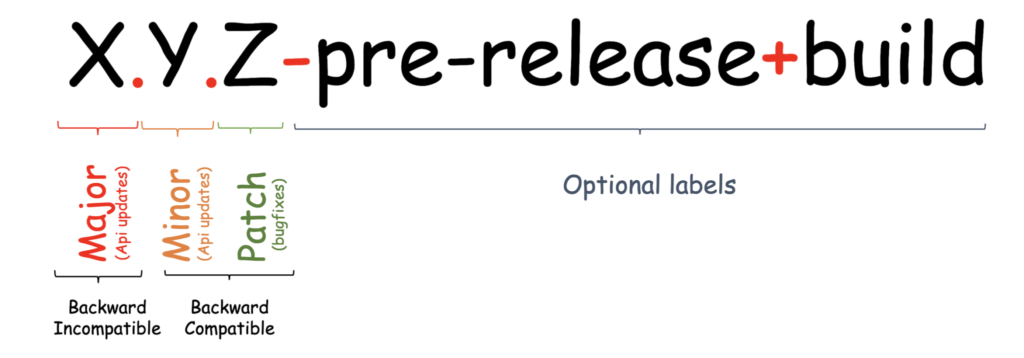
This is an example of Semantic Versioning.  The article “A Guide to Semantic Versioning” by Suemayah Eldursi (https://www.baeldung.com/cs/semantic-versioning)  clearly breaks down each segment of a Semantic Version. Semantic Versioning is a scheme for labeling versions of software using meaningful numbers to represent what was changed.

The first digit refers to the major updates.

  • Updates that involve changes that break API functionality and are not backwards compatible.  

In my example, you can see the current major update matches the available.

The second digit indicates minor updates.  

  • Updates include new features that are backwards compatible and will not break anything in the API.  

In my example, you can see the current version is one minor update behind the available version.

The third digit describes the number of patches. 

  • Small bug fixes and changes that don’t add any new features, are backwards compatible, and don’t cause any breaks in the API.  

In my example, the current patch number is irrelevant because of the minor update, however, we can see that there have been 7 patches since the minor update.

Semantic Versions may also include a pre-release label and build number.  Pre-release labels, such as alpha and beta, and build numbers would look something like “1.0.0-alpha.4”  These are used to let the user know that it is a pre-release build and may have more use for developers to identify additional version information as needed.

Being able to read a version number is important for users so that they can know what changes have been made to the software or if it’s backwards compatible.  Therefore, updating the version number correctly is just as important.  The article “Introduction to Semantic Versioning“ by Parikshit Hooda (https://www.geeksforgeeks.org/introduction-semantic-versioning/) provides a great illustration that demonstrates what type of update you should choose and what the version number would look like after:

In this example, you can see how a bug fix would only change the last digit from an 8 to 9.  It’s important to note that a minor or major update resets all following numbers to 0.

Maintaining proper documentation of your updates through Semantic Versioning is vital for both the user and developer. As a developer, keeping an organized record of each update and communicating what changes were made to users.

From the blog CS@Worcester – CS Learning by kbourassa18 and used with permission of the author. All other rights reserved by the author.

Scrum

This week in our Software Process Management, we delved into the world of Scrum, an agile project management framework that’s been gaining a lot of attention in the software development industry. Scrum is all about fostering collaboration, flexibility, and adaptability in a project, and we explored the crucial roles that customers and developers play in planning and completing each sprint.

Let’s start with a quick overview of Scrum. It’s a framework that emphasizes incremental and iterative progress. Instead of a lengthy and rigid project plan, Scrum divides the work into smaller, manageable pieces called sprints. Each sprint typically lasts around two to four weeks, during which a specific set of features or tasks is tackled. This approach allows teams to be more responsive to changing requirements and deliver valuable software faster.

Now, onto the roles:

  1. Product Owner: In Scrum, the customer’s voice is represented by the Product Owner. This role is pivotal in ensuring that the team is working on the right things. The Product Owner collaborates closely with stakeholders to define the product’s vision, prioritize features, and create a backlog of tasks. They act as the bridge between the customer and the development team, answering questions and providing feedback.
  2. Scrum Master: The Scrum Master is like the team’s guide, facilitating the Scrum process. They ensure that everyone understands and follows the Scrum framework, including the roles, events, and artifacts. Scrum Masters remove any obstacles or distractions that might hinder the team’s progress.
  3. Development Team: As a computer science student, this is where you come in. The Development Team consists of professionals who do the actual work of creating the product. This can include software developers, designers, and testers. The team is self-organizing and cross-functional, which means they work together to complete the tasks committed to during the sprint planning. They are responsible for delivering a potentially shippable product increment at the end of each sprint.

In Scrum, collaboration is key. Customers and developers regularly interact during various ceremonies like sprint planning, daily stand-up meetings, sprint review, and sprint retrospective. This close collaboration helps to ensure that the product being developed aligns with the customer’s needs and expectations.

The sprint planning meeting is where the Product Owner presents the prioritized backlog items, and the Development Team discusses what can be accomplished in the upcoming sprint. This collaboration ensures that the team commits to a realistic amount of work and that the customer’s priorities are respected.

During the sprint, the Development Team is focused on delivering high-quality work. The daily stand-up meetings keep everyone in sync, and any impediments are addressed quickly.

At the end of the sprint, the team and the customer come together for the sprint review to demonstrate the work done. This provides an opportunity for feedback and adjustments based on the customer’s input.

Finally, the sprint retrospective is where the team reflects on their processes and identifies areas for improvement, making each subsequent sprint better than the last.

In conclusion, Scrum is an exciting and collaborative approach to software development that empowers both customers and developers. It ensures that the product remains aligned with customer needs while fostering a dynamic and adaptable working environment. As computer science students, this framework equips us with valuable skills for future software development projects. So, embrace Scrum, work closely with your team, and be prepared for a dynamic and rewarding journey in the world of software development.

From the blog CS@Worcester – Dose Of Dev by msavice and used with permission of the author. All other rights reserved by the author.

CS-343 Week 6

With the constant updates that software can endure, there have been schemes that help track each update. Software versioning is the process of assigning either unique version names or numbers to unique states of computer software. This allows programmers to know when changes have been made and track them. There are several different types of versioning schemes, including name versioning, basic versioning, and internal and external versioning.

Name based versioning identifies software with words and labels rather than a numerical value. This is usually less structured than some of the numerical versioning systems. A basic versioning scheme uses simple, numeric values to track changes. While it is simple and easy to understand, it may not provide detailed information about the nature of the changes with previous versions. Internal versioning, also known as internal build numbers, is used within an organization or for internal purposes to track and manage different iterations. This is separate from external versioning, which is used to communicate with users. The versioning scheme we have started to learn about in class has been semantic versioning. This is a format that I have seen before, but personally did not know much about how exactly the scheme works.

Semantic versioning, also referred to as SemVer, is a versioning system that has the ability to provide a universal way of versioning software development. It is represented by a 3-component number (X.Y.Z) to represent the three different software releases. The Z value indicates the releases for bug fixes, with no functionality changes coming in these updates. Y shows a minor version update where a new functionality is introduced. When increasing the Y value after an update, you must reset the Z value back to 0. The X value denotes a major version, which breaks the current API. It is helpful to split up the different updates that the software endures in this manner so that the user knows the importance of each change.

There are advantages that SemVer brings to software development. It is a fairly simple scheme which provides the ability to track every transaction and help manage dependencies. This also helps the user to identify the risk of taking on the updated packages. It is a very valuable option for version management, especially when it relates to open-source and collaborative development environments.

Semantic versioning and impact of breaking changes in the Maven repository – ScienceDirect

From the blog CS@Worcester – Jason Lee Computer Science Blog by jlee3811 and used with permission of the author. All other rights reserved by the author.

The DRY Design Principle

In this week’s blog post, I will be discussing some of what I learned about the DRY design principle from the article “The DRY Principle: Benefits and Costs with Examples” written by The Valuable Dev. I initially chose this particular article because it perfectly aligns with the DRY design principle topic within the syllabus. This article discusses what DRY is, as well as why you shouldn’t always use DRY. I personally found the author’s use of humor to be very refreshing. I feel many of the blogs I have read so far have seemed to be robotic in how they are written.

The article says that DRY is primarily about a repetition of knowledge first and foremost. “Therefore, the logic of this shipment should only appear once in the application. Why? Imagine that you need to send shipments to a warehouse. You need to trigger this behavior in 76 different places in your application. No problem: you repeat the logic 76 times. After a while, your boss comes to you and asks you to change this behavior. Instead of sending shipments to one warehouse, you need to send them to three different ones. The result? You’ll spend a lot of time on your shipment logic since you’ll have to change it in 76 different places! This is a waste of time and a good way to produce bugs to piss your boss off.” The author suggests instead of repeating the logic that you are using, and it would be better to use abstraction to prevent the kind of issues that the example given causes. This would not only allow for changes to be made faster but also minimize the risk of bugs being created because you are only changing code in one area instead of 76 different places.

The author also discusses a situation where DRY doesn’t apply. In this example, the author is working on software for a VOD (video on demand) platform that both filmmakers and content teams would use regularly. The author was considering creating abstract classes to use instead of the current implementation that was being used due to many classes being almost copy-pasted, as well as seemingly having similar utility for both filmmakers and content teams. “In many cases, we knew that the interface would evolve differently in the future. We would have created a lot of conditionals in the controllers’ actions if we had created one set of controllers for both applications. Nobody wants a forest of if statements; the resulting code would have been way more complex. Additionally, the controllers shouldn’t contain any business logic. If you recall the definition of the DRY principle, it’s this knowledge and business logic that should not be duplicated.” As both classes would become more developed in the future, they would differ significantly. If they were made into an abstraction, the code needed for them to work for filmmakers and content creators would have been messy and complicated to manage.

Article: https://thevaluable.dev/dry-principle-cost-benefit-example/

From the blog CS@Worcester – P. McManus Worcester State CS Blog by patrickmcmanus1 and used with permission of the author. All other rights reserved by the author.

Understanding the Essentials of GIT Version Control

In the ever-evolving landscape of software development and its processes, version control systems play a pivotal role in ensuring code integrity when it comes to GIT, collaboration, and project management. Among these, GIT stands out as a distributed version control system with a rich history and a plethora of capabilities.

Going and delving deep into the fundamentals of GIT, i wanted to see the brief history behind GIT-i uncovered the facts of it being created by a man who went by the name of Linus Torvalds(the same guy who created the Linux kernel operating system). We explore how the GIT application revolutionized software development by supporting a non-linear process of operating within coding projects, being able to facilitate large project management as well as enabling code tracking. The blog post i went on was mostly a comprehensive guide to using GIT, the characteristics it has, the main components, commands which we’ve already covered in previous classes and activities alongside it’s various applications in other domains.

This seemed like a good choice considering it proves a sort of holistic view of GIT, of course another core feature that we use for software process management course- but more precisely being able to understand version control systems which is very crucial in the modern-day software development industry- providing valuable insights in terms of how GIT aligns with the key principals associated with software process management.

This resource does deepen my knowledge and understanding GIT’s role in software development and the uses/features- from the distributed model, branch management, better data integrity as well as being able to maintain parallel developments even in large code projects is an important takeaway from all of this. it can also be used for a variety of situations, whether it’s an open-source project, managing a product or handling real-time web pages and applications.

Since GIT is a useful application that i think will be an important part of future coding endeavors- i do expect to use it as a core tool taking into account it’s capabilities, the previously mentioned efficient branching to the merging and its distributed nature making it an essential resource and asset for maintaining quality code and ensuring good collaboration between team members. Knowing of it’s advantages and disadvantages helps to make informed decisions based on the situations one may encounter when using the application. To conclude with, GIT is a pivotal element in the world of software development. This resource provides a comprehensive guide to GIT’s features, characteristics, and applications- making this a highly powerful tool.

https://www.educba.com/introduction-to-git/

From the blog CS@Worcester – CSTips by Jamaal Gedeon and used with permission of the author. All other rights reserved by the author.

Scrum for other fields?

This week in class, we went over the process of Scrum. Essentially, it is a loose framework on how a team should be working if they want the greatest potential from that work. I say ‘loose’ because it is loose, other than providing how the process should go, it allows teams to not only follow this framework, but adapt it and make it unique for their team and their work. I like this methodology for this reason. 

Scrum states that a team consists of developers, a product owner and a scrum master. Each has their own roles and responsibilities in the process. The process has five parts. The main event is the Sprint, which is a one month process where everyone is working in order to achieve a goal. Before this can happen, there is the Sprint planning, which is planning the Sprint and figuring out what needs to be done. Everyday before people start working, there is the Daily Scrum, a short meeting about what needs to be done that day. At the end of the Sprint, there is the Sprint review, going over the results and progress of the Sprint, and the Sprint retrospective, reflecting on the Sprint, as a whole and on individual parts, so that the next Sprint is better. Each part, and the roles, are described in detail in the Scrum guide.

In this blog post, Gregory Crown and Robert Pieper talk about how Scrum could be used outside the realm of software development, like marketing. I chose this particular post because not only does it connect to what we’re learning in class, it talks about how Scrum can be used outside of software development. In the post, they specifically talk about how marketing can use the framework of Scrum, and how it benefits from it. Pieper says that if it is a complex activity or problem, Scrum can help. He describes complex as something requiring a lot of opinions. He uses a water bottle as an example, saying one stakeholder may not like the color, another may ask what the purpose of the rubber thing at the bottom of it is, etc. Essentially, if you show the benefits of something, and there are a lot of different opinions on it, you can benefit from Scrum. He describes it in a very nice way, saying, “if you’re in a subjective environment where you’re getting a lot of opinions, use Scrum.” He says that if what you’re working on is something that just meets requirements, and then moves on, you don’t need Scrum. 

Personally, I agree with what he says. On paper, Scrum is an excellent framework for a lot of things. It has the layout on how to do things, but allows people to fill in the rest, however necessary for things to be done. It is a clean way of doing things, strict yet flexible. This shouldn’t just be a computer science thing either, if others can benefit from this, do it.

From the blog CS@Worcester – Cao's Thoughts by antcao and used with permission of the author. All other rights reserved by the author.