Hello everyone and welcome back to my blog. Last week we talked about APIs in Activity 12 and I want to go more in depth about APIs and what a REST API is since I don’t really know what they are. API stands for Application Programming Interface and it is a set of definitions that allows two applications to talk to each other. Almost every application uses an API to communicate data from your device to a server. The server has its own APIs to receive that data and interpret it, and then send it back to your device. Then the application translates that data into a readable format for you. You do not have to know how they are implemented into your application, which can simplify the application development and save a lot of time.
APIs can also give security by only allowing certain data through and not all the data. For example, when you buy an item on an online store, you tell the store what items you want to buy and the store tells you what you need to pay. No other information from either your device or the website’s databases is transferred over. What I find interesting about APIs is how they work in video games. There can be multiple APIs in a game that each do something different, such as managing a game’s sound, rendering, and graphics, while others manage AI tasks such as path-finding. Pokemon is one of the most popular video game series out there and there is an API called “Poke API” that has every single Pokemon listing with moves, types, and weaknesses as well as every item in the games. A Pokemon website can use that API to easily get the latest updated information about Pokemon and the games.
REST API or RESTful API stands for Representational State Transfer API. It usually takes advantage of HTTP when used for Web APIs. This means that developers do not need to install libraries or additional software in order to take advantage of a REST API design. However, not all APIs can be REST APIs. In order for an API to be RESTful, it has to follow certain criteria. The client and the server should be separate from each other and allowed to evolve individually and independently, meaning making changes to the database won’t affect the clients. Stateless client-server communication, meaning no client information is stored between get requests and each request is separate and unconnected. Cacheable data that streamlines client-server interactions. A uniform interface which lets the client talk to the server in a single language, standardized means of communicating between the client and the server. A layered system that organizes each type of server. And lastly, Code-on-demand, which is the ability to send executable code from the server to the client when requested. All of these define what REST APIs do.
Hello everyone and welcome back to my blog. Last week we talked about APIs in Activity 12 and I want to go more in depth about APIs and what a REST API is since I don’t really know what they are. API stands for Application Programming Interface and it is a set of definitions that allows two applications to talk to each other. Almost every application uses an API to communicate data from your device to a server. The server has its own APIs to receive that data and interpret it, and then send it back to your device. Then the application translates that data into a readable format for you. You do not have to know how they are implemented into your application, which can simplify the application development and save a lot of time.
APIs can also give security by only allowing certain data through and not all the data. For example, when you buy an item on an online store, you tell the store what items you want to buy and the store tells you what you need to pay. No other information from either your device or the website’s databases is transferred over. What I find interesting about APIs is how they work in video games. There can be multiple APIs in a game that each do something different, such as managing a game’s sound, rendering, and graphics, while others manage AI tasks such as path-finding. Pokemon is one of the most popular video game series out there and there is an API called “Poke API” that has every single Pokemon listing with moves, types, and weaknesses as well as every item in the games. A Pokemon website can use that API to easily get the latest updated information about Pokemon and the games.
REST API or RESTful API stands for Representational State Transfer API. It usually takes advantage of HTTP when used for Web APIs. This means that developers do not need to install libraries or additional software in order to take advantage of a REST API design. However, not all APIs can be REST APIs. In order for an API to be RESTful, it has to follow certain criteria. The client and the server should be separate from each other and allowed to evolve individually and independently, meaning making changes to the database won’t affect the clients. Stateless client-server communication, meaning no client information is stored between get requests and each request is separate and unconnected. Cacheable data that streamlines client-server interactions. A uniform interface which lets the client talk to the server in a single language, standardized means of communicating between the client and the server. A layered system that organizes each type of server. And lastly, Code-on-demand, which is the ability to send executable code from the server to the client when requested. All of these define what REST APIs do.
Hello everyone and welcome back to my blog. Last week we talked about APIs in Activity 12 and I want to go more in depth about APIs and what a REST API is since I don’t really know what they are. API stands for Application Programming Interface and it is a set of definitions that allows two applications to talk to each other. Almost every application uses an API to communicate data from your device to a server. The server has its own APIs to receive that data and interpret it, and then send it back to your device. Then the application translates that data into a readable format for you. You do not have to know how they are implemented into your application, which can simplify the application development and save a lot of time.
APIs can also give security by only allowing certain data through and not all the data. For example, when you buy an item on an online store, you tell the store what items you want to buy and the store tells you what you need to pay. No other information from either your device or the website’s databases is transferred over. What I find interesting about APIs is how they work in video games. There can be multiple APIs in a game that each do something different, such as managing a game’s sound, rendering, and graphics, while others manage AI tasks such as path-finding. Pokemon is one of the most popular video game series out there and there is an API called “Poke API” that has every single Pokemon listing with moves, types, and weaknesses as well as every item in the games. A Pokemon website can use that API to easily get the latest updated information about Pokemon and the games.
REST API or RESTful API stands for Representational State Transfer API. It usually takes advantage of HTTP when used for Web APIs. This means that developers do not need to install libraries or additional software in order to take advantage of a REST API design. However, not all APIs can be REST APIs. In order for an API to be RESTful, it has to follow certain criteria. The client and the server should be separate from each other and allowed to evolve individually and independently, meaning making changes to the database won’t affect the clients. Stateless client-server communication, meaning no client information is stored between get requests and each request is separate and unconnected. Cacheable data that streamlines client-server interactions. A uniform interface which lets the client talk to the server in a single language, standardized means of communicating between the client and the server. A layered system that organizes each type of server. And lastly, Code-on-demand, which is the ability to send executable code from the server to the client when requested. All of these define what REST APIs do.
Hello everyone and welcome back to my blog. Last week we talked about APIs in Activity 12 and I want to go more in depth about APIs and what a REST API is since I don’t really know what they are. API stands for Application Programming Interface and it is a set of definitions that allows two applications to talk to each other. Almost every application uses an API to communicate data from your device to a server. The server has its own APIs to receive that data and interpret it, and then send it back to your device. Then the application translates that data into a readable format for you. You do not have to know how they are implemented into your application, which can simplify the application development and save a lot of time.
APIs can also give security by only allowing certain data through and not all the data. For example, when you buy an item on an online store, you tell the store what items you want to buy and the store tells you what you need to pay. No other information from either your device or the website’s databases is transferred over. What I find interesting about APIs is how they work in video games. There can be multiple APIs in a game that each do something different, such as managing a game’s sound, rendering, and graphics, while others manage AI tasks such as path-finding. Pokemon is one of the most popular video game series out there and there is an API called “Poke API” that has every single Pokemon listing with moves, types, and weaknesses as well as every item in the games. A Pokemon website can use that API to easily get the latest updated information about Pokemon and the games.
REST API or RESTful API stands for Representational State Transfer API. It usually takes advantage of HTTP when used for Web APIs. This means that developers do not need to install libraries or additional software in order to take advantage of a REST API design. However, not all APIs can be REST APIs. In order for an API to be RESTful, it has to follow certain criteria. The client and the server should be separate from each other and allowed to evolve individually and independently, meaning making changes to the database won’t affect the clients. Stateless client-server communication, meaning no client information is stored between get requests and each request is separate and unconnected. Cacheable data that streamlines client-server interactions. A uniform interface which lets the client talk to the server in a single language, standardized means of communicating between the client and the server. A layered system that organizes each type of server. And lastly, Code-on-demand, which is the ability to send executable code from the server to the client when requested. All of these define what REST APIs do.
Hello everyone and welcome back to my blog. Last week we talked about APIs in Activity 12 and I want to go more in depth about APIs and what a REST API is since I don’t really know what they are. API stands for Application Programming Interface and it is a set of definitions that allows two applications to talk to each other. Almost every application uses an API to communicate data from your device to a server. The server has its own APIs to receive that data and interpret it, and then send it back to your device. Then the application translates that data into a readable format for you. You do not have to know how they are implemented into your application, which can simplify the application development and save a lot of time.
APIs can also give security by only allowing certain data through and not all the data. For example, when you buy an item on an online store, you tell the store what items you want to buy and the store tells you what you need to pay. No other information from either your device or the website’s databases is transferred over. What I find interesting about APIs is how they work in video games. There can be multiple APIs in a game that each do something different, such as managing a game’s sound, rendering, and graphics, while others manage AI tasks such as path-finding. Pokemon is one of the most popular video game series out there and there is an API called “Poke API” that has every single Pokemon listing with moves, types, and weaknesses as well as every item in the games. A Pokemon website can use that API to easily get the latest updated information about Pokemon and the games.
REST API or RESTful API stands for Representational State Transfer API. It usually takes advantage of HTTP when used for Web APIs. This means that developers do not need to install libraries or additional software in order to take advantage of a REST API design. However, not all APIs can be REST APIs. In order for an API to be RESTful, it has to follow certain criteria. The client and the server should be separate from each other and allowed to evolve individually and independently, meaning making changes to the database won’t affect the clients. Stateless client-server communication, meaning no client information is stored between get requests and each request is separate and unconnected. Cacheable data that streamlines client-server interactions. A uniform interface which lets the client talk to the server in a single language, standardized means of communicating between the client and the server. A layered system that organizes each type of server. And lastly, Code-on-demand, which is the ability to send executable code from the server to the client when requested. All of these define what REST APIs do.
Hello everyone and welcome back to my blog. Last week we talked about APIs in Activity 12 and I want to go more in depth about APIs and what a REST API is since I don’t really know what they are. API stands for Application Programming Interface and it is a set of definitions that allows two applications to talk to each other. Almost every application uses an API to communicate data from your device to a server. The server has its own APIs to receive that data and interpret it, and then send it back to your device. Then the application translates that data into a readable format for you. You do not have to know how they are implemented into your application, which can simplify the application development and save a lot of time.
APIs can also give security by only allowing certain data through and not all the data. For example, when you buy an item on an online store, you tell the store what items you want to buy and the store tells you what you need to pay. No other information from either your device or the website’s databases is transferred over. What I find interesting about APIs is how they work in video games. There can be multiple APIs in a game that each do something different, such as managing a game’s sound, rendering, and graphics, while others manage AI tasks such as path-finding. Pokemon is one of the most popular video game series out there and there is an API called “Poke API” that has every single Pokemon listing with moves, types, and weaknesses as well as every item in the games. A Pokemon website can use that API to easily get the latest updated information about Pokemon and the games.
REST API or RESTful API stands for Representational State Transfer API. It usually takes advantage of HTTP when used for Web APIs. This means that developers do not need to install libraries or additional software in order to take advantage of a REST API design. However, not all APIs can be REST APIs. In order for an API to be RESTful, it has to follow certain criteria. The client and the server should be separate from each other and allowed to evolve individually and independently, meaning making changes to the database won’t affect the clients. Stateless client-server communication, meaning no client information is stored between get requests and each request is separate and unconnected. Cacheable data that streamlines client-server interactions. A uniform interface which lets the client talk to the server in a single language, standardized means of communicating between the client and the server. A layered system that organizes each type of server. And lastly, Code-on-demand, which is the ability to send executable code from the server to the client when requested. All of these define what REST APIs do.
The blog post starts by identifying what are the different teams in software development and what each team does or is responsible for. It also talks about how what the development team does might be counterintuitive to what the DevOps team does and create problems for the two teams. An example of such a case would be when the development team adds a new feature because the new feature might affect the stability of the code by breaking the code which leads to problems for the DevOps team. The blog post also talks about what is Docker and containerization. It defines both terms and lists the benefits and features of both. It also talks about how Docker and containerization can solve problems that arose when we use virtual machines. For example, Docker can have faster build and testing times. Then, the blog identifies and talks about the different parts of the Docker architecture. In the post, it identified that Docker is composed of four components: images, containers, registries, and the Docker engine. The post defines each term and what each one does. The rest of the post talks about the components of the Docker Engine (such as the daemon, how to submit requests to said daemon…etc.) and why we should use docker, what are its benefits and what are its alternatives.
I personally really like this blog post made by the BNC Software company because the article is not too long or difficult to read. Personally, I have always had a terrible memory and been the kind of person where if I read something I can form some sort of an understanding about something, but I won’t completely understand or remember the topic until I get a formal definition. So, I chose this blog post to look at because I think this post does just that for me. The post explains the terminology in almost layman terms which makes it easier for me to remember and understand the material. Another reason why I chose this particular post is because I think this blog post explains the basics of Docker very well and is a great resource for us to have as we start moving on to more advanced topics in Docker. While reading this post, I think it brought up an interesting point about how the development team can interfere with the work of the people on the DevOps team. This was a question that I had before but never really thought about or put in the time to research this topic. It reminds me of what we learned in Software Process Management and LeBlanc’s Law. Starting up a Docker container takes a lot of initial effort and time commitment, but it would save us time in the long run because we would run into fewer problems of incompatible code and run less of a risk disrupting the stability of the code.
I wanted to read more about micro-services and monolith architecture after working on the recent activity with them and comparing and contrasting the two. They both have their benefits and have similarities, but there are important differences that make people question which is the better choice for designs that they are working on.
Monolith architecture has one database and is more contained, but is more risky to change and update because of how reliant it is on database. Microservices has two databases and has less risk because there is less reliance on each database and one that is getting changed will only affect up to half the system, while monolith risks the whole system being affected. Monolith is faster because it uses one database instead of two and less overall components, but micro-services is safer and better for larger or more complex systems. Microservices seems the better choice out of the two, but monolith has its benefits that should be kept in mind.
I wanted to look more into the two architectures and found an article “Microservices vs Monolith: which architecture is the best choice?” from N-iX, that went over the two and did more comparisons. Monolith was described as the default model for a while, but microservices was getting more traction and monolith is less used. The purpose of the article was to go over the two and decide if monolith is still useful and what it could still be used for.
More comparisons between the two were talked about as the article went over the strengths and weaknesses of both. The pros and cons that were already talked were mentioned, such as the risk of changing components in monolith and how microservices is better for more complex systems, but there were some that were either not mentioned or briefly talked about in the activity that show up in the article that makes the debate between the two architectures more even.
While monolith is more risky, it is more simple to work with and has less overall components to work with, which can make it effective for less complicated systems. It was also said that it is easier to debug and test monolith because it works as a single unit while microservices is multiple. Microservices is better with complex systems and can be easier to understand because of the division of the architecture with the multiple databases, and there is less risk with changes. Flaws of microservices are that it can get too complex, testing is more difficult, and has more cross-cutting issues.
In conclusion, monolith does still have its benefits and is better than microservices for simple and smaller systems, while microservices is better for complex and larger systems but would need more experience to use it efficiently.
This study is based on title usage on O’Reilly online learning. The data includes all usage of O’reilly platform, not just content that O’Reilly has published, and certainly not just books. I have included search data in the graphs.
Programming languages:
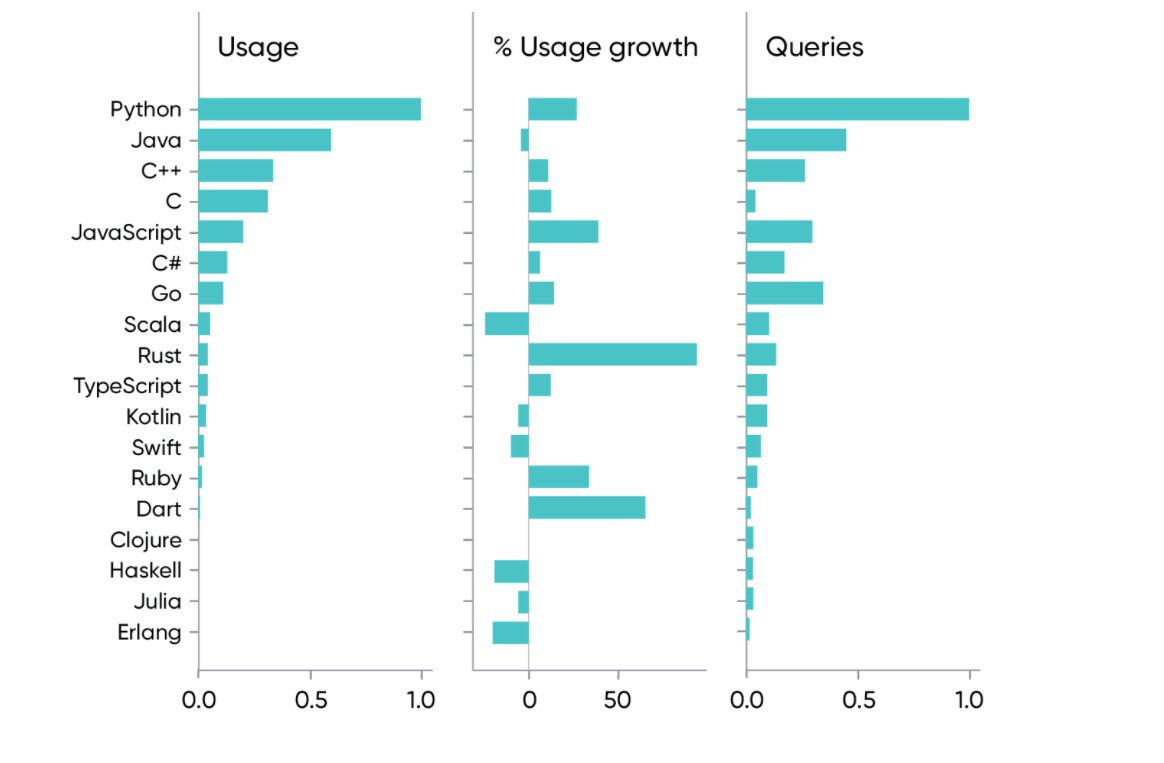
In the first figure, you can see year-over-year growth in usage, and the number of search queries for several popular languages. The top programming languages according to O’reilly are Python (up 27%), Java (down 3%), C++ (up 10%), C (up 12%), and JavaScript (up 40%). Looking at 2020 usage rather than year-over-year changes, it’s surprising to see JavaScript so far behind Python and Java. (JavaScript usage is 20% of Python’s, and 33% of Java’s).
Past the top five languages, Go has grown 16% and Rust has grown 94%. Go has clearly established itself, particularly as a language for concurrent programming, and Rust is likely to establish itself for “system programming”
Figure 2 shows what happens when you add the use of content about Python, Java, and JavaScript to the most important frameworks for those languages.
Adding usage and search query data for Spring (up 7%) reverses Java’s apparent decline (net-zero growth). Looking further at JavaScript, if you add in usage for the most popular frameworks (React, Angular, and Node.js), JavaScript usage on O’Reilly online learning rises to 50% of Python’s, only slightly behind Java and its frameworks.
None of these top languages are going away, though their stock may rise or fall as fashions change and the software industry evolves.
We see several factors changing pro‐ gramming in significant ways:
Multi Paradigm languages:
Since last year, According to O’reilly there is a 14% increase in the use of content on functional programming. Object oriented programming is up even more than 29% growth as compared to functional programming since last year. Starting with Python 3.0 in 2008 and continuing with Java 8 in 2014, programming languages have added higher-order functions (lambdas) and other “functional” features. Several popular languages (including JavaScript and Go) have had functional features from the beginning. This trend started over 20 years ago (with the Standard Template Library for C++), and we expect it to continue.
Concurrent programming:
Platform data for concurrency shows an 8% year-over-year increase.Java was the first widely used language to support concurrency as part of the language.Go, Rust, and most other modern languages have built-in support for concurrency. Concurrency has always been one of Python’s weaknesses.
Dynamic versus static typing:
The distinction between languages with dynamic typing (like Ruby and JavaScript) and statically typed languages (like Java and Go) is arguably more important than the distinction between functional and object-oriented languages. Python 3.5 added type hinting, and more recent versions have added additional static typing features. TypeScript, which adds static typing to JavaScript, is coming into its own (12% year-over-year increase).
Low-code and no-code computing:
low-code is real and is bound to have an effect.Spreadsheets were the forerunner of low-code computing. When VisiCalc was first released in 1979, it enabled millions to do significant and important computation without learning a programming language. Democratization is an important trend in many areas of technology; it would be surprising if programming were any different.
AI, Machine Learning, and Data:
Healthy growth in artificial intelligence has continued: machine learning is up 14%, while AI is up 64%; data science is up 16%, and statistics is up 47%. While AI and machine learning are distinct concepts, there’s enough confusion about definitions that they’re frequently used interchangeably. We informally define machine learning as “the part of AI that works”; AI itself is more research oriented and aspirational. If you accept that definition, it’s not surprising that content about machine learning has seen the heaviest usage: it’s about taking research out of the lab and putting it into practice. It’s also not surprising that we see solid growth for AI, because that’s where bleeding-edge engineers are looking for new ideas to turn into machine learning.
It’s possible that AI (along with machine learning, data, big data, and all their fellow travelers) is descending into the trough of the hype cycle. We don’t think so, but we’re prepared to be wrong. As Ben Lorica has said (in conversation), many years of work will be needed to bring current research into commercial products.
The future of AI and machine learning:
Many companies are placing significant bets on using AI to automate customer service. We’ve made great strides in our ability to synthesize speech, generate realistic answers, and search for solutions.
We’ll see lots of tiny, embedded AI systems in everything from medical sensors to appliances to factory floors. Anyone interested in the future of technology should watch Pete Warden’s work on TinyML very carefully.
Natural language has been (and will continue to be) a big deal. GPT-3 has changed the world. We’ll see AI being used to create “fake news,” and we’ll find that AI gives us the best tools for detecting what’s fake and what isn’t.
Web Development:
Since the invention of HTML in the early 1990s, the first web servers, and the first browsers, the web has exploded (or degenerated) into a proliferation of platforms. Those platforms make web development infinitely more flexible: They make it possible to support a host of devices and screen sizes. They make it possible to build sophisticated applications that run in the browser. And with every new year, “desktop” applications look more old-fashioned.
The foundational technologies HTML, CSS, and JavaScript are all showing healthy growth in usage (22%, 46%, and 40%, respectively), though they’re behind the leading frameworks. We’ve already noted that JavaScript is one of the top programming languages—and the modern web platforms are nothing if not the apotheosis of JavaScript. Twenty-five years later, that’s no longer true: you can still “view source,” but all you’ll see is a lot of incomprehensible JavaScript. Ironically, just as other technologies are democratizing, web development is increasingly the domain of programmers.
Clouds of All Kinds:
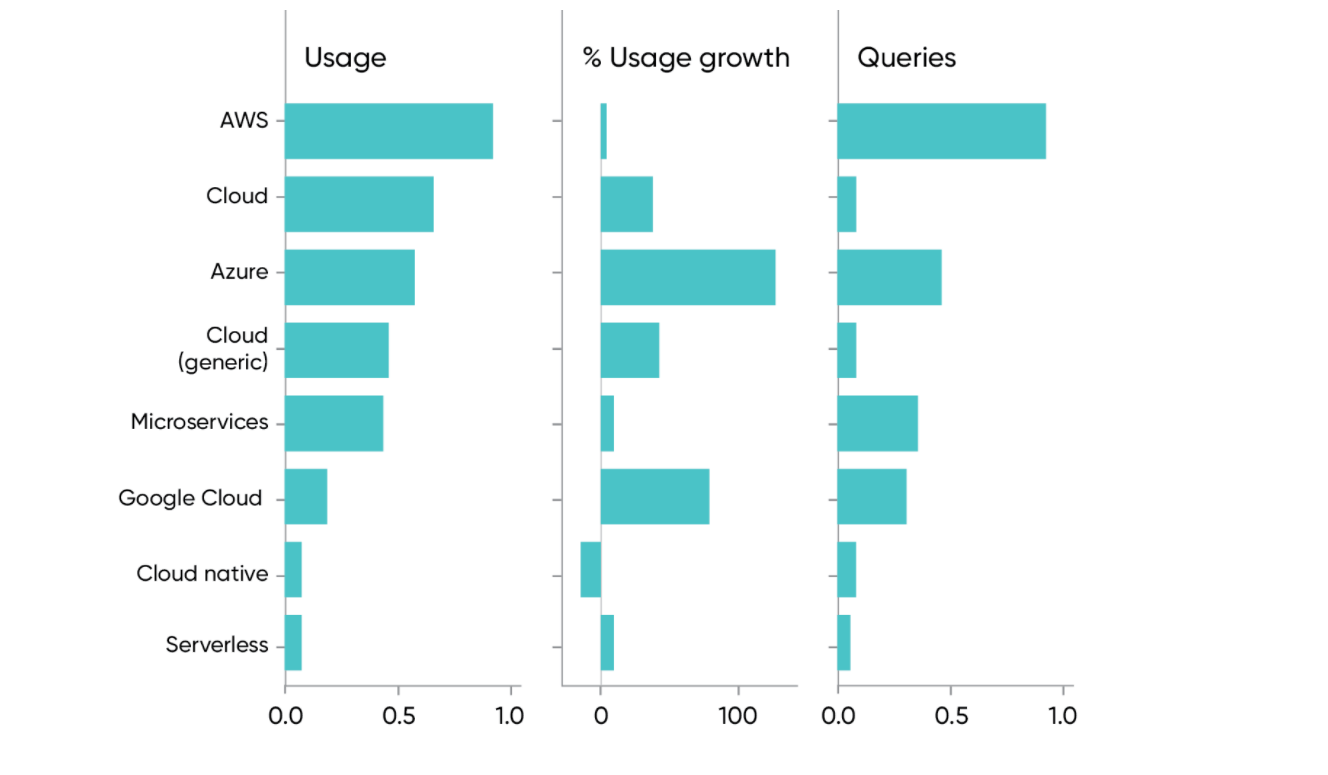
It’s no surprise that the cloud is growing rapidly. Usage of content about the cloud is up 41% since last year. Usage of cloud titles that don’t mention a specific vendor (e.g., Amazon Web Services, Microsoft Azure, or Google Cloud) grew at an even faster rate (46%). Our customers don’t see the cloud through the lens of any single platform. We’re only at the beginning of cloud adoption; while most companies are using cloud services in some form, and many have moved significant business-critical applications and datasets to the cloud, we have a long way to go. If there’s one technology trend you need to be on top of, this is it.
The horse race between the leading cloud vendors, AWS, Azure, and Google Cloud, doesn’t present any surprises. Amazon is winning, even ahead of the generic “cloud”—but Microsoft and Google are catching up, and Amazon’s growth has stalled (only 5%). Use of content about Azure shows 136% growth—more than any of the competitors—while Google Cloud’s 84% growth is hardly shabby. When you dominate a market the way AWS dominates the cloud, there’s nowhere to go but down. But with the growth that Azure and Google Cloud are showing, Amazon’s dominance could be short-lived.
While our data shows very strong growth (41%) in usage for content about the cloud, it doesn’t show significant usage for terms like “multi cloud” and “hybrid cloud” or for specific hybrid cloud products like Google’s Anthos or Microsoft’s Azure Arc. These are new products, for which little content exists, so low usage isn’t surprising. But the usage of specific cloud technologies isn’t that important in this context. usage of all the cloud platforms is growing, particularly content that isn’t tied to any vendor. We also see that our corporate clients are using content that spans all the cloud vendors; it’s difficult to find anyone who’s looking at a single vendor.
Security and Privacy:
Security has always been a problematic discipline: defenders have to get thousands of things right, while an attacker only has to discover one mistake. And that mistake might have been made by a careless user rather than someone on the IT staff.
CISSP content and training is 66% of general security content, with a slight (2%) decrease since 2019. Usage of content about the CompTIA Security+ certification is about 33% of general security, with a strong 58% increase.
It’s disappointing that we see so little interest in content about privacy, including content about specific regulatory requirements such as GDPR. We don’t see heavy usage; we don’t see growth; we don’t even see significant numbers of search queries.
For the homework#3 of this week, I had a chance to practice on the docker compose. However, excepting for the little knowledge that I learned from the activity 10 in class, I had no clue what docker compose was. Therefore, I wanted to learn more about docker compose to get a better understanding and also learn how to write a docker compose file.
Docker Compose Tutorial: advanced Docker made simple is one of the resources that I find useful to help me get an overview about the docker compose, how to write an .yml file, and how to run the .yml file with docker-compose commands. Through the website, I know that docker compose is used to define and run multi-container Docker applications; and I also get an idea of what components should be included in a .yml file to create a docker container. Specifically, to create a container service, we need some entries like build, link, image, ports, volumes, command, environment, etc.; and the function of each entry is also described in detail on the website. For example, back to the activity 10 in class, now I am able to convert the docker command given in the below picture to an equivalent .yml file.
As shown in the above docker command, my .yml file will create a container named cache using the image named redis with the tag of 6.0.8. This container has internal port 6379 connecting to the external port 11000, and it also mounts two directories of ./redis.conf and /etc/redis.conf. So, the components that should be included in my .yml file are version, services, web, image, ports, and volumes.
First, version is to define which version of docker compose that I am using. Services is used to define all different containers that I want to create. Web is use to present the container name, in this case, I will replace web with cache. Image will represent which image is used to create the container (redis:6.0.8). Ports is used to map the external port with the internal port (11000:6379). Volume is used to mount the source directory, ./redis.conf, with the destination directory, /etc/redis.conf.
In short, in my opinion, I believe the website that I found is a good resource, because from it, I can find really useful information about docker compose, such as definition of docker compose, how to write .yml file, and docker-compose commands. Thanks to this resource, I am more familiar with .yml file and docker-compose commands. Especially, I used what I learned from this website to do my homework 3.