Interface vs Abstract class vs Concrete class

Summary:

As a programmer, java is all about classes and there are design patterns that we must follow, and it is our duty to question them. Java is an object orientated programming language where we have the ability to write our code in the form of reusable classes. Code re-usability doesn’t start by creating objects out of classes, it starts way before that when we are creating the classes itself. The class types that we have available to us are Interface, Abstract, and Concrete classes.

Reason:

The reason why I chose this article was because I thought this article would help us understand why we us certain classes and when to use them. In class we have gone over different design patterns where the uses of every class are different depending on what we want to achieve. I believe that it is important to fully understand how they each function as it will make understanding the design patterns much easier.

What I’ve Learned:

Interfaces are a blueprint for your class that can be used to implement a class and an interface cannot have any concrete methods. What your interface can have are static members and method signatures. All methods that you declare in an interface can have static, default or abstract modifiers. Abstract methods cannot have a body; all they can have is a method signature. Variables are not allowed in interface. Hence any data declaration is public static final. Interfaces can extend other interfaces (one or more) but not classes (abstract or not). Interfaces cannot be instantiated as they are not concrete classes. Methods and constants cannot be declared private, methods cannot be declared final.

Abstract classes are a bit different from interfaces. These are also used to create blueprints for concrete classes but abstract classes may have implemented methods. Abstract classes can implement one or more interfaces and can extend one abstract class at most. A class can be an abstract class without having any methods inside it. But if it has any methods inside it, it must have at least one abstract method. This rule does not apply to static methods. As abstract classes can have both abstract and non abstract methods. Static members are allowed. Abstract classes can extend other at most one abstract or concrete class and implement several interfaces. Any class that does not implement all the abstract methods of it’s super class has to be an abstract class itself.

Concrete classes are the usual stuff that every java programmer has come across for sure. It is like the final implementation of a blueprint in case you are extending it some abstract super class. A concrete class is complete in itself and can extend and can be extended by any class. The only condition is that all the methods have to be implemented in order for it to qualify as a concrete class.

From the blog CS@Worcester – Life as a CS Student by Dylan Nguyen and used with permission of the author. All other rights reserved by the author.
Code Smells

https://jserd.springeropen.com/articles/10.1186/s40411-017-0041-1

A code smell is used to see or detect issues in code. There are many tools used by different developers in order to make the detection of code smells easier and faster. Aswell as being used to detect more general issues in code developers can also use code smells to help them know when refactoring of code would be beneficial. Code smells most frequently represent issues with maintainability (future or present) or comprehensibility if a developer refactors their code these issues will either take a much smaller form or they can be non-existent.

This article focuses on three of the many code smells and what each of them mean. One code smell outlined in this article is the “God class” code smell, this code smell tells the developer that class contains too much code/information or that the methods inside of the class are used to do too much. Which as the article says violates the “single responsibility principle”. The “God Method” code smell is described as when a method is assigned too much functionality which makes it hard to maintain. This code smell also “tends to centralize the functionality of a subsystem” according to the article. Lastly “Feature Envy is a code smell which shows that a method is more influenced or interested in a class other than its own.

The three code smells outlined in the article are some of the most frequently detected and can be detected without using a specific code smell detection tool. Some well known detection tools listed by the author are “inFusion, JDeodorant, PMD and JSpIRIT” all four of these tools are free or can be used on a trial. All four tools can be used to analyze Java and are known to at least detect the three code smells from the article. But other tools can be used or be more effective depending on the language you use to code or the code smell present in the code.

I chose this source (article) as it is easy to follow but also relatively in depth about the general definition of code smells as well as giving a list of tools used for code smell detection which other students as well as myself could find helpful in future classes or the professional world. This article showed me what tools I should be using to detect code smells in my own code and the reason as to why code smells are important to address/fix by way of refactoring and I plan on using this article or reflecting back to it when I need to find a tool for detecting code smells in the future.

From the blog CS@Worcester – Dylan Brown Computer Science by dylanbrowncs and used with permission of the author. All other rights reserved by the author.

“Encapsulate what varies.”

“Find what changes and encapsulate it.”-  This is a different approach from the redesign approach. In simpler words, we are able to consider what we want to change without redesigning, rather than thinking about who might force a change in design.

This principle of encapsulating makes it possible for nothing to affect the rest of your code.

Encapsulation can be found everywhere!

When we turn the steering wheel and the car wheels rotate, we see that there is a variety of moving parts that work together to transform our action into the final effect that the car wheels have, but all these details are encapsulated by us. But this example can never be confused with abstraction. Because they are simply similar and can be true. Just like in the real world but also in the world of Software we have various examples of encapsulation but also of Abstraction that interact together. These are two concepts that are different but that are also related to each other, and that in most cases work together.

The moment we include anything that has the potential for change, we are dealing with time savings. In general, encapsulation has to do with objects which in a way make possible the merging of attributes but also of the methods they have, for the sole reason that they do not have an impact on other objects they have. But it works differently in cases when we are dealing with the design of a program which is mostly object-oriented. This is because the requirements that may most likely change in the future, need to be more concise for one reason only: that the change is likely to occur at the time it is requested. The volume of the code is changed by the summary which minimizes the volume of the code, and which may need to be changed in the future.

When we see that this principle is particularly relevant to the code which changes very often, we are dealing with the benefit of encapsulating the code, regardless of the frequency of the code change. Like what:

The code that is encapsulated has the possibility of reasoning to be separate from the code

  • To prevent conjugation summarized with the implementation of the code which is encapsulated, such as when summarizing when the interaction of a downstream system. At this point this replacement is even easier.
  • -Other developers can understand from the encapsulation constants, that they are sufficiently connected and have control security in case they have changed or even the way it has changed.

References:

https://genderi.org/encapsulate-what-varies.html

https://alexkondov.com/encapsulate-what-varies/

From the blog CS@worcester – Xhulja's Blogs by xmurati and used with permission of the author. All other rights reserved by the author.

Command Line

Command-Line is essential to developers and I think every developer should master this skill. In my point of view, the command line is quicker than a regular click which saves developers much time along with effort, and the command line is one of the best tools at our disposal. Recently, I have had more opportunities to practice command-line while learning about Docker. It comes to my sense that using CLI fastens the Docker process than the original clicking method.
Knowing CLI gives you better accessibility to control the system. You can only access these kinds of commands via the shell on Unix/Linux and Power-shell on Windows. The basic commands only involve changing the directory, creating new files, and editing text files. The more advanced techniques could involve managing database systems like Apache/SQL. And elite users could use the command-line to do test penetrating to expose security vulnerabilities.
Developers spend an amount of time in Command Line Interface to execute codes or to run packages. Two essential programs are git and brew was designed exclusively for CLI though there is a way to use it without CLI interference, this is still much quicker and easier to use and work with the code base in it. CLI also allows us to do manipulations with your system internals. It offers better flexibility and control than regular GUI.
Front-end and back-end developers are better off with CLI. Since back-end developers will be dealing with servers, configuration files, and making sure the code for your site is working. Front-end developers don’t need as many CLI skill sets as back-end but knowing CLI serves them .better in the long run. After all, both developers use git and git functional based on CLI.
Talking about the bad stuff, CLI in Linux is popular among penetrating testers, meanwhile, hackers love CLI because of its flexibility. Using CLI to run Nmap to expose vulnerability is a powerful tool. It allows us to scan the network and discover not only everything that is connected to it but also much sensitive information. Besides Nmap is Metasploit, another powerful tool for penetrating testing. The problem with Metasploit is it makes hacking simple than it used to be. Nmap and Metasploit are two powerful for testers and developers and to people who use Linux, these are essentials, not necessarily for regular Linux users.
To summarize, the main advantage of using CLI is if you know the commands, CLI could be faster and efficient than other operations. It can handle repetitive tasks easily and CLI requires less memory than other interfaces.

From the blog CS@Worcester – Nin by hpnguyen27 and used with permission of the author. All other rights reserved by the author.

The Strategy Design Pattern

Christian Shadis, 10/20/2021

In the blog post “Strategy Design Pattern in Python”, Giridhar Talla defines and discusses the Strategy Design Pattern first in a broader object-oriented approach, but then directly with Python implementation. Talla uses the Gang of Four’s definition of the Strategy Design Pattern to first create an abstract implementation of the design pattern, and then using a more concrete example to show the pattern in use. He also includes a UML diagram visualizing the design pattern.

The strategy design pattern was a topic of focus for my CS-343: Software Construction, Design, & Architecture class. We examined the pattern using a simple example in Java called DuckSimulator, which had different Quack and Fly strategies. While the value of the pattern was immediately evident, the concept of the pattern itself still confused me, especially when attempting to implement the design in Java for homework. I chose to study and write about this blog post because it took a straightforward approach like the in-class activity, but it is implemented in Python instead of Java. I decided that the best way to understand the abstract nature of the strategy design pattern was to consider its implementation in other object-oriented languages.

I found the blog post both informative and direct – Talla’s language is easy to follow, and his code snippets are clear and concise. What I found simultaneously helpful and confusing was his abstract implementation of the pattern using not a real-world example, but simply by creating Context and Strategy classes. This made it helpful to see exactly how each component interacts with one another without getting caught up in or confused trying to figure out what part of the example represents a strategy or a context. This abstract code chunk is a solid foundation for building a python script using the design pattern if you it to your specific real-world example.

The article did supplement my understanding of the design pattern by adding extra abstraction. On the other hand, however, I still find myself confused trying to implement the pattern in Java. Because of this, I plan to continue reading about the pattern and practicing implementing it. The code I write is often very dependent on using if/else branches to run algorithms differently based on object attributes, which is a problem this design pattern can mitigate. I plan to read the original Gang of Four chapter on the Strategy Design Pattern to further increase my understanding because being able to implement this pattern will greatly improve the efficiency of programs the pattern would work with.

Source: https://auth0.com/blog/strategy-design-pattern-in-python/

From the blog CS@Worcester – Christian Shadis' Blog by ctshadis and used with permission of the author. All other rights reserved by the author.

Back to the Basics: Inheritance Vs. Abstraction

When it comes to coding in Java, Interfaces and Abstract classes may be referred as a part of the basics. These are concepts you must understand to pursue the coding of Data Structures. That being said, just because you are able to code Interfaces and Abstract classes, doesn’t exactly mean you understand it completely. Just because a Code compiles without error, does not mean there aren’t mistakes in the code. It also does not mean these concepts were implemented correctly. Although these are basic concepts, it does not mean they will not appear in a future interview. You will know you have a confident understanding when you can explain these concepts through word of mouth without referring to a cheat sheet.

Since I believe this question will come up in any Software Development Interview, I decided it would be a good idea to write about it and attempt to concrete these ideas in my mind. If I were to put a key difference between Inheritance and Abstraction, I would say that Interfaces are to Standardize, and Abstraction is to Generalize. With an Interface, you are creating a methodology of creating a new class. Your interface will create standard properties and methods which can be reused in an existing class. It helps to improve code reusability. While your abstract class is a concept that hides implementation details and shows only the functionality to the user. Meaning it defines the code identity of a class. It is used for objects of the same type. While an Interface only defines peripheral abilities of a class, it only provides a signature and not any code. Abstraction is meant to help reduce the complexity of the code.

To nail the interview question, start with the largest differences and work your way down to the more subtle ones. Abstract classes can only extend one Interface while an Interface can extend several Interfaces. You can define fields in Abstract classes while you cannot in interfaces. Abstract classes work at a faster speed. You use Abstraction to avoid independence. While you use Interfaces for future enhancement. Abstract classes contain Data Members and Constructors while a Interface does not. An Interface cannot have access modifiers, everything is public by default.

To further educate myself, I found a great Youtuber of the name Gabriel Zimmermann. Who is actually does interviews at his Software Company. He gives a great video on how to answer this question if it comes up in your interview. As well as a detailed explanation of this topic to help someone learn for themselves!

https://www.youtube.com/watch?v=Lnqmde9LP74

Andrew Sychtysz

10/19/2021

From the blog CS@Worcester – Andrew Sychtysz Software Developer by Andrew Sychtysz and used with permission of the author. All other rights reserved by the author.

MVC Design Pattern

Source: https://www.geeksforgeeks.org/mvc-design-pattern/

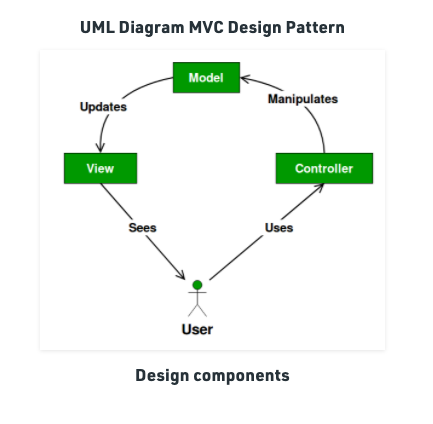
The Model View Controller pattern is a common design pattern used in web development. I chose to write about the MVC design pattern this week, because I have experience using it, but at the time I did not realize that I was using a design pattern. At that point I was not familiar with the idea of a design pattern, or the extent to which they are used in Software Develpment. My thought is that doing some intentional study of the topic will solidify my knowledge. My experience with MVC was in ASP.NET Core. But some other popular MVC frameworks are React, Angular, and Laravel.

With MVC the data model, application data, presentation information, and control information are seperate objects. The Model contains application data, and does not present the data to the user. In my experience these Classes contained data like barcodes and timestamps. But did not have methods that manipulate the data, define API methods, or a present a UI. The Controller Class is an intermediary between the Model classes and the View Class. The Controller Class contains methods that execute on Models. In my experience, I mostly used Controllers for API calls. These API methods uploaded text files to a database with an HTTP post method, and retrieved JSON data with a HTTP get method. The View Class prescents the data to the user. In my experience I used .Vue files to present data. The View files instanced of Models, presented as JSON objects, and the Controller contains API calls that allowed the transfer of data from the Model to the View.

Like all Design Patterns in Software Development there are advnatages and disadvantages to the Model View Controller pattern. Some Advantages are that multiple developers can work simultaneoulsy on the model, controller and views. Another Advantage is the MVC allows for logical grouping of data. And Models can have more than one View. Some disadvantages is the added layer of abstraction can make working on and navigating the service to be complex. I ended up tracing methods from class to class, using built in Visual Studio tools, because remembering where the method I was looking for became cumbersome. Using the MVC design pattern creates many files, because each layer of every feature of the service has a Model, Controller, and View. With all that being said, I still think that the MVC pattern is great for meduim to large scale services.

From the blog CS@Worcester – Jim Spisto by jspisto and used with permission of the author. All other rights reserved by the author.

Blog post 10/18/21 – JUnit tests and code refactoring

As we progress through CS-343 we are learning how to refactor existing code. In my previous coding class it was a challenge to learn all the rules of java and apply them to new projects – getting the code to run was a success. The next step is writing code that is up to professional standards as we prepare to enter the workforce. JUnit tests are used by developers to implement tests directly in your project , making sure no corner is left unchecked. This increases the quality of your code and speeds up the refactoring process because you can see clearly what parts of your code need improvement. The tests are a goal for your project, and you will meet your goal once all tests reach 100%. I have only briefly used JUnit testing in my previous courses and still struggle with writing them myself. I found this video helpful because it allows you to watch a professional programmer walk through a code refactoring session and write tests from scratch.

Testing and Refactoring Legacy Code – Sandro Mancuso

The developer has his screen split between the legacy code and the refactored code/tests, working from the inner methods and functions then working outwards. Over the summer I created a basic paint application using JavaScript. I will use the code refactoring methods I learned in this video to begin refactoring my own personal coding project.

In this video, they go one class at a time first examining the code then line by line writing the tests. When running the JUnit test class, the java file will have different color highlighting on certain lines to show you which parts of your code meet the standards and which do not. I would recommend this video to everyone in our class to watch because it gives you the full step by step process for writing JUnit tests and using the results to refactor your code.

From the blog CS@Worcester – Site Title by lenagviaz and used with permission of the author. All other rights reserved by the author.

Code Smells

This week, I wanted to read up on code smells. Code smells are conditions of code that indicate problems with code quality.

A great resource I stumbled upon is “Everything you need to know about Code Smells” from Codegrip at https://www.codegrip.tech/productivity/everything-you-need-to-know-about-code-smells/.

Code smells may slow down processing and can make it easier for bugs to develop in the program. There are three levels of smells: application level, class level, and method level smells.

Codegrip lists duplicate code, shotgun surgery, and contrived complexity as application level smells. Duplicate code, of course, is similar code that appears in more than one location. Shotgun surgery is a change that results in the need to change other classes. Contrived complexity is using complex design patterns where a simpler design could be used.

Class level smells are: large class, freeloader, feature envy, divergent code, data clump, inappropriate intimacy, middle man, downcasting, parallel inheritance hierarchy, refused bequest, and cyclomatic complexity.

Large class smells are when a class has too many functions and it has too many instance variables, whereas freeloader is when a class does too little. Feature envy is when a class with a method wants to use features of other classes more than its own. Divergent code smell arises from a class that has to undergo many changes in order to make a change in a system. Inappropriate intimacy is when a class depends too much on the implementation information of other classes. Downcasting is when there’s a typecast that breaks the abstraction model. Parallel inheritance hierarchy smells are present when you make a subclass for a single class, and then a subclass must be made for other classes. Refused bequest is when a subclass does not use the methods and data of the superclass. Cyclomatic complexity smells occur when a class has an excessive amount of branches and loops.

Method level smells are: long method, speculative generality, message chains, too many parameters, oddball solutions, god line, excessive returner, and identifier size.

Speculative generality smells are present when only test cases are users of methods. Message chains are when methods call on other methods and those methods call on additional methods. Oddball solutions occur when multiple methods are used to solve the same problem. God line is when a line of code is unreasonably long. Excessive returner is when a method returns more data than what is actually needed. Identifier size occurs when the identifier is too short or too long.

I selected this source because I liked how it neatly categorized the different levels of code smells and offered an audio version of the post. In addition, I thought it was interesting to see how Codegrip explained code smells as it provides tools to recognize code smells and provides suggestions for how to resolve them. This source helped me learn the code smell types and how to recognize them. I’ll be able to apply this to my code in the future to prevent opportunities for big errors to develop down the line.

From the blog CS@Worcester – CS With Sarah by Sarah T and used with permission of the author. All other rights reserved by the author.

Docker

Hello and welcome to “Docker Containers’ Power.” Let’s take a closer look at what Docker containers have to offer in terms of the development process.

What is Docker?

Docker is an open-source project that automates application deployment into portable, self-contained containers that can run in the cloud or on-premises. Docker is also a firm that promotes and develops this technology, collaborating with cloud, Linux, and Windows manufacturers such as Microsoft.

Developers can use Windows, Linux, or macOS development environments. The developer launches a Docker host on the development computer, which deploys Docker images, containing the program and its dependencies. As far as I know, developers that work on Linux or macOS utilize a Linux-based Docker host and can only produce images for Linux containers. Developers using macOS can make changes to their code.

Docker Desktop for Windows or macOS is available to host containers in development environments and gives extra developer tools. These solutions set up a virtual machine (the Docker host) to run the containers. There are two types of runtimes for Windows Containers:

Windows Server Containers use process and namespace isolation technology to enable application isolation. A kernel is shared by a Windows Server Container, the container host, and any containers executing on the host.

By operating each container in a highly efficient virtual machine, Hyper-V Containers improve on the isolation given by Windows Server Containers. The kernel of the container host is not shared with the Hyper-V Containers in this setup, which provides better isolation. The images for these containers are made in the same way and have the same functionality. The difference is in the way the container is built from the image and operating a Hyper-V Container necessitates the use of an additional parameter.

Comparison of traditional virtual machines to Docker containers.

Infrastructure, Host Operating System, and Hypervisor are the three foundation layers of the host server for VMs, and each VM has its own OS and all necessary libraries on top of that. The container engine, which keeps containers isolated while sharing the base OS functions, is installed on top of the infrastructure and OS on the host server for Docker.

Containers are simple to deploy and start since they use considerably fewer resources (for example, they don’t require a full operating system). This allows you to have a higher density, which means you can operate more services on the same hardware unit and save money.

From the blog CS@Worcester – Site Title by proctech21 and used with permission of the author. All other rights reserved by the author.