7 Types of Software Testing

This week I wanted to learn more about the types of software testing that are out there. In class we already learned about methods like black and white box testing. I wanted to see if there were more methods that we may not have covered. 

This article describes 7 of the most common software testing methods. It is important to note that software testing and software development as a whole is always changing. As such there are many more than just seven software testing methods and there will definitely be new methods created in the future. These seven here are just some of the most common. 

They are:

  1. Black Box Testing
  2. White Box Testing
  3. Acceptance Testing
  4. Automated testing
  5. Regression Testing
  6. Functional Testing
  7. Exploratory Testing

Something I found interesting about this article is the relationship the author outlined between automated and regression testing. Automated testing is making your tests run automatically and regression testing is testing to verify the system still works as it did before some changes were made. Automated and regression testing go hand in hand because as software is incrementally changed you have to perform regression testing often. This is the real purpose behind automated testing – you can test repeatedly.

Another interesting method that was discussed is exploratory testing. The author refers to it as a “lazy” method of testing but also acknowledges its merits. Exploratory testing is essentially looking at a certain area of an application and exploring for any unexpected behavior. This testing method does not have any test cases. While this testing method does not really apply to the small applications that we work with in class, it may be useful in the capstone course. In that course we are creating a much larger web application with a front and backend so exploring may prove useful. 

https://usersnap.com/blog/software-testing-basics/

From the blog CS@Worcester – Half-Cooked Coding by alexmle1999 and used with permission of the author. All other rights reserved by the author.
JavaScript Testing

Because we are using JavaScript in the capstone course, I wanted to look as the tools used for testing in JavaScript, especially since I only have experience with testing in Java.

Because JavaScript is for web development, tests usually have to be run in a browser. This can be in a regular browser in an HTML page with JS scripts, or in a headless browser from the command line which is faster as there is nothing rendering onscreen. You can also run tests in Node.js. jsdom is commonly used with this to simulate a browser with pure JavaScript.

There are also many testing tools with different functions. Some tools have multiple functions and some have only one.

  1. Test launchers are used to launch your tests in the browser or Node.js with user config. (Karma, Jasmine, Jest, TestCafe, Cypress, webdriverio)
  2. Testing structure providers help you arrange your tests in a readable and scalable way. (Mocha, Jasmine, Jest, Cucumber, TestCafe, Cypress)
  3. Assertion functions are used to check if a test returns what you expect it to return and if its’t it throws a clear exception. (Chai, Jasmine, Jest, Unexpected, TestCafe, Cypress)
  4. Generate and display test progress and summary. (Mocha, Jasmine, Jest, Karma, TestCafe, Cypress)
  5. Mocks, spies, and stubs to simulate tests scenarios, isolate the tested part of the software from other parts, and attach to processes to see they work as expected. (Sinon, Jasmine, enzyme, Jest, testdouble)
  6. Generate and compare snapshots to make sure changes to data structures from previous test runs are intended by the user’s code changes. (Jest, Ava)
  7. Generate code coverage reports of how much of your code is covered by tests. (Istanbul, Jest, Blanket)
  8. Browser Controllers simulate user actions for Functional Tests. (Nightwatch, Nightmare, Phantom, Puppeteer, TestCafe, Cypress)
  9. Visual Regression Tools are used to compare your site to its previous versions visually by using image comparison techniques. (Applitools, Percy, Wraith, WebdriverCSS)

https://medium.com/welldone-software/an-overview-of-javascript-testing-7ce7298b9870

From the blog CS@Worcester – Half-Cooked Coding by alexmle1999 and used with permission of the author. All other rights reserved by the author.

Craft over Art

This week I took a look at the pattern “Craft over Art”. According to this pattern, programming is a craft not an art. As software developers, we are being hired to build some piece of software to solve a customer’s problem. We should not be trying to indulge our own interests by creating something we think is beautiful. While our software can be beautiful, it must primarily be functional.

This pattern made me think about how easy it is to get drawn into the program you are writing, especially if it is a project you are passionate about. You can quickly get sucked in and start trying to put every bell and whistle you can in, especially with projects that include a visual aspect. As students it is especially important to not go overboard. While extra effort is appreciated by instructors, you cannot get over an A grade anyway. That time should be spent on other things.

An important point here is also that as software developers we are providing a service to customers. Because of this we cannot wait for inspiration to strike before we start working on a project. We should still do satisfactory work even if the project is not something, we are passionate about. This is a profession not a hobby.

Something that was not touched on here is often times the most beautiful solution in programming is also the most functional and the most efficient. Programming is a very function driven field. Unlike painting or sculpting where the greatest pieces can also be the most abstract, programming rewards the code that is the cleanest and the most functional. It is unlikely for a programmer to create something that is more beautiful than useful, especially in a professional setting. I could definitely see it happening though in a personal project or in a field like game development.

The most important part I took away from this pattern is the need for a minimal level of quality. I typically focus on getting the job done as fast as possible. I need to learn to maintain a certain internal standard. Quality takes time and I must work on taking the time to do it right. In the future customers will not be as forgiving or provide as precise instructions as professors. I have to be prepared to solve real problems for real people that do not have solutions already.

From the blog CS@Worcester – Half-Cooked Coding by alexmle1999 and used with permission of the author. All other rights reserved by the author.

Breakable Toys


Experience is built upon failure as much as (if not more than) success.

Breakable Toys is about purposefully creating learning opportunities by pushing yourself outside of your realm of experience and designing and developing complete software projects on your terms. The concept of this pattern is one that I speak of frequently, in regards to many areas of life. The comparison of the jugglers was actually pretty insightful. It would not make sense to attempt something new, knowing you may fail without having practiced it first. As the saying goes, “Practice makes perfect.”, and this is especially so in software development.

Trial and error seems to be an obvious concept whenever learning something new. Although, it does not seem likely that one would have room for many failures in software development, as that would become costly. With that thought in mind, the suggestion to build your own systems on your own time – your Breakable Toys – is ingenious. Within that suggestion, one of the Breakable Toys given as an example in the book Apprenticeship Patterns is to create a personal Wiki page. The book mentions that in doing this, you can gain knowledge in web design, HTTP, concurrency and parsing. Not only that, but you gain experience and a growth in work ethic, confidence and pride in yourself and your work. An equally beneficial reason to create a personal Wiki page is that it is a perfect way to keep a record of what you learn.

Breakable Toys is a pattern I can see becoming one of the most useful patterns I’ve learned of thus far. With knowledge of this pattern, I am confident that with hard work and dedication – and more than likely a whole lot of screw-ups – my abilities and confidence as a programmer will progress. Going forward in this field, I fully intend to start building some of my own Breakable Toys in order to enhance my skills and broaden my understanding of software development. I would encourage other programming students and programmers alike to invest their time in building their own Breakable Toys.

From the blog cs@worcester – Coding_Kitchen by jsimolaris and used with permission of the author. All other rights reserved by the author.

Static Testing VS Dynamic Testing

Hello and welcome back to my Blog. Today I am going to be sharing about Static and Dynamic Testing.

What is Static Testing?

Static Testing is a method of software testing in which software is tested without executing the code. Static Testings main objective is to find errors early on in the design process in order to improve the software’s quality. This form of testing reduces time spent finding bugs and therefore reduces the cost of having to pay developers to find bugs. This is advantageous because we get fewer defects when we are nearing deployment. Static Testing also increases the amount of communication amongst teams.

Below, I will give a brief overview of Review and Static Analysis, the two main ways in which Static Testing is performed.

Review is a process that is performed to find errors and defects in the software requirement specification. Developers inspect the documents and sort out errors and ambiguities.

In Informal review the dev shares their documents and code design with colleagues to get their thoughts and find defects early.

After it has passed the Informal review, it is moved on to the Walkthrough. Walkthroughs are performed by more experienced devs to look for defects.

Next, a Peer review is performed with colleagues to check for defects.

Below is a list of free, open-source Static Testing tools:

VisualCodeGrepper

Risp

Brakeman

Flawfinder

Bandit

What is Dynamic Testing?

Dynamic Testing is a software testing method that is performed when code is executed. It examines the behavior and relationship of the software in relation to the performance, (e.g. RAM, CPU). In dynamic testing the input and output are examined to check for errors and bugs. One common technique for performing dynamic testing is Unit Testing. In Unit Testing, code is analyzed in units or modules, which you may know as JUnit Testing. Another common approach to Dynamic Testing is Integration Testing. Integration Testing is the process of testing multiple pieces of code together to ensure that they synchronize.

Below is a list of open-source Dynamic Testing tools:

Selenium

Carina

Cucumber

Watir

Appium

Robotium

I hope you find as much value as I do in learning about these testing methods.

From the blog cs@worcester – Coding_Kitchen by jsimolaris and used with permission of the author. All other rights reserved by the author.

Decision Tables in Software Testing

After learning about decision tables in class, I feel like i started understandin what i was doing alot more. It really simplified everything in the programming down, and broadened my view of software testing.

According to this particular article, they explain that a decision table is “a black box test design technique to determine the test scenarious for complex business logic.” Basically, this table gives us a simplified visual version of all the various types of complex scenarios we should be testing for. This article then further goes into why all software testers should use one of these tables. The simplicity and complete coverage of the decision table highlight the reasons for use and honestly make a ton of sense. This table is complete, and it really broadens the view of the programmer before developing the test code rather nicely.

The article then further goes down to show us an examples of a decision table and like expected, made everything very easily. It sets up set of conditions which are binary, either yes or no(or true or false) and a list of rules to show us the various outputs.

The article lastly, goes down and explains how to read the decision table and how to use this information to interpret what we should show in our test code. It gives us expectations and a plan for our test code and honestly, what else more could you ask for.

Ultimately, the concept of this decision table is great, and for more visual people this works wonderfully and really will help in the development of test code.

Source:https://www.edureka.co/blog/decision-table-in-software-testing/

From the blog CS@Worcester – The ways of the Computer: A Blog by JTekelis by jtekelis and used with permission of the author. All other rights reserved by the author.

Creativity in Software Testing

This whole class deals with the testing of software as it is one of the most important parts of programming. This particular article here tells us that although programming is perceived to rather bland and logical, in order to truly test our code we need to think outside of the box and show some real creativty.

Yes time and cost efficiency is very important as the author here explains, and that is why automated testing is rather important. With automated testing you can cover a majority of the code and can be executed pretty quickly.

The real creativty starts to come when talking about manual and exploratory testing. We go on to understand that although automated testing covers a large part of the code, there are still parts of the code left untested. This is where manual testing and the real creative mind of the programmer must come into play for very detailed and specific test cases for the original code. This creative mind usually come from past programming, personal experience and just intuition to truly test the entirety of the code and make sure it is functioning to the best of your ability.

The real meat of the article comes in the last section, when the article goes on to talk about exploratory testing which is the least restrictive version of testing. Although neglected due to time and budget constraints this is one of the most important activity’s in software devolpment is exploratory testing, essentially testing without borders.

He lastly goes onto to bring up a great point and extension of exploratory testing, and talks about Smoke testing. Essentially, smoke testing brings in someone else (whether it is a coworker, manager or casual trained end user) and brings in another set of eyes to check for things the initial programmer did not predict. This second pair of eyes offers even more random and spontaneous possible behaviors to truly test the absolute limits of the code and prevent as many bugs in the program as possible. Ultimately, this article does a great job in explaining that programming truly needs an artistic and creative set of minds, who can work together, to truly master and perfect a program.

source: https://builtin.com/software-engineering-perspectives/software-testing-creativity

From the blog CS@Worcester – The ways of the Computer: A Blog by JTekelis by jtekelis and used with permission of the author. All other rights reserved by the author.

C o d e C o v e r a g e T e s t i n g

Cover your tests

Welcome back, I am going to explain why you should be running most of your tests with some sort of code coverage. Code coverage is a software testing metric that analyzes how effective your tests are when ran with your code. Code coverage enables you to see the degree to which your code has been implemented. It also helps you to determine how successful unit tests are by checking the degree to which your code is covered by them. Code coverage percent is calculated by items tested by dividing elements tested by elements by elements found.

Code coverage enables you to improve the efficacy of your code by having a statistical analysis of code coverage. The test cases your currently running without code coverage may be less effective than you realize. Running with code coverage allows you to identify parts of your software that have not been examined by your test cases. This not only makes better code but it saves time because it gives you a clearer picture of where you need to refactor.

Code coverage enables you to identify parts of the software that are not implemented by a set of test cases.

How is code coverage calculated?

Well, that depends on what tools you’re using. However the common tools combine some of the following types:

  • Line coverage: percent of lines tested
  • Functions coverage: percent of functions called
  • Conditions coverage: percent of boolean expressions covered
  • Branch coverage: percent of branches executed

Are all code coverage types created equal?

When I first learned about code coverage, I assumed that line coverage must be superior, because hitting every line must be most important and probably will include most methods. While this is important it will miss out on a few things. Consider the following code from a stackoverflow answer:

public int getNameLength(boolean isCoolUser) {
    User user = null;
    if (isCoolUser) {
        user = new John(); 
    }
    return user.getName().length(); 
}

When you call this method with the boolean variable isCoolUser set to true, you will have your line coverage come back 100%. However, this method has two paths;

  1. boolean is true
  2. boolean is false.

If the boolean is true, all lines are executed, and code coverage will return 100%. What we don’t see with line coverage is that if you call this method with the boolean set to false, you will get a null pointer. Line coverage wouldn’t show you this bug, whilst branch coverage would. For these reasons, best practice is to use a coverage tool that examines multiple types of code coverage

You’ve convinced me, so how do I start?

Code coverage comes built into most IDE’s. In intellij, when you open the run drop-down menu, its two buttons below, “Run with Coverage”. I have found this tool incredibly useful/invaluable in my coding. Since learning of it, I have not run tests without using coverage. There have been a few instances where I created test classes that passed but I wasn’t aware just how terrible they could be. Using code coverage has made me learn more and see my mistakes much more easily. Lines I thought were testing the code, I could comment out and see if it reduces code coverage and learn from that. In Intelli-j’s code coverage, lines that have been executed are green while lines that aren’t are red.

Other code coverage tools are listed below:

SonarQube

JaCoCo

Clover

Selenium

Carina

Cucumber

Good coverage can’t fix bad test writing practices.

If your tests aren’t comprehensive, covering multiple possibilities, coverage won’t save you.

Thanks for taking the time to stop by and read my blog.

I learned quite a bit of information from the following links:

https://ardalis.com/which-is-more-important-line-coverage-or-branch-coverage/

https://stackoverflow.com/questions/8229236/differences-between-line-and-branch-coverage/8229711#8229711

https://www.softwaretestinghelp.com/code-coverage-tutorial/#Methodologies

From the blog cs@worcester – Coding_Kitchen by jsimolaris and used with permission of the author. All other rights reserved by the author.

Path Testing

On my last blog post, I talked about boundary class testing and equivalence class testing. I want to once again share a new method of testing that I’ve learned about recently; path testing. This is a thorough way of testing your program. Instead of testing a wide variety of possibilities using a singular input, path testing navigates through the whole program, line by line, and makes sure that every possible path has been used at least one time. This ensures that if any error occurs, you can pinpoint where in the program the error is.

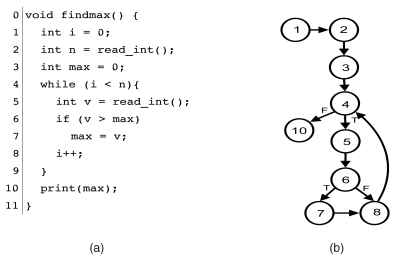
A program flow graph, or control-flow graph, is a form of path testing that visualizes a program using numbers that represent each executable line of code. This directed graph shows the order of which each code statement executes. For any conditions or loops, the graph demonstrates every possible outcome. This allows someone testing the program to locate precisely where an error in the code is held. It also makes it easier to understand the logic behind the loops and conditions in the program, as it allows you to see different results that would be executed depending on the set conditions. This also goes for loops, and you can see what part of the program that the code will loop.

This is an example of what a program flow graph would look like. The graph starts off at line 1 and continues down a straight path until 4. Line 4 is where the first condition in the program is located, and we can see that it either continues to line 5,6,7 and 8, or if the condition is not met, if goes to line 10. At line 8, the program loops back to line 4 to check the condition once again.

This is a simple example of program flow graphs. It is a very useful white-box testing method that is applicable when trying to track an error in a program. Compared to boundary value testing, which is a black-box testing method, path testing is a more detailed method to check for errors. Overall they are both useful techniques to have under your belt as a software developer, and understanding how each of these test methods work means growing as a computer scientist.

Useful Sources:

https://www.geeksforgeeks.org/path-testing-in-software-engineering/
https://www.guru99.com/basis-path-testing.html
https://ifs.host.cs.st-andrews.ac.uk/Books/SE9/Web/Testing/PathTest.html#:~:text=The%20objective%20of%20path%20testing,one%20or%20more%20new%20conditions.
https://www.geeksforgeeks.org/software-engineering-control-flow-graph-cfg/

From the blog CS@Worcester – CSBlogger by mjaber54 and used with permission of the author. All other rights reserved by the author.

Boundary Value and Equivalence Class Testing

When testing a software, it is important to consider what inputs will be used and how they will affect the outcome and usefulness of the test. There are several design techniques for determining input variables for test cases, but the two I will focus on in this post are boundary value and equivalence class.

Boundary value testing is designed to, as the name suggests, test the boundary values of a given variable. Specifically, this test design technique is intended to test the extreme minimum, center, and extreme maximum values of a variable, and it assumes that a single variable is faulty. In normal boundary value testing, the following values are selected for a given variable: the minimum possible value, the minimum possible value plus one, the median value, the maximum possible value minus one, and the maximum possible value. Normal testing only tests valid inputs. Robust boundary value testing, in addition to testing the values of normal testing, tests invalid values. This includes the minimum value minus one and the maximum value plus one.

Equivalence class testing divides the possible values of a variable into equivalence classes dependent on the output that value represents. Equivalence class testing can also be divided into robust and normal where robust testing includes invalid values and normal does not. In addition, equivalence class testing can also be weak or strong. Weak testing only tests one value from each partition and assumes that a single variable is at fault. Strong testing tests all possible combinations of equivalence classes and assumes that multiple variables are at fault.

Sources:
https://www.guru99.com/equivalence-partitioning-boundary-value-analysis.html
https://www.softwaretestingclass.com/boundary-value-analysis-and-equivalence-class-partitioning-with-simple-example/

From the blog CS@Worcester – Ciampa's Computer Science Blog by graceciampa and used with permission of the author. All other rights reserved by the author.