Blog #3: UML Diagrams Cont.

In a previous blog post, I did a little research on UML and ER diagrams, and tried to express how valuable I believe they are in the real world. Today, I plan to dig deeper into the specifics of these diagrams like their formatting and meanings (if one were to look at a finished diagram. There are many specifics for a great UML Class Diagram that help to make it even more useful than simply drawing it out to represent different programs or databases. The example I discussed in my previous post when I referenced this was how the difference between a plus or minus sign before variable names shows how the variable can be public or private (plus being public and minus being private). The next thing I would like to attempt to explain is the importance of how the lines between boxes on the diagram are drawn. Each is specific enough to show exactly what type of relationship is being made between the boxes using arrows, triangles, dashes, strikethroughs, and more. If there is a full line between two boxes then it is a relationship and having a triangle at one or more of the boxes demonstrates that that box or those boxes are providing many things to the relationship. If it has a strikethrough instead, then it is providing one thing (two strikethroughs means one and only one). The boxes can have one-to-one, one-to-many, and many-to-many relationships depending on how the line between them is drawn. These rules apply more toward ER diagrams, but there are many similarities to common UML diagrams. For UML diagrams, we often use open or closed arrows or diamonds at the end of our lines that help indicate the hierarchal relationship between the boxes. Using these symbols, along with changing whether the line is dashed or solid, we can demonstrate inheritance, association, and much more. So we already can see that the format of these diagrams can show more than just the basics, but let me continue to explain even more. Before I continue though, I would like to say that visual-paradigm.com is an extremely useful website that describes all of this even better than I can. I accessed it to help me research these diagrams for two different blog posts now, and I definitely recommend giving it a look. I will leave the link to it at the bottom of this post as usual. Anyways, I want to describe the formatting of the boxes themselves next. This is for UML Class diagrams more than it is for ER diagrams, but it could be applied to both. In general, each box will represent a class in some program (or a table in a SQL database), and they are often separated into three rows. The first row is the name of the class, the second row is for the variables, and the third row is for methods (or functions, operations, etc.). Each variable and method can be public or private as I already discussed, and the methods can include the parameters in the parentheses as well as the return type at the end of the line. There is much more that can be explained, but I would like to end this post by expressing that these diagrams can be made however seems most fit for us. If we do not need to know all of the details of methods and variables, we can simply make our diagram as straight forward as we want by just putting names for the boxes. This is for looking at the diagrams conceptually rather than getting stuck in the details of each class. If we want to show a lot of the class, but not all the nitty-gritty details, we can use the specification approach, which shows details of the classes, but not all. Lastly, if we want our diagram to include all parts of the classes, we can do that as well, and it is called implementation. These are all valuable methods and designs, and it is up to the user to decide what is the best for them.

https://www.visual-paradigm.com/guide/uml-unified-modeling-language/uml-class-diagram-tutorial/

From the blog CS@Worcester – Tim Drevitch CS Blog by timdrevitch and used with permission of the author. All other rights reserved by the author.
Blog #2: UML Diagrams

Fairly earlier in this semester we worked with Unified Modeling Language (UML) and Entity Relationship (ER) diagrams. These tools are both extremely useful in representing databases. I often find that the way these diagrams show databases without coding is similar to how pseudocode shows how a program or method works without explicitly coding. In this way, like pseudocode, these diagrams are perfect for putting together a project before actually programming it like brainstorming. For my final project this semester in a separate class, I had to make a database for an ice hockey program using SQL queries. Before I even started writing queries for that project, I started putting it together in an ER diagram without even thinking about it. This made the actual programming for that project ten times easier. For the purposes of this blog, I decided to dive deeper into studying UML and ER diagrams to try to learn even more about them. I found an awesome article about UML Class Diagrams at visual-paradigm.com that tried to be a tutorial on how they work. I will leave the link to it at the bottom. It backs up my claims that they diagram is used primarily for visualization of projects after, during, and most importantly before they are programmed. It also went over a ton of specifics and formatting for the diagrams that we went over in class this semester like the layout of the tables or boxes and the different arrows that showed relationships in the model database. It gets way more in depth than I plan on being in this blog post like when to use a plus sign instead of a minus sign for variables in the tables (for private and public variables). I definitely recommend checking it out yourself as it taught me a lot, not just now, but at the beginning of the semester itself. Similar to the situation with Docker for me, I found that it was supper awesome that I was able to see that learning these diagrams in class would prove useful in real life. When I used a diagram for my final project in my other class (which was not required), I knew that these were very important tools in the real world. For that reason, I am especially happy that it was one of the topics that we covered this semester.

https://www.visual-paradigm.com/guide/uml-unified-modeling-language/uml-class-diagram-tutorial/

From the blog CS@Worcester – Tim Drevitch CS Blog by timdrevitch and used with permission of the author. All other rights reserved by the author.

Software Architectural Patterns and Their Uses

Image for post

When working with larger projects, a unified system or pattern can be useful in keeping things organized and cohesive over time. Design patterns can be applied to general problems in software development, such as creating many similar objects with slight differences from a factory class which handles object creation within the program, or using decorators in a program to add specific attributes or behaviors on a per-object basis. But while these design patterns are helpful for solving singular problems, they often lack the scope necessary to layout and plan the entirety of a project or large program or application.

Architectural Patterns

I found an article written on the blogging platform Medium https://medium.com/@nethmihettiarachchi484/common-software-architectural-patterns-in-a-nutshell-7df312d3989c which briefly explained the concept of Architectural patterns, which refer to higher-level guidelines and decisions made regarding a piece of software as a whole, rather than one specific problem within the code. This was confusing at first, but as the article provided brief explanations (and examples) of various architectural patterns, I was able to grasp the concept more conclusively. Now I will go into detail regarding two patterns I found likely to be useful and the kinds of programs they would be most applicable to.

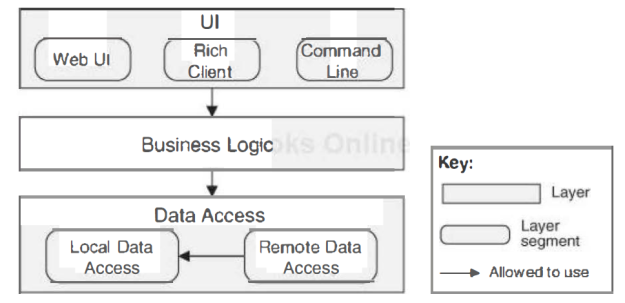
The Layered Pattern uses a system of layers to group together similar functionality for ease of access and organization. Layers can set access rules for other layers (layer C has access to layers A and B, layer C only has access to layer B). For example, imagine a solitaire program, one layer controls drawing and taking input for interface components (windows, buttons, score etc) while another layer could contain the logical rules of the game solitaire, mechanics and random distribution of the cards (things the user would never need to access directly). For applications where there are a lot of similar behaviors which could be easily grouped into layers, the layered pattern makes a lot of sense.

Additionally, the Multi-tier pattern also concerns layers, in this case, entire systems (complete features, ie: user-input for input related features, display for display features) are grouped into tiers. A tier is a grouping of elements within the program which are interrelated, and seem most often used in web-related capacities or in online applications with various segments to consider (web browser, web, front-end and back-end could be potential tiers). Since each component or feature can only be part of one tier, individual tier choices will need to be carefully considered. Another major drawback is the amount of setup that goes into the process of implementation, since each of the tiers needs to exist as a grouping before the components can be assigned. I think this pattern would be most useful for large projects spanning multiple languages and technologies in the real world (web-applications for example, with front-end, back-end, browser components).

While I only highlighted two of the patterns discussed in this blog post, I think that layered and multi-tier patterns will be most useful for small-medium (layered) and large projects (multi-tier) in general.

Site referenced: https://medium.com/@nethmihettiarachchi484/common-software-architectural-patterns-in-a-nutshell-7df312d3989c

From the blog CS@Worcester – CodeRoad by toomeymatt1515 and used with permission of the author. All other rights reserved by the author.

Rest APIs: Basics and Principles

 Next in my apparent series of explaining computer science topics so I am not completely lost in class is Rest APIs. In all seriousness we have been working with REST APIs as of late in class and I do actually find this blog to be an effective way of sitting down and grappling with these topics. Thus for this week I decided to do the same thing, being explaining exactly what REST API’s are. To do this I will be using a REST API tutorial website and blog post by a front-end developer. As I looked into these more however, I realized that this topic would be a bit too complex for one blog post. For this one I chose to focus on the REST principles.

   Let’s not waste any time here and get right to a definition, because I am starting to lose it a little with all of these different terms. REST is an,”…architectural style for distributed hypermedia systems,”, according to the REST API Tutorial website. To put that in terms that make more sense to a simple man such as myself REST, an acronym for representational state transfer, is a set of principles that are followed to make loosely coupled web applications. More specifically, these constraints are uniform interface, client-server, stateless, cacheable, layered system, and optionally code on demand. These principles will be the majority of this post. I honestly did try to squeeze them into one part of a blog post but it just is not an effective way of explaining them, nor is it fun. 

   Uniform interface is the idea of applying generality to a components interface through some interface constraints. Client-server is that, by separating interface and data storage problems, you improve the portability of a user interface across multiple platforms, and have more simplified server components. Stateless stands for the idea that each client-server request is self contained; each has all required information to understand the request. Cacheable means that, for any response, a client cache has the right to reuse the response data for other similar requests. Layered system means that each system component cannot interact beyond the layer containing other components it needs to interact with. Finally there is code on demand, which is an optional principle revolving around allowing clients to extend program functionality by downloading scripts to be run.

   Phew…let’s all just take a deep breath and a step back to figure out what the purpose of all of this is. These REST principles all revolve around making a simpler, more flexible program for your client and developers. Essentially these principles are more complicated, or just different, forms of design smells. Unfortunately I am running out of space for this post, but in the next I plan on diving even further into this topic, but I will leave my source below in case you want a more developed explanation.

Source:

https://restfulapi.net/

From the blog CS@Worcester – My Bizarre Coding Adventures by Michael Mendes and used with permission of the author. All other rights reserved by the author.

Front-End Design

For this next blog post I decided to finally sit down and learn exactly what front-end design entails. I know that it has to do with the parts of a program that your user is interacting with, but beyond this I have almost no knowledge. With a few projects on the horizon for me that will require some front-end work, I figured it was a great time to start learning. To begin I wanted to discuss a blog post by an experienced front-end developer, the first being Frontend Design by Brad Frost.

This blog post brings up some really interesting points about front-end developers that I had not really considered before. Before I begin I want to give an exact definition for front-end design. Essentially, front-end design is the practice of making HTML, CSS, or a JavaScript to produce an interface allowing your user to utilize a website or web application. So front-end design has much more to do with visual design than programming to an extent that surprised even myself. Brad Frost states it very clearly in his blog post, stating that a front-end developer will understand many general principles of app development, but do not necessarily focus on any in particular. For example you might understand a decent amount of JavaScript and some backend software, but cannot write application code nor engineer the backend software. As a front-end developer you are more of a jack of all trades and master of none. So front-end designers still work with programming, but these languages are different from more traditional ones.

Front-end designers do not necessarily need to be traditionally trained in programming to effectively do their job. This is because languages like HTML and CSS, while still certainly coding, do not involve some of the complexities of Java or Python. There is much more of a focus on making an attractive, effective design rather than ensuring you have optimized and debugged different facets of the design’s code. One issue that results in this, as stated in the blog, is that some just see front-end designers as capable of the same level of programming as dedicated developers which is not the case. The blog also mentions how developers and designers are often not kept together, creating a manufactured divide between the departments. This is a more general issue with some teams in the industry but, undoubtedly, adds to the confusion of exactly who does what. As I have now learned, front-end developers tend to have a general understanding of development principles, but focus on the UI design and usability.

Sources:

Frontend Design | Brad Frost

What Is a Front-End Developer? · Front-End Developer Handbook 2018 (frontendmasters.com)

From the blog CS@Worcester – My Bizarre Coding Adventures by Michael Mendes and used with permission of the author. All other rights reserved by the author.

REST API Design

This week on my CS Journey I want to focus on REST API Design. In my last blog, I talked about how an API request works and how to be able to read the API documentation and use it effectively. In this blog, I will be emphasizing briefly the key constraints to REST API design. There are six important constraints to the design. Which are: Client-Server, Stateless, Cache, Uniform Interface, Layered System, and Code on Demand. Together, these make up the theory of REST.


Starting with client-server constraint is the concept that the client and the server should be separate from each other and allowed to evolve individually and independently. In other words, a developer should be able to make changes to an application whether on the data structure or the database design side at the same time it is not impacting the client server side. Next REST APIs are stateless, meaning that calls can be made independently, and each call contains all the data necessary to complete itself successfully. The other Constrain is Cache, since a stateless API can increase requests and handles large loads of calls, a REST API should be designed to encourage the storage of cacheable data. That means that when data is cacheable, the response should indicate that the data can be stored up to a certain time. 


The next constrain is Uniform Interface, having a uniform interface that allows the client to talk to the server in a single language. This interface should provide standardized communication between the client and the server, such as using HTTP with resources to CRUD (Create, Read, Update, Delete). Also, another constrain is a layered system. As the name implies, a layered system is a system comprised of layers, with each layer having a specific functionality and responsibility. In REST API design, the same principle holds, with different layers of the architecture working together to build a hierarchy that helps create an Application. Also, A layered system helps systems to increase flexibility and longevity and it allows you to stop attacks within other layers, preventing them from getting to your actual server architecture. Finally, the least known of the six constraints is Code on Demand which allows for code to be transmitted via the API for use within the application. Together, these constraints make up a design that operates similarly to how we access pages in our browsers on the World Wide Web.


Overall, I learned the most important aspects of REST API Design. The blog was certainly helpful to understand the key constraints very well. I have only mentioned the main important parts of it. I highly recommend everyone taking a look at the source below. 

Source: https://www.mulesoft.com/resources/api/what-is-rest-api-design

From the blog Derin's CS Journey by and used with permission of the author. All other rights reserved by the author.

Blog #1: Docker Platform

A large topic that we covered this semester has been Docker. For that reason, I decided to do a bit of outside research on what it does well and how to use it as best as possible. Most of the helpful information that I found for this topic came directly from Docker’s website in the Docker Overview section. I will put the link to that at the end of this post. The website claims that Docker is used mainly for enabling the user to separate their applications from their infrastructure so software can be delivered quickly. This definitely holds true with what we have learned in class and with what we have used Docker for specifically during this semester. It is a free platform that thrives off of helping users develop, ship, and run applications. Its biggest strength is that is shortens the time it takes to go from writing code to running it in a production. Docker containers are indubitably important because they allow many developers to edit and program locally while being able to share their work with others. Containers, to put it simply, are runnable images. Images are templates that have instructions to help build containers and are read-only. A lot of work for docker actually is done in command prompt applications like Git Bash or Terminal. For this class, I used Terminal because I have a MacBook. At first, when using Docker in this class, it was very unclear to me how it all functioned or what the point of using it was. After some time, I began to realize the importance of it as it made connecting programs easy and quick for me. It has come to my attention that the Computer Science department at Worcester State is actually trying to create an entire database for the cafeteria workers with the help of undergraduate students. This was very exciting for me to hear for many reasons. I always am appreciative when I know that what I am learning in school has real life implications and uses, and this motivated me to want to learn it even more. Not to mention, it might be a specific platform that I will need to use in my Capstone for my last semester here before graduating. This blog post has been an extra excuse to take some time to research Docker even more than before and dive deeper into learning what it is for/why we use it rather than simply how to use it. This is not to say that I would not have done more research on Docker outside of class in general (especially with the Capstone next semester), but more to say that this blog is in some way motivating me to get the research done and helping me understand the platform even more by allowing me to discuss my findings. I definitely recommend anyone wondering about Docker to read the information I studied before this blog post by using the link I will put at the bottom. Coming from the Docker website itself, I believe it is a great reference to learn about the free platform and extremely helpful when trying to discover how it works and why we use it.

https://docs.docker.com/get-started/overview/

From the blog CS@Worcester – Tim Drevitch CS Blog by timdrevitch and used with permission of the author. All other rights reserved by the author.

Windows Vs Linux (Week 1 makeup)

 As many of us know there are two main Os systems one being the more commonly known as Windows operating system and the second most commonly known operating System is Mac OS. With the two giants out of the way, there is still one more OS that is overlooked by many to this day.  Most may know this particular OS as Linux. Linux is an open-source  Operating system that is derived from the Unix platform that is also most commonly found in MAC operating systems. Many of you might be wondering what open source means, and it is quite simple to open source stands for a system where anyone can be a developer for it and can make their own or appropriate changes to the program in order to help or straighten the operating system. While windows as many might know by is a licensed operating system where in order to install the operating system you must buy the rights in order to download and have it on your system if not already installed.  When it comes to Windows it is very straightforward and simple to use rather than Linux where it will take you a little reverse engineering in order to fully understand and grasp the full potential. When it comes to both of these operating systems they both offer pros and cons. Some of Linux’s pros we will start off, first and for most Linux is a free open-source OS. Linux uses a more traditional monolithic Kernel. A monolithic Kernel is considered to be modular in its design where it allows most of its drivers to be able to dynamically load and unload when running. One of the cons with the Linux system though is that it is still considered and regarded as a bare-bone operating system with little to no features and has barely any updates throughout the years. Know when it comes to actually see the usage comparing between Linux and Windows there is no comparison between the two for the fact that windows will beat Linux tenfold especially since every prebuilt laptop or computer you buy from the store other than MAC will be running Windows at any price point.  As well when it comes to windows you will usually see multiple kinds of users ranging from businesses, developers, and kids. As well something to consider with windows which could be a double-edged sword and this would be for the fact that windows are a closed sources system that usually has an issue running open-source networks. With that being said it still is possible when downloading third-party apps or software that are add ons to the Windows OS which can turn your once known windows machine into a Linux machine to run open-source software. Which allows Windows to be versatile in many ways.  

From the blog Nicholas Dudo by and used with permission of the author. All other rights reserved by the author.

Tools Of the Trade for Big Data Analyst (Nov 27th)

 When it comes to Big Data we must use a specific set of tools in order to complete the job properly. most of the tools of the trade are software and hardware. One of the biggest software tools to use while trying to analyze data is Tableau. Tableau is the best at visualizing data. Tableau allows us to explore without having the interruption of the flow of data when analyzing.  Another benefit of using Tableau for any data analyst is the ability of Tableau using AI which will allow a faster and predicts outcomes much faster using CRM. CRM which is a branch of Tableau allows many sales associates to make the correct decision which allows us to work more efficiently. With this efficiency, we can ten to spot trends faster, predict outcomes. The AI feature usually allows us to have the guidance we desperately need so we do not make any mistakes because as humans we are not perfect and can make mistakes and dumb ones at that. In my research, I decided to go down the rabbit hole of information for Tableau CRM it allows many data scientists to unify platforms, focus on outcomes, automate discovery, unify multiple platforms into one and build a different database with just a simple push of a button. Like many different software programs, they all have their pros and cons. A similar software program is SAS visual analytics. This kind of software is most helpful with and sharing and analyzing data as well as presenting the data in clean and formal nature. The main function of this specific software is to allow companies in need of powerful software that will be to tie pieces of data together to have them in one file in order to showcase at a large event. In many ways, I would consider this software to be like Microsoft excel and word in one program where you are able to show different analyses in one meeting to make sure different departments understand how they all work together as a set of gears. With that being said there are multiple pros and cons to SAS one of them being it allows us to have a large number of users under one simulation. in the sense we could have multiple presentations all linked into one where SAS will take the data that you have selected and put it under one easy to read module instead of having to sift through many different simulations.  The second pro about SAS is it allows you to have a customizable portfolio that splits up the business into different aspects so you’re allowed to divide a business. For example, we can take a car dealership where we allow to have sales, parts, and service department. So in retrospect, we need to see how much this car dealership makes in revenue. And in order to calculate that we need to divide it into sections while when showing the Ceo or sales team we need software that merges everything into one which is where SAS comes into play. 

From the blog Nicholas Dudo by and used with permission of the author. All other rights reserved by the author.

Agile Methodologies

I learned about agile methodologies in one of my classes in Worcester State. At first I was confused and didn’t make sense to me but then after I read some more and started practicing with my classmates I saw the benefits of it. As Alistair Cockburn says: “Process and technology are a second-order effect on the outcome of a project. The first-order effect is the people.”

We cannot manage teams of programmers as if they were systems made up of components driven by a process. To use Alistair Cockburn’s phrase, people are not “plug-replaceable programming units.” If our projects are to succeed, we are going to have to build collaborative and self-organizing teams.

Those companies that encourage the formation of such teams will have a huge competitive advantage over those that hold the view that a software development organization is nothing more than a pile of twisty little people all alike. A gelled software team is the most powerful software development force there is.

Over the past 25 to 30 years agile innovation methods have greatly increased success rates in software development, improved quality and speed to market, and boosted the motivation and productivity of IT teams. From what I remember from my class is that we always played roles to feel that real work environment.

An agile software development process always starts by defining the users and documenting a vision statement on a scope of problems, opportunities, and values to be addressed. The product owner captures this vision and works with a multidisciplinary team (or teams) to deliver on this vision. Here are the roles in that process.

User

Agile processes always begin with the user or customer in mind. 

Product owner

The agile development process itself begins with someone who is required to be the voice of the customer, including any internal stakeholders. That person distills all the insights, ideas, and feedback to create a product vision.

Software development team

In agile, the development team and its members’ responsibilities differ from those in traditional software development.

There are different agile methodologies but I would say my favorite is scrum. It focuses on a delivery cadence called a sprint and meeting structures that include the following:

Planning — where sprint priorities are identified

Commitment — where the team reviews a list or backlog of user stories and decides how much work can be done in the sprint’s duration 

Daily standup meetings — so teams can communicate updates on their development status and strategies)

I learned a lot about methodologies online though a web that our professor enabled for us. Unfortunately I don’t remember the name but if you go online and search there are a lot of good websites who will give you a good explanation of how it works. One of webs that I like to read about it is the infowrold https://www.infoworld.com/article/3237508/what-is-agile-methodology-modern-software-development-explained.html?page=2 that gives you a good explanation on how these methodologies works.

From the blog CS@Worcester – Tech, Guaranteed by mshkurti and used with permission of the author. All other rights reserved by the author.