Sprint Retrospective 1

Completed tasks

I was worried about how well my team would work together at the start of the sprint. We are all rather quiet and I feared that would impact our project. Even Professor Wurst expressed some concern. While I feel our communication could use improvement, I think we did a fine job completing what we planned to do in this sprint.

We divided the sprint tasks amongst us and mostly worked on our tasks independently. All work that was completed was shared so that others could study and review the tasks they did not work on. While this worked for our first sprint, I am hesitant to repeat this method as I believe it can lead to confusion in the group. For our next sprint, I think we should try and assign tasks to multiple people so we can emphasize that the responsibility for the tasks fall on the entire group.

I feel we did a great job of sharing our work and resources. Most of our decisions are public on gitlab so that it is clear why we did what we did.

My primary focuses this sprint were learning how to set up a mongo database and how create a REST API for it. One thing I think I could improve on is the frequency of my updates. I generally completed a task before making my work public. It may be beneficial to update more often. Something I would like more from my team is feedback. While my work was reviewed, I have not felt like I have received any real criticism, constructive or otherwise.

By the end of this sprint, we had a good skeletal structure of the update module. We implemented test versions of the technologies we would use in our full stack application and completed a small MEAN stack, a full stack app using MongoDB, Express.js, Angular.js, Node.js. With what we completed in this sprint, I believe the coming sprint will be clearer in scope and better planned.

From the blog CS@Worcester – D’s Comp Sci Blog by dlivengood and used with permission of the author. All other rights reserved by the author.

Developing for LFP Again: First Sprint Retrospective

For over the past month I have been working as a member of the UpdateGuest team as part of developing for the LibreFoodPantry community. This blog post is a retrospective for the first sprint our team had. During this first sprint our team focused on setting up the UpdateGuest service and beginning the research into the tools we want to use to implement this service.

The issues that I was assigned to work on for this first sprint mostly focused on figuring out what we needed from other teams for the UpdateGuest service to function and what information the UpdateGuest service needs to store and to provide for other services under the VisitModule.

Specifically looking at the work I did this sprint:

The first issue I worked on was determining what data fields UpdateGuest would store, this was relatively simple and we decided that our service would mostly be using the fields the RegisterGuest team was storing since our service pulls guest data from theirs.

The second issue I worked on was a quick one creating a .gitignore file for one of our projects.

The third issue I worked on was determining the endpoints UpdateGuest needed from RegisterGuest to be able to get data from their service, this was solved quickly as the RegisterGuest team posted an issue where they listed all of the endpoints their service would have and this was all we needed.

The last issue I solved was what endpoints UpdateGuest needed to create for other services to use (along with our own), this became a discussion on many things, mostly with our team and the RegisterGuest team, to coordinate the endpoints and data they needed from us and how to format the endpoints and the data we are sending back and forth, but also how our service functions in general.

Finally, I helped to discuss and merge the creation of the Angular app for the UpdateGuestWebUI project.

I think that during this first sprint that our team did well. We successfully completed nearly all of the issues that we initially proposed to work on at the beginning of the sprint and even managed to create a couple of new ones and pull some additional issues from the backlog that were completed. Our pacing and completion of issues was mostly on track with the weighting system we used when creating the issues during sprint planning, although this might need some refining. We had good meetings in class where we all talked about what we were working on and we resolved any issues or questions that were ongoing with our work. We also used GitLab effectively to coordinate all of this work and document the different discussions and work as it was ongoing throughout the sprint.

I think that some things could be improved. I think that we could all try talking and communicating a bit more both in-class during our sprint meetings and outside of class either on issues on GitLab or on Discord. From Dr. Wurst’s suggestion I think we should establish some working policies for the rest of the semester’s sprints, especially about communication, but also when work should be done on the project. I think this is necessary so that others have time to contribute and interact on other group member’s issues and work before class meetings, so we are better prepared to discuss them in-class. I think specifically we need to define a team policy of replying to comments on GitLab or Discord when someone directly mentions an individual or the whole team asking for input that helps to solve or facilitate an issue.

Individually I think that I need to improve on my own communication skills and in helping facilitating team meetings in-class. Most importantly, I think that I need to get better at letting others talk and understanding the points they are making, especially if their opinions or solutions differ from my own, before I comment on them. Additionally, I think I need to get better at articulating my explanations of solutions and trying to not sound condescending while doing this. I also think that I could improve on my response time when directly mentioned on GitLab on issues.

Overall, I am excited to be working on a LibreFoodPantry project again and look forward to the remaining sprints as we continue developing our services this semester.

From the blog CS@Worcester – Chris' Computer Science Blog by cradkowski and used with permission of the author. All other rights reserved by the author.

Retrospective #1

Now that Sprint 1 has come to an end, it is time for the retrospective blog. I will start by including everything I contributed to this sprint:

This link is a note in an issue where I have put a document discussing the Pros and Cons of whether we should be using a relational database or not. I put some examples of relational databases and non-relational databases for when I was making a decision along with links explaining a few of them.

This link is another comment on GitLab basically stating that we are using mySQL because of the simplicity and it is easy to look up information on it if needed.

This is the repository for our database currently, it is currently on a separate branch and not merged with the master due to a sudden change in database fields which will be implemented first thing in the next sprint.

This is another repository that holds the results of completing the Tour of Heroes Angular tutorial. This was the last thing completed for the current sprint to give me a refresher on Angular as I haven’t worked with Angular in a little over a year.

This was our first sprint so everything obviously wasn’t going to be perfect. However, I believe that we used GitLab very well considering this is my first time actually collaborating on a big project using GitLab. I think that we created issues that were specific enough to be considered issues. We utilized the boards well too. Our communication was mainly done through class and text message, but overall, I still think we communicated every issue that needed to be communicated.

Of course there were things that didn’t work well either considering it was the first sprint and this is most of our first experiences with Agile and sprints. While I mentioned that our GitLab use was very good. There were some faults with it as well. For example, my desktop didn’t let me push to GitLab which is an issue that still needs to be resolved. I specifically had trouble working with the separate branches because it was confusing at first. Our issues weren’t created the right way at first, and had to be restarted even though there were ways to just edit them without restarting. We had good communication, but I felt as though I wasn’t as involved as I should have been with the other team members work. I also think that there wasn’t enough communication between the other groups in the class as a whole.

Some of the changes that can be made as a team is more involvement in each others work. I think that we can all spend more class time looking at each others work rather than looking at it on our own time because this allows for more discussion. I also think that our team could start communicating with other teams more. Most of the teams came to us rather than us going over to the other teams to collaborate.

My individual changes that I need to make is talking more to my team members about what they have been working on rather than focusing on my own work. I could offer more solutions to the front end team about design. Probably my biggest issue would be my procrastination. I have to start working on my assignments earlier because that has an effect on how the rest of my team performs. I think that this next sprint will be much better now that we have been exposed to this more.

From the blog CS@Worcester – My Life in Comp Sci by Tyler Rego and used with permission of the author. All other rights reserved by the author.

Sprint 1 Retrospective

I think that the first sprint went well overall. My teammates and I completed all of the issues we assigned ourselves during the planning meeting, so the sprint was definitely a success. We accomplished this thanks to our effective use of the GitLab issue board. For the most part, our issues were clearly defined by their titles and labels, which helped us understand what needed to be done. Additionally, we assigned different team members to different issues, which made it easy to track our own issues and the progress of each other. The issue board also helped guide our in-class discussions, as the column-based structure allowed us to quickly select doing issues to discuss their progress and evaluate the needs review issues as a group before moving them to done. Finally, the board gave us a platform for discussion outside of class with each other and with other teams. We successfully used this to clarify what we needed from other teams and to answer questions among ourselves.

I think the main issue among the team during this sprint was communication. We did not always keep each other informed about our individual tasks, which sometimes made it difficult to resolve problems. During our class sessions, discussions frequently came to a stop after we reviewed our issues, leading us to silently work separately instead of collaborating. One major hinderance to our progress was an issue with our .gitignore file in the UpdateGuestWebUI repository. We had a branch where a mock Angular app was created, which had commits made before we finalized the .gitignore on the master branch. This caused unnecessary files to be committed, and we spent multiple weeks trying to find a way to remove them. We eventually found a simple solution that involved removing and recommitting every file after updating the .gitingore. It really shouldn’t have taken us that long to find such a simple solution, and I think we could have solved the problem quickly if we all worked together on it rather than focusing on our assigned issues independently.

I think there are several changes that can be made for future sprints, both for me individually and for the team as a whole. For myself, I think I could leave more comments on issues. I often made progress on my assigned issues or wanted to ask questions to my teammates, but I decided to wait until our class meetings to inform them about my progress and ask them my questions. Not only did this result in several of my contributions being undocumented on GitLab, but I also felt that it slowed the pace at which I could work. I also think that I need to work on communicating with the team in class more. During our meetings, I need to try listening better and making more contributions during discussions so that I can keep myself informed about the team’s progress and help my teammates resolve their problems more efficiently.

For the team as a whole, I think we can make some improvements to our usage of the GitLab issue board. I think we used it effectively overall, but there were some problems that caused confusion, such as an issue getting duplicated. We also exclusively used template descriptions for our issues, which sometimes made it unclear what we planned to do. I think we could better coordinate how we create and label our issues to avoid such confusion in the future. Additionally, I think the team could make improvements to communication. Instead of simply sitting in silence during class, we could explain to each other what we are working on in order to keep each other informed. Also, asking questions about issues and listening closely to comments from each other would undoubtedly help us avoid drawing problems out for too long. While this sprint was certainly an overall success, making these changes would help us work more efficiently and ultimately complete more of the project.

Links to My GitLab Contributions:

These are issues I was assigned to, where I made comments detailing my progress.

These are issues where I replied to comments from a teammate, acknowledging that their progress would help me with my assigned issues.

These are issues I opened, assigned weights and labels, and edited the descriptions of.

These are issues I moved across the board.

This is the duplicate issue that I closed.

This is the UpdateGuestWebUI repository I created and worked in. Note that the branch where I added the .gitignore and the Angular Mock branch where I resolved the .gitignore issue have since been merged into master.

From the blog CS@Worcester – Computer Science with Kyle Q by kylequad and used with permission of the author. All other rights reserved by the author.

Creating Chords from Sine Waves in Python

This week as part of my independent study I worked on feature extraction in Python. I have been using Python for Engineers as a reference, and it describes basic digital signal processing. As an exercise, I expanded on the code found in that chapter.

It’s a non-trivial task to create a sine wave in code (although compared to the most complex aspects of DSP, it’s a cakewalk). A sine wave will create the purest tone possible, as it creates a constant oscillation. This oscillation is what you perceive as a pitch. The equation for a sine wave is given as:

y(t) = A sin(2πft + φ)

where A is amplitude, f is the frequency, t is time, and φ is the phase in radians. We can ignore phase because this simply indicates where the wave starts at t=0, and this doesn’t matter to our ear. We hear the same oscillation regardless of where it starts.

Take a look a the code for creating a sine wave. Some of the details aren’t as important, but you can see the book for a description. The line that actually creates the sine wave values is:

sine_wave = [np.sin(2 * np.pi * frequency * x/sampling_rate) for x in range(num_samples)]

If you aren’t familiar with list comprehension in Python, this is just using the sine wave equation above, substituting time, t, as a specified number of samples divided by the sampling rate. The result is a list of values representing a sine wave. In reality, this is all an audio file is, with some additional encoding (and usually more interesting oscillations than a sine wave).

So what if we wanted to do this for a chord of multiple sine waves? Maybe using more list comprehension? Sure.

# Note Frequencies
a4 = 440
c5 = 523.25
e5 = 659.25
chord = [a4, c5, e5]

sine_waves = [[np.sin(2 * np.pi * freq * x/sampling_rate) for x in range(num_samples)] for freq in chord]

This is doing the same as above, only it’s doing it for each frequency in a list of frequencies. But that’s the easy part. The original code just multiplies the samples by the amplitude, then converts them to hexadecimal values and writes it to the file:

for s in sine_wave:
    wav_file.writeframes(struct.pack('h', int(s*amplitude)))

But we can’t simply do that for each sine wave in succession, or we’d get different sine waves playing one after another. That’s an arpeggio, not a chord!

So we have to get a little creative. But not too creative. If you think of each sine wave playing from a separate speaker, what you hear is the sum of the air pressure from each speaker. A single speaker is the same story: it’s just playing the sum of the three sine waves. So then, iterating through each index, we can add the amplitudes of each individual sine wave. I also had to reduce it enough to store the value as a short int, by dividing by two.

# Only write samples to the end of the shortest sine wave
shortest_sample_len = min([len(j) for j in sine_waves]) 
for i in range(shortest_sample_len): 
    current_frequencies = [wave[i] for wave in sine_waves]
    value = sum(current_frequencies) / 2
    wav_file.writeframes(struct.pack('h', int(value*amplitude)))
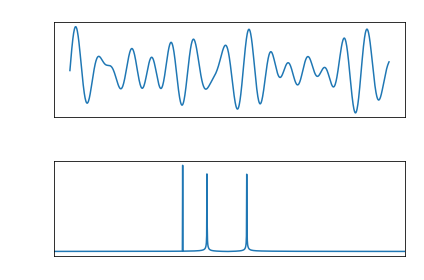
Output of the sums of the sin waves before multiplying by amplitude

Python for Engineers goes on to describe how to use a Fast Fourier Transform to get the frequencies from the wave file with a single sine wave. But the code works just as well for the sine wave chord! This is because the FFT is an array that treats each index as a frequency, and the value at that index is the frequency’s amplitude. This means that regardless of the number of tones in a sample, the FFT can be plotted and will reveal outliers: those indices with a much higher amplitude. These are the frequencies in the audio file.

One last thing to keep in mind is that since the indices are used to represent the frequencies, they will be whole numbers. For example, c5 = 523.25hz will show up as a spike at indices 523 and 524, which 523 having the larger value of the two.

Output of finding the frequencies of the chord created above

Full code for creating a chord in Python is posted here.

From the blog CS@Worcester – Inquiries and Queries by James Young and used with permission of the author. All other rights reserved by the author.

Sweep the Floor

In the craft tradition, newcomers start as apprentices to a master craftsman. They start by contributing to the simpler tasks, and as they learn and become more skilled, they slowly graduate to larger, more complex tasks.

—Pete McBreen

Sweep the floor pattern shows that an apprentice can work very closely with experienced professional people of any industry, but they cannot be equal with them since the first day they start working on the company. First contributions to the company by an apprentice are usually small and simple tasks, because the team you are part of, doesn’t know where you fit better, nor do you. As bad as this may sound, “sweeping the floor” is a very good start, because you show to your superiors that you can do small things with high quality, and in the future, you can do greater things with the same quality.

What got my attention is Paul’s experience in a software company. He was aware that he couldn’t write code at a certain time, so he accepted to contribute to the company differently, by even sweeping the floor for real. He was only 17 when he first started, but slowly he started doing more technical assignments, like updating the content of the website or working on the backup. These tasks helped him a lot to gain the trust of the team. Since he was able to do the small tasks right, later Paul would be the same passionate person to do something huge in the company. But let’s not forget that it doesn’t matter how small or big your assignment is if you do something with passion and get the best out of it. As it says on the pattern: If no one sweeps the floor, then the glamorous work can’t be done because the team is hip-deep in the dirt. Every role is important, and no one should be ashamed of their job!

In my opinion, being an apprentice is very useful after you graduate. Courses you have taken during college, will not be everything you will need when you become an apprentice. Being able to start from the dirt, will help you understand step by step how things work in the company. Not everybody is ready to start from the dirt though, especially people who have some experience in the field. However, depending on your commitment to learning everything, in the future, you might be able to do great things on your own. As a conclusion, take the opportunity to Sweep the Floor, and make sure you prove to yourself and to the team that you’re worth doing something greater every day. 

From the blog CS@Worcester – Gloris's Blog by Gloris Pina and used with permission of the author. All other rights reserved by the author.

Practice, Practice, Practice: No, not that Dave Thomas

While this pattern is excellent advice, as the title suggests, I could not help but get distracted by the quotes and advice offered by Dave Thomas. Of course, it was nothing substantive that he was saying just that I could not get the Wendy’s founder, also Dave Thomas, out of my head. As for the actual substance of this particular section, it falls into the category of things I am trying to do more consistently in my academic life. Despite being kind of nerdy romanticized, and potentially misapplied, karate jargon; it is effective enough in conveying the idea of lessons, or more accurately patterns, that should be practiced often. Obviously, the linchpin of these lessons is that they are done in private where you can fail gracefully, a common concept in many of these patterns.

Regarding how I apply these patterns, I use a site called codewars where these exercises are also called kata but are done in a web IDE and can be checked for functionality within seconds. As well, all the solutions done by users can be searched, so one can “compare notes” with other users and see what, often insanely truncated, solutions others reached. This fulfills the dojo aspect of these coding exercises as well. If ever you were looking to apply a pattern most directly, this is it – and I hope other students will use this resource. While I don’t believe the site allows users to create their own kata like the pattern says, they do have a suggestion section in the forums. After long hours of honing your skills you could dream something up to really test yourself and others.

This pattern is related to a favorite of mind, Breakable Toys; and not unreasonably so, many of these exercise are incredibly difficult and I have found myself dropping them into my own IDE to finish off at my own pace apart from the web IDE. As mentioned previously, the school and work schedule I maintain makes it a little difficult to keep up with these exercises, or completely them consistently enough. However, I believe that have read this pattern, being set to graduate, and barreling towards my graduation and subsequent career, I do not want to neglect any practice I can get.

From the blog CS@Worcester – Press Here for Worms by wurmpress and used with permission of the author. All other rights reserved by the author.

Be The Worst

I love this apprenticeship pattern. It immediately caught my attention, and although I knew exactly what it was getting at by reading the title, it’s a great reminder.

We’ve probably all heard the phrase “if you’re the smartest person in the room, you’re in the wrong room”. That’s what this pattern is describing. As the worst on a team, you will have an occasion to rise to, riding on the coattails of your teammates and becoming better for it. This means harder work. It requires the ability to apply many other patterns described in the book to succeed efficiently.

The above quote is a bit harsh, though, and isn’t mentioned in the book. It’s not that one should be openly criticizing their coworkers or consider themselves the smartest person in the room, despite every programmer’s periodic God complex. Besides, it’s difficult to ascertain who exactly is the smartest, or best developer, or best employee. There are many metrics and a team is full of people with different strengths and weaknesses. The individuals are less important than the group: this pattern is probably best implemented by looking at teams as a whole. Are your skills lower than those of the group as a whole? This could be caused by a lot of great developers not working well together. This, too, will slow your progress down. This, too, is a reason to change.

I have mixed feelings about this sentiment. It’s patently true that working with people significantly above your skill level will help you improve if you’re willing to put the work in. But it would be a real shame to leave a close, efficient team just because you’re no longer worse than all of them.

But that is an important part of growth: knowing when to move on. Finally ending my college career makes me consider all the things I could have done, or could do if I finished a second concentration or major. Or what I missed for general education credits, extra curricular activities, and social experiences by cramming the entire degree into three years and not taking my time to enjoy it. It’s nearing the time to move on, though. Despite a connection to classmates and professors, it would not be wise to stay longer. This doesn’t mean professional or academic relationships have to end, but the majority of my time will soon be spent improving in my chosen career, with new challenges, on a new team.

From the blog CS@Worcester – Inquiries and Queries by James Young and used with permission of the author. All other rights reserved by the author.

Breakable Toys

This week I decided to write about the Breakable Toys pattern because the last pattern that I wrote about mentioned this pattern, and it was in the See Also section of the last pattern as well. From the title, I have gathered that this pattern is about just random coding projects that have no consequences and the programmer can just experiment with the code and try out new things.

After reading the Context section i discovered that this pattern involves failure and learning from those failures in order to become a better developer. The problem of this pattern basically says that you work in a field that doesn’t allow for failure, but your individual growth depends on failure. This makes sense because there isn’t a lot of room for mistakes in a real work environment because mistakes can lead to much bigger issues.

The solution to this problem is as I mentioned earlier with slight differences. Rather than coding just random projects, you should code projects that “are similar in toolset” (Oshineye, Hoover). The authors recommend using Wikis as your breakable toy. They say this because of their simplicity. They also mention that they can be great for learning HTTP and REST which I thought was interesting because our Capstone involves both HTTP and REST, so maybe I should start working on a wiki on the side. Another breakable toy idea that they suggested that one of their ex-colleagues used is creating games. This is a cool tool because it is a fun way to learn how to code because at the end you are given a product that you can play with way after the fact. Realistically, you could just look up Tetris on the internet, but it is much cooler if you are playing something of your own creation. Lastly, they mention how this pattern is similar to Be The Worst which is actually what I plan on writing about for my next blog.

The Action section basically just tells the programmer to create a very simple wiki, and add features into it as you continue with your career. I like this method because there are no repercussions if you mess up and you can learn from these mistakes. I think that I will actually use this pattern in the future, and my internship has kind of done this for me too. The projects that are assigned to me are projects that they use in their day to day life, but I have freedom to make mistakes and learn from them.

From the blog CS@Worcester – My Life in Comp Sci by Tyler Rego and used with permission of the author. All other rights reserved by the author.

Apprenticeship Patterns: Learn How You Fail

Failure is an acceptance of what you are capably of. Not in a means of saying that you can not but in terms of stating that being aware of what you are missing. This prevents the boundaries that you are creating, such as giving up for being stuck at only one thing that you already know.

Failures are a big part in order to be successful. I have experienced it many time when learning my first programming language. I even decided to change my major to Business. 

At first it seemed really interesting and i was curious to learn more about how functions, objects and data works n java. I practiced and started ding the same problems again and agin until i had an idea of what the code was doing. But when I had a similar problem but it it was conned in different way I was lost. I ended up belly passing.

I then met one of my class mates, she was a minor and had better experienced then me in programming. She was really good at explaining. She taught me an easy was to adopt new skills. She told me which text editor to use, how to consume your time,being tim efficient, and which programming language is easier to understand.

“Ingenuity is often misunderstood. It is not a matter of superior intelligence but of character. It demands more than anything a willingness to recognize failure, to not paper over the cracks, and to change. It arises from deliberate, even obsessive, reflection on failure and a constant searching for new solutions.”


Atul Gawande, Better.

I applied those skill. I was still failing but was making progress, i was understanding what Mistakes I was doing. I was only missing out minor mistakes or I was sometimes rushing. But pointing out my mistakes I was ale to prevent myself to stop giving up on programming, 

Now as a senior I am not afraid to take th risk. I take failed as a new learning experience wirer I am able to apply my understanding in much more effiecnt way.

That is what the author is trying to tell. Many people see fair as a negative condition. However, It is a part of being successful. 

From the blog CS@Worcester – Tech a Talk -Arisha Khan by ajahan22 and used with permission of the author. All other rights reserved by the author.