Fakes, Mocks, and Stubs in Unit Testing

In the blog post Test Doubles — Fakes, Mocks and Stubs., Michał Lipski describes and implements three different types of test doubles: fake, stub, and mock, and the situations in which you would need to use them in your unit testing. He also provides useful examples for each of the three terms.

Here’s a useful image found in his blog that helps to understand the differences between the three:

Fake – object that has a working implementation, but not the same implementation as the ones in production. Usually they take some shortcuts are are simplified versions of the production code. This is useful because you’re able to do integration test of services without starting up a database or performing time consuming requests.

Stub – object that holds predefined data and uses it to answer calls during tests. This is useful when we can’t or don’t want to involve objects that would answer with real data or have undesirable side effects.

Mock – object that registers calls as they are received. This is useful when we don’t want to invoke production code or when there is no easy way to verify that the intended code was executed.

The reason I chose this blog post in particular is because the first time I was exposed to stub functions was earlier in my internship while working on unit tests, and at the time I didn’t have a great understanding of what their purpose was. I was recently reminded of them last week during lecture, so I decided that it’d be a useful topic to read about. At the time I wasn’t aware that there were different types of test doubles, so I found that the examples found in Lipski’s blog are really helpful in understanding the key differences between them, as they share many similarities and are likely to get mixed up. According to Lipski, misunderstanding and mixing test doubles implementations may influence test design and increase fragility of tests, standing in our way to seamless refactoring. So I think that this blog may be a useful resource if you were trying to write clean unit tests.

Source: Test Doubles — Fakes, Mocks and Stubs.

From the blog CS@Worcester – Andy Pham by apham1 and used with permission of the author. All other rights reserved by the author.
Defending against Spectre and Meltdown attacks

http://news.mit.edu/2018/mit-csail-dawg-better-security-against-spectre-meltdown-attacks-1018

In January the security vulnerabilities Meltdown and Spectre were discovered. These vulnerabilities were born not from the usually way of software or physical CPU problems but from the architecture of the CPU itself. This means that large amounts of people, buisnessess and more were vulnerable.  With this new method of defense it is much harder for hackers to get away with such attacks. This method of defense may also have an immediate impact on fields like medicine and finance who limit their use of cloud computing due to security concerns. With Meltdown and Spectre, the attackers took advantage of the fact that operations can take different times to compute. For example, someone trying to brute force a password will look at how long it takes for a wrong password to compute and then compare it to another entry and see if it takes longer. If it does then something in the entry that took longer will have a correct number or letter. The normal defense to this attack is Cache Allocation Technology (CAT), which splits up memory so that it is not stored all in one area. Unfortunately this method is still quite insecure because things are still visible to all partitions. This new approach is a form of secure way partitioning called Dynamically Allocated Way Guard (DAWG). Since it is dynamic it can split the cache and then change the size of those different pieces over time. DAWG is able to fully isolate one program from another through the cache and still has comparable performace to CAT. It is able to establish clear boundaries for programs so that when sharing should not happen it does not, this is helpful for programs with sensitive information.

The article mentions that these microarchitectural attaks are becoming more common because other methods of attack have become more difficult. I thought that was interesting because it seems like a relatively new method and a new security risk that has not had time to receive development for security. This is an issue that can effect anyone and is a serious problem. On top of that, performance is a big concern with this security since is deals directly with the CPU and its architecture which is not an easy fix. The article also points out that because of these attacks, more information sharing between applications is not always a good thing. I find this pretty interesting since a large number of different applications made by the same company now have information sharing capabilities such as the microsoft umbrella of software. Sharing information between things can actually put you at more of a risk than it is worth saving time by sharing things.

From the blog CS-443 – Timothy Montague Blog by Timothy Montague and used with permission of the author. All other rights reserved by the author.

Test Scenario vs Test Case

https://reqtest.com/testing-blog/test-scenario-test-case/

This blog post compares two important aspects of software testing: test scenarios and test cases. A test scenario is a high-level documentation of a use case. It is used to make sure that the end-to-end functioning of the software is working correctly. With this type of testing, clients, stakeholders, and developers help the testers create scenarios that ensure the software works as intended. Test scenarios look at software from the point of view of the user to determine real world scenarios and use cases. Some important reasons to use test scenarios are:

  • They help validate that software is working correctly for each use case
  • They help determine the real-world use of the software
  • They help find discrepancies and improve the user experience
  • They save time, money, and effort
  • They are vital in evaluating the end-to-end functionality of the software
  • They help build better test cases because the test cases are derived from the scenarios

A test case is a set of conditions that help determine whether the software being tested satisfies requirements and works correctly. It is a single executable test that contains step-by-step instructions to verify that software functions the way it’s supposed to. A test case is used to validate a test scenario. Normally, a test scenario contains multiple test cases which contain information on how to test the scenario. This information includes prerequisites, inputs, preconditions, expected results, and post-conditions. Test scenarios are extracted from user stories and test cases are extracted from scenarios.

Both test scenarios and test cases should be used to ensure a high test coverage. As agile practices become more common, test scenarios are being used more and more.

I thought that the content of this blog was interesting and useful. I learned the difference between test scenarios and test cases and why both of them are used. Since agile development environments are becoming so common it is very useful to understand what test scenarios are. It was interesting to learn how test scenarios and test cases are related because I had no idea what differentiated them before I read this post. Overall this was an informative article that I enjoyed reading.

From the blog CS@Worcester – Computer Science Blog by rydercsblog and used with permission of the author. All other rights reserved by the author.

The Process of Designing a Product

This week I read a post of Joel Spolsky, the CEO of Stack Overflow. This post talks about an approach of designing a software product that is “Activity Based Planning.” The main idea of this method is to figure out the activity that the user is doing and focus on making it easy to accomplish that activity. Some examples will show how to apply this approach in designing a product. First example, you’ve decided to make a web site that lets people create greeting cards. Using a somewhat naïve approach, you might come up with a list of features like this: Add text to card, Add picture to card, Get predesigned card from library, Send card (Using email or printing it out). This way of thinking would lead to a program that starts out with a blank card, with menu items for adding text, pictures, loading cards from a library, and sending cards. And then what the user is going to have to do is sit down and browse through the menus, trying to figure out all the commands available, and then do their own synthesis of how to put these atomic commands together to create a card. Now, with an approach of activity based planning, you need to come up with a list of activities that users might do. So, you talk to your potential users, and you come up with this “top three” list: Birthday Greeting, Party Invitation, and Anniversary Greeting. Now, instead of thinking about your program from programmer perspective (in terms of what features you need to have to make a card), you’re thinking about it like the user, in terms of, what activities is the user doing, specifically:

  1. Sending a birthday card
  2. Planning a party, and inviting people to it
  3. Sending an anniversary card

Suddenly, there are new ideas of designing. Instead of starting with a blank card, you might start with a menu like this:

What do you want to do?

  • Send a birthday card
  • Send an anniversary card
  • Send a party invitation
  • Start with a blank card

Suddenly users will find it much easier to get started with your program, without browsing around on the menus, since the program will virtually lead them through the steps to complete the activity. The three activities suggest some great features which you might want to add. For example, if you’re sending a birthday or anniversary card, you might want to be reminded next year to send a card to the same person, so you might add a checkbox that says “remind me next year”.

Activity based planning is even more important when you are working on version two of a product that people are already using. We should observe a sample of customers to see what they are using your program for and which activities they go with your program. We could add more activities to program or make existing activities more suitable to certain groups of customers. Therefore, activity based planning is helpful in the initial version of your application, where you have to make guesses about what people want to do, but it’s even more helpful when you’re planning the upgrade, because you understand what your customers are doing.

In conclusion, designing good software takes about six steps:

  1. Invent some users
  2. Figure out the important activities
  3. Figure out the user model— how the user will expect to accomplish those activities
  4. Sketch out the first draft of the design
  5. Iterate over your design again and again, making it easier and easier until it’s well within the capabilities of your imaginary users
  6. Watch real humans trying to use your software. Note the areas where people have trouble, which probably demonstrate areas where the program model isn’t matching the user model


Article: https://www.joelonsoftware.com/2000/05/09/the-process-of-designing-a-product/

From the blog CS@Worcester – ThanhTruong by ttruong9 and used with permission of the author. All other rights reserved by the author.

Understanding the idea of Behavioral-Driven Development

So for this week, I have decided to read about “Behavioral-Driven Development” from the Future Processing blog. The reason I have chosen this blog is because usually I hear this development does help with the established practices of Test-Driven Development and make it more accessible and effective. This will help me understand why some have suggested in using this development and see the problems with it that make it difficult to give even an introduction.

For this blog post, it goes over the motivations of introducing Behavioral-Driven Development, why to use it, and the typical problems with it. With the motivations listed, there is public distress, test automation, and better Test-Driven Development. Public distress is from those who want it to be introduced for the sake of introducing it, teat automation is from wanting to automate tests which the development does not require automation, and better test-driven development is from that the development is only understood as a higher layer of requirements.  There are many reasons listed in why this development should be used but the main thing is it is a communication tool. This tool for the main reasons listed can help to answer the question of how the problem will be solved, clarifies when we consider that the program solves our problem, and discovers what should happen when an unusual scenario comes. When it comes to typical problems with this development, there are incomprehensible scenarios such as no explicit dictionary, these scenarios becoming an unnecessary overhead, and the use of it in teams.  In conclusion, ideological use of this development is demanding and difficult. But it is always worth trying and adapting technics like this communication tool and it might lead to the right software for the needs of a client.

What I think is useful about this blog is it goes all the way to express this development as a communication tool. From this blog, it goes over the way how this development introduced generally, gives lists of the uses of the development and the problems with it, and even has a scenario to show how it works with further explanation. The content of this blog has definitely change my way of thinking with this development.

Based on the content of this blog, I would say that this blog is a little difficult to understand at first if you don’t know about Test-Driven Development. However, I don’t disagree with any of this content because it clarifies some things about Behavioral-Driven Development such as understanding the perspective of a user with this development. For future practice, I will try to use this development with a given when and then template.


Link to the blog: https://www.future-processing.pl/blog/behaviour-driven-development/

From the blog CS@Worcester – Onwards to becoming an expert developer by dtran365 and used with permission of the author. All other rights reserved by the author.

The Automatic Test Pyramid

Ham Vocke in his blog about The Practical Test Pyramid says “Traditionally software testing was overly manual work done by deploying your application to a test environment and then performing some black-box style testing e.g. by clicking through your user interface to see if anything’s broken. Often these tests would be specified by test scripts to ensure the testers would do consistent checking.

pry


It’s obvious that testing all changes manually is time-consuming, repetitive and tedious. Repetitive is boring, boring leads to mistakes and makes you look for a different job by the end of the week.”


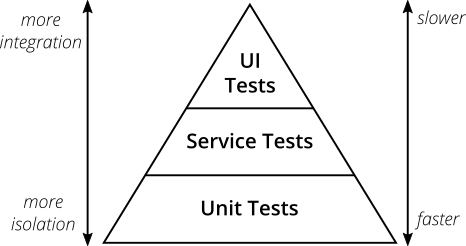
From this thought you ask yourself how you can make something boring not boring. Well as a great computer scientist you decide to “pawn” that work off on the computer. This automation was thought up by Mike Cohn in his book Succeeding with Agile

Mike Cohn’s original test pyramid consists of three layers that your test suite should consist of (bottom to top):

  1. Unit Tests
  2. Service Tests
  3. User Interface Tests

Although this pyramid can be overly simplistic it still serves as a good rule of thumb to follow when establishing your own tests. The names of the layers may not stand out to everyone specifically Service Test, but given the shortcomings of the original names it’s totally okay to come up with other names for your test layers, as long as you keep it consistent within your codebase and your team’s discussions.

Ham Vocke offers an extremely detailed and long blog entry that goes into much more detail. I plan to introduce more ideas from this blog as a continuation, but the main idea to grasp from this first post is the idea of automated testing, and introduce the metaphor of the pyramid. If you want to read ahead of my post check out his entry at the link below.

-Computing Finn

Andrew Finneran


https://martinfowler.com/articles/practical-test-pyramid.html

From the blog CS@Worcester – Computing Finn by computingfinn and used with permission of the author. All other rights reserved by the author.

ReportPortal.io

For my blog for this week, I listened to a podcast with Joe Colantonio. His guest for that particular episode was Dzmity Humianiuk who is a product manager for an application called ReportPortal.io. ReportPortal.io is an Artificial Intelligence powered test automation on dashboarding. It is open source and works with almost every test automation tool out there. Dzmity worked 11 years in IT and switched to software development. He had thought of his idea five years ago when he was trying to find a way to collect a large amount of data. This was the first idea that started with implementing something that is robust and would be the standard for all test automation results within his company. ReportPortal.io is really cool because it is like magic, where you are able to get everything with one click. The key benefit being the real time reporting. For example, if you need to execute a lot of cases when you have a pretty big scope of test automation, there is no need to wait for the full execution of all test cases. There is not waiting up to ten hours, and instead you will see results within the portal in just a few seconds after the execution has just started. Usually, any problem or test cases that start to fail, you will be able to the next day. With ReportPortal you are able to notice it within a few seconds, make it click, fix it and execute it again. ReportPortal uses machine learning and implements some of its algorithms that utilize all the historical data that is given in the database. Then it analyzes the most recent execution. Dzmity also talks about how making the tool customizable was crucial and from the beginning they were assuming it would be open sourced. It i built on microservices architecture which means that it is perfect extension point for the report portal. This allows user to be able to implement their own tiny micro service which can use their API which in hand can use any other microservices that are inside. It also allows everyone to see the code and contribute to it. Lastly he talked about how they are even able to integrate it with Silk testing which is very old school testing and make it compatible with the modern software. Again, a very interesting podcast! I have never heard of ReportPortal.io an it was really cool what the product manager had to say about it!

From the blog mrogers4836 by mrogers4836 and used with permission of the author. All other rights reserved by the author.

Regression Testing

Regression Testing

For this week’s blogpost I will be looking at an article from ReQtest that explains what regression testing is and its benefits. Regression testing ensures that previously developed and tested software applications are working the same as they were before recent code changes were done. Tests cases are re-executed to check to see if this occurs. Regression testing is needed when new features are added or when changes in requirements and code are modified per changed requirements. Bug fixing and fixing performance related issues are also instancing of when regression testing is needed.  When a system is changed errors may arise, this is when regression techniques come into play.

  • Retest All: this re executes all the tests that exist in the test bucket. This usually requires a large amount of time and resources making a very expensive resource.
  • Regression test selection: this executes the selected part of the test suites for example re-usable test cases or obsolete test cases
  • Test case prioritization: Prioritization of test cases depends on business impact and used functionalities.

The benefits of regression testing come from its basic idea, when your system is not working prior to changes made. Regression testing increases the possibility of tracking bugs caused by these new changes. It also helps in finding unwanted side effects that might have been caused due to a new operating environment. Of course, this will help identify bugs and errors in the early stage as well. Where this probably shines the most is when constant changes are required in the product. There are different types of regression testing as well. Corrective regression is used when there are no changes introduced in the existing product specifications, usually used to conduct a desired test. Progressive Regression is used when modifications are added in the specifications of the product and new tests cases are created. There are many more types of regression testing that is listed in the article such as Selective, Retest-All and complete regression. Some of the best tools for regression testing are WinRunner, QTP, vTest, Regression Tester and AdventNet QEngine.

All and all I thought this article was very informative, as I learned about a new testing method I have yet to learn or know about. It also seems to be very important especially if your system is working then after a change something goes wrong after said change occurs.


https://reqtest.com/testing-blog/regression-testing-types-techniques-tools/

From the blog CS@Worcester – Matt's Blog by mattyd99 and used with permission of the author. All other rights reserved by the author.

Bug Reports

CS443 Blog Post

https://reqtest.com/testing-blog/bug-report-template-good-bug-reports/

For this week’s blog I looked at bug reports and a template to perhaps help create better bug reports. Firstly, a software bug essentially is an error that produces unexpected or incorrect results, therefore when something is not working in the software as it should be it is inferred as a bug in the software. A bug report is a document that is extremely useful in communication to the developers that tell which parts of the software/application are not behaving as expected. These reports should have enough information that helps the developers pinpoint the exact issue helping them resolve it. The quality of the bug reports is crucial as a high-quality report reduces the chances of the bug in the future. While a bad bug report may cause the developer not to replicate the bug and not be able to fix it. Well what does a good bug report consist of? Well a good bug report has the following characteristics

  • A good bug report has a unique identifier number to easily identify the bug and set it apart from the rest
  • It contains all the information required to reproduce the bug and fix the issue while prioritizing the bug for fixing and outlining the expected behavior
  • It usually covers a single bug, for multiple issues multiple reports should be created
  • A good bug report can be easily understandable by the tester and the developer, implicating that the bug report should portray the same meaning between those who created the report and those who will be trying to fix the bug
  • A good bug report follows a standardized bug report template while promoting collaboration between others and allows the bug to be fixed in the shortest amount of time

Bug reporting software’s such as ReQtest will help you in your bug tracking initiatives. Usually bug reporting software will help you report, document, store, manage, assign, close and archive bug reports. ReQtest is one of these tracking software’s that allows you to create a professional bug report. The template consists of fifteen different fields of information ranging from the ID number used to uniquely identify the bug report to the frequency of the bug occurring to the linked requirements that are linked to the bug report. Looking at the site you can see what each field requires and does exactly. Finally, after the bug report template has been used a checklist is usually required. Is the bug report clear to follow? Was the bug reported previously? Have you tried to reproduce said bug with the help of your own bug report? And so forth.


I thought this article was interesting as it gave me some good insight on how a bug report should be and such. The way it explains the bug report template is straightforward to pretty much any audience along with the entire article which is very nice to newcomers of the topic. Coming into this I had a general idea of what bug reporting consisted of but this article made me understand more of it. Overall I liked this article as it was informative and straight to the point.

From the blog CS@Worcester – Matt's Blog by mattyd99 and used with permission of the author. All other rights reserved by the author.

INTEGRATION TESTING

This blog post is about second of level of software testing. Integration testing is when individual units are merged and tested as a group. The purpose of integration testing is discovering errors in the interaction between integrated cases. A good example of integration testing is a basketball hoop, the rim, the pole, and the net. They are created and tested separately in the same facility but when two unit or more are ready they are tested together which is integration testing. Black box testing, white box testing and gray box testing can all apply to this method. There are many approaches to integration testing:


  1. Big Bang – when every or most of the units are merged together and tested at the same time.
  2. Top Down – when lower level units are tested after top level units.
  3. Bottom up – when top level units are tested after lower level.
  4. Sandwich/Hybrid – combination of both top down and bottom down testing method.


Integration testing is important level of software testing because for example if you have a two separately created and tested units like a door and door knob, even though both door and door knob were tested you don’t know if they would fit because they weren’t tested together. There could be many faults for example like the door was inch in width smaller or the door knob was didn’t fit with the door. With integration testing the door and door knob would be tested together after each of the unit is ready so if there any error that makes the door and the door knob to be non-compatible then the test cases will fail which shows that there’s an error and you can fix it.


After reading this article I have a better understanding of integration testing. This article changes the way I think about software testing because I more knowledge about one of the levels of software testing. I now know why integration testing is so important. I find this method useful in many ways in testing in general outside of software testing. All in all, integration testing is important level of software testing.

http://softwaretestingfundamentals.com/integration-testing/

From the blog CS@Worcester – Phan's CS by phancs and used with permission of the author. All other rights reserved by the author.