
Ham Vocke in his blog about The Practical Test Pyramid says “Traditionally software testing was overly manual work done by deploying your application to a test environment and then performing some black-box style testing e.g. by clicking through your user interface to see if anything’s broken. Often these tests would be specified by test scripts to ensure the testers would do consistent checking.
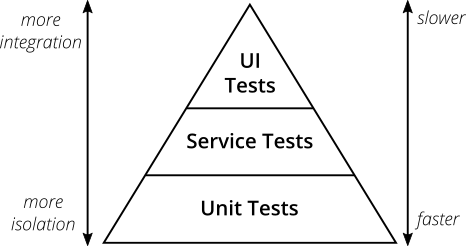
It’s obvious that testing all changes manually is time-consuming, repetitive and tedious. Repetitive is boring, boring leads to mistakes and makes you look for a different job by the end of the week.”
From this thought you ask yourself how you can make something boring not boring. Well as a great computer scientist you decide to “pawn” that work off on the computer. This automation was thought up by Mike Cohn in his book Succeeding with Agile
Mike Cohn’s original test pyramid consists of three layers that your test suite should consist of (bottom to top):
- Unit Tests
- Service Tests
- User Interface Tests
Although this pyramid can be overly simplistic it still serves as a good rule of thumb to follow when establishing your own tests. The names of the layers may not stand out to everyone specifically Service Test, but given the shortcomings of the original names it’s totally okay to come up with other names for your test layers, as long as you keep it consistent within your codebase and your team’s discussions.
Ham Vocke offers an extremely detailed and long blog entry that goes into much more detail. I plan to introduce more ideas from this blog as a continuation, but the main idea to grasp from this first post is the idea of automated testing, and introduce the metaphor of the pyramid. If you want to read ahead of my post check out his entry at the link below.
-Computing Finn
Andrew Finneran
https://martinfowler.com/articles/practical-test-pyramid.html
From the blog CS@Worcester – Computing Finn by computingfinn and used with permission of the author. All other rights reserved by the author.

 In my software design course, I recently learned about how using design patterns helps you code better. I thought it would be a good review to go over the concepts this article introduces and potentially link it to things from class and maybe even add some things we did not get through during class.