Clean Code: Naming

For this weeks blogpost, I will be talking about a podcast that I listened to about Clean Code. Clean Code is a book written by Uncle Bob, who has his own blog websites and talks about all different topics of Clean Coding. In this book it is by him, but each section will include thoughts and ideas from other people who helped create the book. This podcast was again talked about by my favorite Comp. Science podcast group so far, Coding Blocks. This podcast they specifically talk about meaningful names and what the book says about them, and their thoughts on them. Some of the stuff I agreed with and others not so much.      So the first thing brought up about clean code is the Two door idea. One door you open has clean code with only two WTF’s while the other door holds bad code inside of it with a lot of WTF’s. The first door is WTF in a good way, like WTF this is bad, while the second door uses WTF in a bad way, like WTF is this and WTF is that. After that they speak about their own thoughts on the Clean Code book  They go through different sections like liked and even bring up their own experiences of coding in the beginning of their careers up to now. After that their first code that they liked was brought up, “If a name reviews a comment, then that name does not reveal its content”. I found this pretty cool for a number of reasons. One, because I had always viewed comments as good since it explains what the code is doing and can help the user reading the code. Two, because my professor had just mentioned this quote in class, which I found pretty ironic was the first quote I heard about in the first podcast about Clean Code. Naming your variables can reveal the entire purpose though and can avoid disinformation. For example, if you name something that has the word list in it, and it doesn’t have anything to do with making a list, then that name doesn’t convey what it actually does. To go along with that example, remember to not use programming terms if it is not actually that. For the most park longer names do trump shorter names, but the links to the variable names should directly correlate to its scope. Small variable names in small block scopes and larger scope that that variable is available, the longer the name.      The next thing they talked about was the HUngarian Notation. The Hungarian Notation doesn’t prepend STR to available C++/ Old C programs or basics. Hungarian Notation is if you have a string name, it would b sN or a binary integer it would be bIisValid and that’s how you knew what the type was. This left problems though if someone changed the type and would leave the variable name. So you would have this bIisVariable and it was not a boolean or an integer. Hungarian Notation used to be valued but once it got multi lettered ones. It was especially hard when you had a long class name and you use the first letter as an abbreviation, you wouldn’t even know what that type is. It was simple for short primitive types back in the day and it couldn’t be done with today’s editors. It is also important to be names pronounceable. If they are pronounceable, it’ll be easier to explain to someone else. So, when you do nested loops with short names, you have to mentally map things out and if you have to do that your code is going to break down. If the scope is small, it is okay.      One thing they did mention that they had never thought about was that class names should be nouns and method names should be verbs. After this, the Factory Design Pattern was talked about and how it helps when constructors are overloaded. Everything talked about there was talked about sometime in class and I pretty much knew, so I will not go in depth about that topic. Lastly, they mentioned two quotes which I really liked. One was, that  the ‘hardest thing about choosing good names is that it rewrites good descriptive skills and a shared cultural background. The two hardest things about naming is that it can be off by a one error and cache invalidation. Naming is huge and hard. You have to be analytical and descriptive. This brings me to my second quote, “Rename things that don’t make sense when working in your code is good”. So when you see a bug, fix it.      A lot of really good points that i heard about were mentioned that I didn’t talk about with this blogpost. I definitely recommend anyone to listen since naming is such an important part of coding. I was really excited to listen to this podcast since I think Clean COde is a really important aspect anyone can gain from coding. It helps others and yourself when programming. I would really like to use a lot of these tips in the future on my code myself so when I am working with others, it will make the process go a lot smoother for all of us. 

From the blog mrogers4836 by mrogers4836 and used with permission of the author. All other rights reserved by the author.
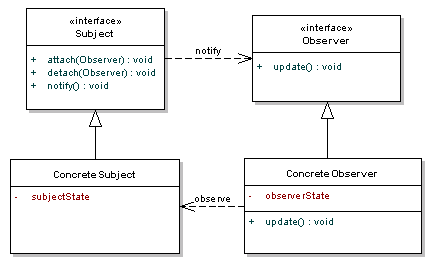
Observer pattern

This week I read an article on Observer design pattern. Since for my ‘Assignment 2 – Additional Design Patterns’ I was doing lots of research on Observer pattern (which I will be writing a tutorial on), I found this particular post to the most informative one.

Basically, the Observer pattern falls under behavioural pattern, as it’s used to form relationships between objects at runtime. The Observer pattern is the gold standard in decoupling – the separation of objects that depend on each other. The definition provided in the original Gang of Four book on Design Patterns states:

Define a one-to-many dependency between objects so that when one object changes state, all its dependents are notified and updated automatically.

The idea behind the pattern is – one of more Observers are interested in the state of a Subject and register their interest with the Subject by attaching themselves. When something changes in Subject that the Observer may be interested in, a notify message is sent, which calls the update method in each Observer. When the Observer is no longer interested in the Subject’s state, they can simply detach themselves.

observer_pattern

Fig. The UML diagram definition

James Sugrue, the author of the article, points the main benefit of using this pattern. He mentions that- to pass data onto the observers, subject doesn’t need to know who needs to know. Instead, everything is done through a common interface, and the notify method just calls all the objects out there that have registered their interest. This is a very powerful decoupling – meaning that any object can simply implement the Observer interface and get updates from the Subject.

Sugrue suggests using this pattern to reduce coupling. He argues – if you have an object that needs to share its state with others, without knowing who those objects are, the Observer is exactly what you need.

After reading about the SOLID principles for my first blog, I believe the observer pattern allows for the Open Closed principle, which stated that a class should be open for extensions without the need to change the class. Open Closed principle holds true while using the observer pattern as a subject can register an unlimited number of observers and if a new observer wants to register with the subject, no code change in the subject is necessary. Now, I feel I have a good understanding of the Observer pattern which helps me in writing a tutorial on it.

Source: https://dzone.com/articles/design-patterns-uncovered


From the blog CS@Worcester – Not just another CS blog by osworup007 and used with permission of the author. All other rights reserved by the author.

Common Design Patterns Used in Java

We’ve been going over the concept of design patterns during the past few weeks, so I thought it would be appropriate to do some research on those most commonly used. Subham Aggarwal has an informative blog on the topic entitled Top 3 Design Patterns in Java. We’ve been examining design patterns written in Java, so I feel that Subham’s blog is a great one to discuss. He provides excellent examples written in the Java programming language.

Subham first explains that design patterns are generally creational, structural or behavioral. He then introduces three design patterns that he speculates are the “top three” used in Java.

1. Singleton Pattern
2. Factory Pattern
3. Decorator Pattern

I covered the Singleton pattern in a recent blog so I will try not to duplicate anything posted in that entry. One aspect that stands out in Subham’s explanation that I ought to mention is his assertion that Singleton is one of the most “inappropriately used” design patterns in Java. Based on what we’ve learned so far, it seems to me that the true intent of Singleton is to have just one instance of each Singleton class. But Subham states that many developers seem to manipulate the pattern in an attempt to have Singleton classes act as global variables, which is not what this pattern is intended to do. Based on Subham’s breakdown and what we’ve learned in class, I would have to say that I believe the Singleton design pattern seems to be a creational one.

Next discussed is the factory pattern, which Subham describes as a way to create certain objects based on the user’s specification. For instance, he provides the following code as an example:

public class ShapeFactory {
 
 // use getShape method to get object of type shape 
 public Shape getShape(String shapeType) {
     if (shapeType == null) {
     return null;
     } 
     if (shapeType.equalsIgnoreCase("Quadrilateral")) {
          return new Quadrilateral();
     }
     else if (shapeType.equalsIgnoreCase("Parallelogram")) {
          return new Parallelogram();
     }
     return null;
     }
}

Something I’d like to add on the subject is perhaps it would be a good idea to develop an enumeration type to define the names of the above given shapes as constants. Also, based on the fact that we are offering a way to create objects here, I would have to say that the factory design pattern is a creational one as well, along with Singleton.

Last but not least, Subham describes the decorator design pattern as one commonly used in Java. The idea here is to “add new functionality to an existing object without changing its structure.” Thus I would have to agree with Subham that this design pattern seems to be a structural one. I do not think we’ve discussed this in CS-343 yet, but I remember using the decorator pattern in a previous course, so I see how it can be useful.

I feel that Subham provides great examples that have helped me better understand these design pattern concepts. The code he provides is well detailed and easy to follow. His blog will be a good reference to me in future projects during my professional career.

From the blog CS@Worcester – Jason Knowles by Jason Knowles and used with permission of the author. All other rights reserved by the author.

10/23/2017 — Blog Assignment Week 6 CS 343

https://nikic.github.io/2011/12/27/Dont-be-STUPID-GRASP-SOLID.html
This week we analyze why a code may be STUPID. What makes code STUPID are the following:
Singleton
Tight coupling
Untestability
Premature Optimization
Indescriptive Naming
Duplication
Singleton, what is wrong with that? According to the example code provided in the article, the singleton allows access to the DB from anywhere using the getInstance() method. In addition, it ensures that there is only one database connection at a time. This is not an issue until a second connection to a different database is needed. In this case, when the application grew larger, the developer needed to change the singleton to have a getSecondInstance(). However, this isn’t a singleton anymore. Another issue is that the getInstance() function binds the code to the DB classname. This means that the DBclass can’t be extended. In this case, when a developer wants to optionally log query performance data to the APC, tight coupling to the class name will not allow it to do so. Dependency injection would have solved the problem, however this is not allowed in singleton pattern. What the writer introduced was what can be called a “hack”, but this is bad coding practice. The last point to be disappointed in is that the getInstance() method allows global access from anywhere using the DB. However, in PHP we learned to avoid the use of the global keyword. Global instances in singletons creates non-obvious dependencies, making the app harder to reuse and test. So, this is impractical coding practice.
The singleton issue can also be generalized to the issue with static methods and properties. For example, the Foo::bar() method will tightly couple the code to the Fooclass. This prevents the Foo function from being extended. This makes it harder for the code to be reused and tested. The example provided is the House class with the constructor function for the variables door and window. The question to ask is how would you replace the door or window in the house class. The answer is you can’t! Instead, the dependency injection can be introduced, however the House class is an example of stupid code.
Finally, we stop at the U in STUPID which stands for untestability. Unit testing is important and if we cannot test we cannot verify its proper functionality. If we don’t test we can end up with broken code. Making a code hard to test is in this case stupid code. What makes a code hard to test? — tight coupling. Dirty hacks can be used to avoid these issues, but we would rather not have broken codes in the first place. Overall, good coding practices means that it can be easily tested.
I chose this blog post because it introduces the disadvantages of the singleton design. This further intends what I have learned in my first blog post on Singleton patterns. Singleton in this case is criticized even for its advantages in creating a global state for a single instantiation. In this case, it is criticized as stupid code because it does not allow the developer to extend the code without modifying it to include a second instance, making it a dupleton.
I chose to learn about STUPID coding practices in order to improve my own coding practices as a developer since it provides good examples for how to avoid bad code and how to improve upon it. By, following some of the guidelines introduced here, this helps to make the code easily extensible without modifying its previous functionalities.

From the blog CS@Worcester – Site Title by myxuanonline and used with permission of the author. All other rights reserved by the author.

10/23/2017 – Blog Post Assignment Week 6 CS 443

https://blog.testlodge.com/software-testing-best-practices/
This week we ask what are the best practices for testing. Although this article suggests 6, we will only discuss 5 in this blog post. The first as discussed in the article is to understand the project objective. It is critical to understand the objective of the overall project from a business and technical perspective. It is also important to have every member of the team know the project’s goals, not just the scope of their testing. Although it is typical for the whole project to be divided among several team members with each team concentrating on only their area of testing, it is always beneficial to have the entire application and architecture in mind. This helps them to know about all of the different components, dependencies, integration points, and data flow. It is also useful for testing defects to be aware of the whole application flow to be able to nail down the root cause. Overall, knowing the objectives helps to identify better test scenarios.

The second best practice is to plan and define strategies. Planning is crucial for success. Therefore, it is recommended that every software developer makes it their daily routines. The article suggests the following activities as part of test planning:

Select the resources with the right skill set.
Identify risks.
Prepare test schedule.
Define strategy, which includes defining the overall strategy/plan to be taken in order to test an application.

The third best practice is to design scenarios and enforce reviews. Standard design phases includes the development of test scenarios and test cases and the typical reviews by stakeholders.

The fourth best practice is the obvious, communication. Every working team requires communication either through emails, the phone, on chat, or in person. What is the case where there is a lack in communication? Consider a defect that has been marked as fixed by a developer. Once the team tests it and finds out that it is not working properly, they mark the issue as unresolved although the other development team had stated that it had worked fine on their end. This demonstrates a lack in communication. The best solution is to mark the defect as unresolved and provides specifics and detailed explanations on what had been tested on multiple browsers and could not be corrected. The key is to be as detailed as we can be in our communications with the other development team.
The final best practice is to identify the scope of automation. Automation in this case can be achieved by writing scripts to perform a repetitive job. This helps to reduce manual efforts. The article suggests the following tips to help in identifying the scope of automation:
Identify the most difficult area that you hate to do, but crucial in the test design, meaning you are forced to test it. The second suggestion is to focus your attention on how to automate the task.

From the 5 best practices, however, I found 3 to be the most useful and that is to know the overall objective of the whole project, to plan around it and finally communication is always the key to a successful career. From experiences with software development, I found that adhering to the overall goals of the project helps to organize the code, which is what every programmers wants and it is what these guidelines and principles teaches us about, that is to clean up our codes. Knowing the overall objectives of the design helps to keep the team on track and it helps to create cohesiveness in the product. This helps to reduce defects and debugging. The other guideline that I found most useful is effective communication, which is require in every field of study. Effective communication helps to speed along the project.

Overall, I chose this blog post in order to compare the suggested best software testing strategy with my own experiences in software development. I found the first, second, and fifth guideline to be useful in software development.

From the blog CS@Worcester – Site Title by myxuanonline and used with permission of the author. All other rights reserved by the author.

JUnit: Tips and Pointers

Considering we’re discussing JUnit in class, I want to learn how to use it as efficiently as possible. For those who are not aware, JUnit is a popular unit testing framework for the Java programming language. Since unit testing is an important concept in Software Development, learning more about the workings of JUnit should not only help me with my studies, but also with my professional career.

I found a good blog offering some tips and pointers on the subject, entitled JUnit Best Practices by Kyle Blaney. The main point seems to focus on the importance of performing efficient unit testing with the JUnit program.

Before going into JUnit specifics, Kyle starts off by stressing that unit tests ought to be “extremely fast” and “extremely reliable.” Due to present technologies, we seem to expect computers to run at the proverbial speed of lightning. Because of this, I believe it is considerable to expect each test to be completed within milliseconds. Also, I agree that unit tests should be reliable in the following sense: they should be failing when the code is broken and passing when the code is not.

In regards to JUnit, Kyle brings up quite a few points, the following of which I felt specifically relate to the course material. This pertains to what we’ve previously discussed about unit testing so far, and what we will likely be covering in the near future.

Kyle explains that we should be running our JUnit tests completely in memory. This means we should not be accessing outside resources during our testing. I agree, because if we cannot get a reliable connection on these outside resources, it will only slow down or possibly halt our unit testing completely.

Another important point that Kyle brought up is that unit test methods should only be performing one assertion. His reasoning is as follows: we cannot be certain that all the assertions occur even if the method appears to have passed. This seems to be in relation to something we’ve learned in our school’s computer science program: “Methods should do one thing and one thing only.” That way, it is much easier to trace our code and figure out what it is supposed to be doing.

We’ve also discussed in class that we should be using JUnit assertion methods that best match the context of our testing. One example Kyle gives is when to use assertTrue versus assertEquals:

Use assertTrue(classUnderTest.methodUnderTest()) rather than 
assertEquals(true, classUnderTest.methodUnderTest()).

Kyle goes into great details within his blog. Along with the points that I’ve discussed in my own blog, he offers code samples of what not to do, and most importantly, what we should be doing to perform the most efficient JUnit testing possible. I found his blog to be quite helpful and learned a lot from reading his take on JUnit “best practices.” Because of this, I expect his strategical insights and sample code will be useful to me in my future career in software development.

From the blog CS@Worcester – Jason Knowles by Jason Knowles and used with permission of the author. All other rights reserved by the author.

B6: Model-View-Controller

Model-View-Controller

          This week, I chose to write about a blog that went over the understanding of Model-View-Controller. The post first started by explaining each term separately by saying that the Models represented the knowledge while the View was a visual representation of the Models and the Controllers were the links between the user and the system. It talked about Models first, saying that most of the time there should be a one to one correspondence to make sure everything is easily understandable. The blog then goes on to talk about Views as a presentation filter, it would be used to easily convey information. As stated before, this is helpful when it is a visual representation of the Model but it can also be connected to the model which allows it to know more about the attributes and data. This leads to the controllers that essentially allow the user to see outputs based off of menus and other ways of giving commands and data. It uses this output to then make changes back in the Views section which will them give out another output.

          I chose this article because it seemed important to know more about how to explain code using models and controllers in this sense to other people. This post used examples that allowed this idea to be understood much easier for me, as the summary was a bit confusing. When they used the example of HTML code in the browser it made much more sense. The way I understood it after that was that the model was the information the creator wanted to put into HTML while the CSS was the view which acted like the “code” that displayed everything in a clean visual representation. This all came together within the browser which they linked to a controller as it is what combines and connects the entire thing. As I said before, the content had ok definitions but the examples they used made up for it since it allowed an easier understanding. I thought this topic was important since we will be learning about this subject as it is a software architectural pattern. This material affected me by showing me a system to show the user simplified information through the use of code. I think that if this were to be implemented within coding, it would be best used as a way to reuse code along with implementation of user interfaces. As a software architectural pattern, I could see this being important to future practices as it seems to be used a lot within popular programming languages and even web application development.

From the blog CS@Worcester – Student To Scholar by kumarcomputerscience and used with permission of the author. All other rights reserved by the author.

WSU Blog #6 for CS-343

URL: https://www.javaworld.com/article/2076265/testing-debugging/junit-best-p…

JUnit best practices

Here is an article about what to do and what not to do when developing your JUnit tests. The second item, “Don’t assume the order in which tests within a test case run,” is exactly what we  discussed in our last class and provided sound advice for a Card Game class personal project I have been working on.

I do not fully understand the ramifications of the first item, “Do not use the test-case constructor to set up a test case,” and feel that I may be guilty of doing this very thing. Moving forward, I will look to better understand whether or not this is something I may be doing. 

From the blog Rick W Phillips - CS@Worcester by rickwphillips and used with permission of the author. All other rights reserved by the author.

WSU Blog #6 for CS-443

URL: https://www.hindawi.com/journals/isrn/2013/432021/

Decision Graphs and Their Application to Software Testing

From the blog Rick W Phillips - CS@Worcester by rickwphillips and used with permission of the author. All other rights reserved by the author.

Bug Taxonomy – Classifying Software Bugs

This week I have decided to change things up a bit. Seeing as we are now past the halfway point in the semester, I decided to start exploring some blogs other than the group I normally browse, just to try and find a different voice, a different point of view. I am happy to report I have succeeded in this mission, and have found a blog post by Michael Stahl on stickyminds.com that clicked with me.

One of the recurring problems we face as testers is making sure that we have covered everything that could possible happen in a piece of software, good or bad. Stahl suggests using bug taxonomy as a way to think of new ideas on what needs to be covered. This type of taxonomy is not trying to compare types of testing with type of bugs, but trying to put software bugs into categories. If you have a list of categories you can go to each time you run through the testing gauntlet, it may allow you to think of new tests that need to be written for your product. A few bug items under the category of performance he suggests are from Testing Computer Software, by Cem Kaner, Hung Q. Nguyen, and Jack Falk: slow program, poor, responsiveness, and no progress reports. His list goes on, but you get the point.

Once I saw this list of categories, this strategy totally made sense to me. Basically, have a list that is entitled “Have I covered:” or something to that extent. Running through the list forces you to think of scenarios you may not have covered, but should be covered. And since the list is categorized (i.e. performance, user experience, etc.) it allows you to focus on one testing area at a time. I can tell you that after reading this post I made a list of things I need to go back and check on for something I am working on at work. So, this strategy has already paid dividends for me.

Although other testers list can be useful and is a good way to share ideas, Stahl strongly suggests making your own list to reference again and again. This is because you may not agree with how another person’s list is laid out. For example, in the list from Testing Computer Software, Stahl mention how under the performance category is “no progress reports”. He feels it should be under a user experience category. I agree that is should be under user experience, but these lists are all up to the testers opinion, so it is not wrong that the book has it in a different spot. This can be avoided by making your list.  

I really enjoyed this blog because making a bug taxonomy list seems like a relatively simple way of trying to find new tests. It practical, and be applied in everyday use without a big hit on time. We always talk about how important time is with testing, so if there is a quick and efficient way that is going to help make my tests better, I am in.

Link:

https://www.stickyminds.com/article/using-bug-taxonomy-design-better-software-tests

Link to picture: https://images-na.ssl-images-amazon.com/images/I/710avuIF12L._SY550_.jpg


From the blog CS@Worcester – README by Matthew Foley and used with permission of the author. All other rights reserved by the author.