What is Smelly Code and Why Your Code May be Stinking Up the Room -Continued…

So, we meet again with what makes code stink. As I mentioned in my blog last week, this is a continuation from the same post that I covered last week, as there were simply too many points I wanted to hit upon to fit in one post. For those who missed last week’s post or can’t remember, smelly code is basically trends in code that commonly known to cause problems. The goal is to make sure you code doesn’t stink when you are done with it, or you’ll regret it later down the line.

The next item on the list are comments. Comments can be great. They provide insight into how the developer was thinking, why they designed it the way they did, what is going on in that quadruple nested for-loop below the comment, etc. The thing is, if you are really a good developer, an argument can be made that the code can speak/explain itself. Personally, I’ve always found comments useful and insightful, but the point here is that your code should not be so ambiguous or so complicated that you need an entire paragraph just to explain what is going on. While I don’t necessary agree that there should be no comments at all, I do agree that comments should be kept to a minimum, and if you can’t, something is wrong with your code.

Pressing further down Jeff Atwood’s list of smelly code we run into the category of duplicate code. Please don’t duplicate your code. The reasons are self-explanatory, but I will reiterate: it is bad, wasteful, and inefficient. If you need to perform a task more than once, put it in a function, simple as that. You’ll save everyone a few headaches. Similarly, he mentions dead code. That is code that is sitting in there, wasting its life away as a comment or performing some task is never used, wasting resources. There should never be a need to leave unused code. The wonderful invention of version eliminated the need to leave old code sitting in a program.

The last item on his list that I want to touch upon is the bad habit of making items public when shouldn’t be, or as he calls it, indecent exposure. There should be a strong effort to make everything is as private as possible, and there should be a damn good reason if it not private. Exposing the internals of a class is dangerous and unwarranted. Unless something absolutely has to be public, it should stay private.

There were items on Atwood’s list that I felt were unnecessary or didn’t completely agree with, but overall, I found his list of code warning signs useful and brought up many valid points. As developers we want our code to be clean, efficient, and easy to read. I feel that going through this list would certainly help anyone reach that goal. A lot of the items on the list are thing experienced developers should know better than to try anyhow, but it can’t hurt double check when you are done. I know I certainly will try to run through his list in the future.

Link:

https://blog.codinghorror.com/code-smells/

From the blog CS@Worcester – README by Matthew Foley and used with permission of the author. All other rights reserved by the author.

The Future of Software Testing

For this week, I chose a blog which talks about the future of software testing. Although these are just predictions by Ryan Yackel who is a senior sales engineer at QA symphony, they really seem plausible and get you thinking about where software testing is going to be in the next decade or so.

Ryan talks about how Everything will be blurry in the beginning and gets clearer after. what he means by that is the fact that agile software development methodologies are now becoming the standard and that will lead to a lot confusion and misconceptions. Because everyone is considered tester in a agile environment which is not true in a lot of cases, this really leaves testers questioning the severity of their role.  Agile methodologies’ popularity is increases among companies and they will soon have a better understanding and mastery of these agile techniques. Once this occurs, the role of a tester in a agile team will become much clearer. This leads to his next prediction.

Software testers expectation is on the rise and Ryan mentions that the expectation will be even greater in the future. Now, software testers need to expand their horizons and embrace new enterprise software testing tools and strategies. Just being knowledgeable about testing software is no longer sufficient. Software testers needs to be knowledgeable about software development, code functions, business logic, and technical competency. Testers a now playing an assertive role in guiding software quality assurance and development broadly.  As a tester, if you fail to adapt to these new higher level expectation, you will have a hard time making it through.

Ryan also talks about how the use of automated testing will increase significantly. It will be difficult for companies to maintain efficiency due to fast growing data in software development. Therefore, many companies will rely on automation in order to maximized their level of productivity. Ryan predicts that automation will become the default method of testing and all the challenges that holds automation testing from being the best way to test software will soon be refined.


From the blog CS@Worcester – Adestin by adestinyblog and used with permission of the author. All other rights reserved by the author.

Software Testing Life Cycle

This week I looked up software testing blogs. While searching the web I found this one blog called mallow-tech. there was this one blog post called “Software Testing Life Cycle” written by Periannan, a test engineer for Mallow Tech. In this blog it talks about what software testing life cycle (STLC) is. Software testing talks about the testing process that has specific steps to be done to make sure that the code meets the quality standards. For many companies they have different phases for STLC however the base of it is the same for every company. STLC usually has six phases. Requirement Analysis, Test Planning, Test Case Design, Test Case Execution, Re-Testing and Regression, and Final Testing and Closure. In the Requirement Analysis phase this is where the team talks to the client about what they want and talks to the team of developers about what parts are testable and how they would run those tests. The next phase is test planning which they see what kind of they are going to use to test out the code. Number three is test designs this is where test cases are created according to the specifications for the project. Next is the test execution. Here they execute the tests in logical sequences with specific test data. Next is the retesting and regression testing phase by this time the tests would have been done and the bugs would have been reported. The team would then fix those bugs and then run the test again to make sure everything was fixed. Lastly final testing and closure is where the final parts of the STLC is completed and they start to send it out into the public to find out if the code works.

This blog was very helpful for me because I did many blogs about different tests that we have to do but this blog talks about the process of testing. With this blog I think it is super helpful as an add on to my other blogs. In the real world we are not going to just run tests one right after another. We need a plan on what to do and when to do it. This shows me that everything in the computer science world is not just doing code and making sure it works it is all about doing things in steps just like how we write code it should be neat and organized and planned.

From the blog CS@Worcester – The Road of CS by Henry_Tang_blog and used with permission of the author. All other rights reserved by the author.

Writing Clean Code

This week I decided to read a blog post for my blog entry. The blog post I read is titles “Writing Clean Code” by Jason McCreary. Before finding this blog post, I’ve had a general and basic idea about coding and how it should be written, but I haven’t understood in great detail how to properly write clean code. The reason I chose this blog is to learn and be able to use the clean coding techniques on my future projects so it will be easier for other people read.

Clean code is extremely important in becoming a strong software engineer and when working in a team having clean code is a must so your teammates can understand your code. The blog opens up by saying that in more or less all software engineering jobs you will be working with a new code base at one point or another and that inconsistency is a big fundamental problem when working with different code bases. The author ends the blog by saying “In the end, coding is writing” and as a developer our responsibility is to maintain a consistently so it will make our code easy to follow when being looked over.

One major takeaway from this blog that I will apply immediately to my next project is using clearer names. Before reading this blog if I wouldn’t put much effort into naming things in my project but I learned that applying clear names not only improves readability, but boosts the context making the intent of the code easier to read. If I am to use clear names it will help the reader understand more quickly.

My goal is to become a software engineer and in the CS program sometimes it is hard for me to write clean code because I am focusing on other parts of the assignment or don’t have everything labeled to where my audience can understand. This article has given me ways to write clean, effective code in the future and I hope it can do the same for you.


Source: https://dev.to/gonedark/writing-clean-code


From the blog CS@Worcester – Dcanton Blog by dcantonblog and used with permission of the author. All other rights reserved by the author.

Time Machine Antics

The podcast episode this post is written about can be found here.

This week I listened to a podcast in which the podcasters stage an argument between a 1990s “traditional” test manager and a modern test manager. I chose this podcast from about 4 I thought sounded interesting, because I wanted to know the current state of the industry and where we came from. It was enormously helpful in demonstrating the difference in how software gets tested these days compared with how it was done previously.

The one playing the role of the 90s manager explains how at his company, testing is kept largely separate from development. After software is implemented, it’s sent to software testers, whose job it is to find bugs. If they do find bugs, the project is sent back to the developers for them to fix. The second round of testing might reveal that the bug wasn’t fixed after all, and the result can be an endless game of ping-pong where the product doesn’t get released for ages.

Laid out in this way, it was clear how this inefficient setup led to the modern strategy of integrating software development and testing. The modern test manager explains that at his company, test specialists are embedded in the development team from the beginning, and the whole team is in charge of ensuring the quality of the product. The developers actually write most of the tests for their own code as they go along and end up finding most of the bugs. Test specialists may write more complex tests or write diagnostic tools, but mainly their job is to see the big picture and make sure that all the testing that needs to get done gets done. In fact, the modern manager says that most of the bugs that the team members who specialize in testing find don’t find them through writing typical tests or test automation, but through data analysis and looking at how customers use a product.

I gathered through listening to this conversation unfold that the basic idea of the modern setup is that catching bugs earlier makes them way less hassle to fix, so testing isn’t pushed to the end. Everybody in the team is capable of doing everything required for both implementation and testing, but they each specialize in a particular area. Going forward, I’ll make sure I don’t conceive of the testing process as entirely separate from the development process, but rather as something that goes along with code implementation in order to prevent headaches down the line.

From the blog CS@Worcester – Fun in Function by funinfunction and used with permission of the author. All other rights reserved by the author.

The Technical Skills You Need to Have as a Software Developer

In this blog post, John Sonmez talks about “soft skills” and how they can help you become a better software developer. Here are some tips from the author:

1. Instead of trying to learn several programming languages at the same time it’s better to have one language that you know in and out, that you are comfortable writing.
2. Structure your code well by writing “good, clear, understandable code that doesn’t require a large amount of comments because the code itself is communicative.” – John Sonmez
3. Having a good understanding of object-oriented design and managing complexity as most popular languages rely heavily on object-oriented design and analysis.
4. Understanding how to create algorithms, and how to modify known algorithms to match your specific needs.
5. Understanding of data structures like arrays & vectors, linked-list, stacks, queues, trees, hashes and sets. These are important to know well, especially if you are being interviewed.
6. Knowing a development platform well is a good idea because some places design for specific platforms (PC, Mac, etc)
7. Learning a framework, or a complete stack. “A framework is simply a set of libraries that are used to develop code on a particular platform or on multiple platforms.” and “A stack is a set of technologies, usually including a framework, that are commonly used together to create a full application.”
8. Basic Database Knowledge, how to add, modify, delete and work with different database systems.
9. Source Control, understanding how to use tools like GIT.
10. Testing, more often projects are being created in small increments and tested as they go, this is allowing developers to catch bugs before they begin to cascade.

I chose this resource because I’m always looking for information on becoming a better software developer and want to become an asset to wherever I dedicate my work. Some of the information is general information but I do think it’s important to work on maintaining these core skills to improve the quality of your work. I learned the importance of working on knowing at least one language very well, along with knowing one platform very well knowing how to implement popular data structures, writing good algorithms and knowing when to use what. I learned the importance of object oriented design and how prevalent it is today. I learned about frameworks and stacks and what they are, and the importance of understanding how databases work. I also learned that more recently developers are being expected to know how to test their code, especially with agile testing.

The post The Technical Skills You Need to Have as a Software Developer appeared first on code friendly.

From the blog CS@Worcester – code friendly by erik and used with permission of the author. All other rights reserved by the author.
A Feast of Decisions

We recently went over how to test our programs and code using decision table testing. Decision table testing is extremely useful for laying out the requirements and conditions so that it is easier to comprehend and understand. This blog goes over, in detail, how to set up a decision table for a problem with an ATM and what conditions must be met to withdraw money. You can find it here: http://reqtest.com/requirements-blog/a-guide-to-using-decision-tables/ (I also used their pictures.)

I chose this blog to share with you because it relates directly to the assignment we were given for decision table testing. It has a section before the steps that give you the advantages and disadvantages to using the decision table which I thought would be useful to know and highlight. It also has every step for creating a decision table and is easy to understand.

“One advantage of using decision tables is that they make it possible to detect combinations of conditions that would otherwise not have been found and therefore not tested or developed. The requirements become much clearer and you often realize that some requirements are illogical, something that is hard to see when the requirements are only expressed in text.” – Ulf Eriksson, ReQtest

This advantage to decision table testing is a big one. Being able to easily cover every single case without being confused is extremely helpful. Essentially, decision tables give you a visual to go with the words.

The disadvantage to using decision table testing is that the decision table does not represent the complete test cases. Meaning you will have to think a little harder about how you write your cases.

With this being said, decision table testing can be used anywhere and this blog stresses that the tables should be constructed during system design so that the designers and testers are able to take advantage of the tables.

The steps are pretty easy to creating a decision table, the blog goes into more details with pictures (I recommend checking it out).

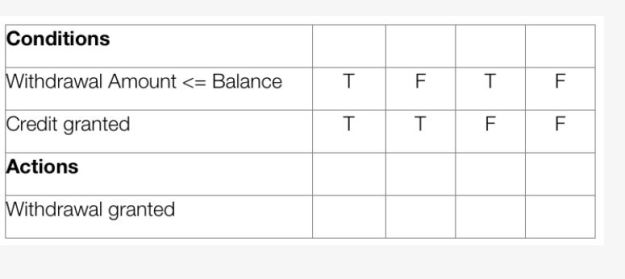
First, you want to figure out the conditions and actions in your problem. Conditions will be a requirement while actions will be the thing that happens if specific requirements are fulfilled.

conditandactions

Second, You want to figure out how many rules you are going to have. This is found by 2^n where n is the number of conditions in your table.  Your going to want to fill out your table with the different possibilities of conditions being true/false.

numbofcond

3

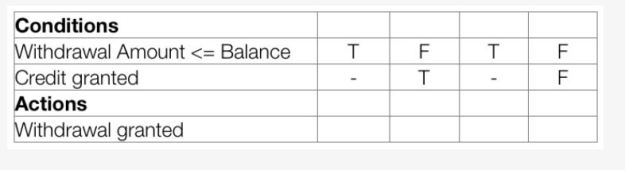
Third, you want to reduce your table by combining redundant cases. The “-” means that you don’t care if credit is granted sense you have enough money in your account regardless.

4

Notice how Column 1 and 3 were the same? Now they are combined.

5

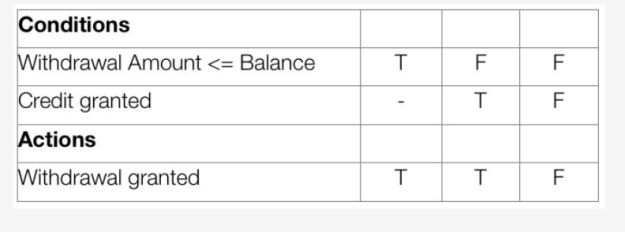
This is the final table you would use to write test cases for this program! Overall, Decision Table Testing is a great way to lay out all requirements in front of you to ensure you do not miss any possible combinations of input!


From the blog CS@Worcester – Rookey Mistake by Shane Rookey and used with permission of the author. All other rights reserved by the author.
Ouch, that’s sharp!

Source: https://blog.codinghorror.com/flattening-arrow-code/

Stumbling across this week’s blog post Flattening Arrow Code by Jeff Atwood, I found myself reading about arrow code, which is self-explanatory. Basically, Jeff explains how he deals with Arrow Code, which is considered an Anti-pattern that is deemed a bad practice and should promptly be avoided wherever possible. The main benefit from refactoring is to reduce the cyclomatic complexity value, this value being used to determine how complex a piece of code is. The larger the value, the higher the complexity, the lower the value, the lower complexity. Another would be, from Jeff’s words “…to have code that scrolls vertically a lot… but not so much horizontally.”

When I look at code, I never suspect that there would be distinct patterns that are deemed as a bad practice. By reading about arrow code, I first thought, “Hey, I’ve seen that before” but left with “Oh, that is probably not the way to go about writing code”. In other words, I should probably learn this now. Anti-patterns, although the only one focused on in this blog is the arrow pattern is a great way to help avoid certain practices in the future. Even though, as of right now, I don’t understand most of what he said about converting negative checks into positive checks or decomposing conditional blocks into separate functions. Other things like guard clauses, being a conditional statement at the top of a function that bails out as soon as it can. Which I assume contributes to reducing time spent/resources spent running that function. Also, includes the idea of not sticking to the idea that there should only one exit point at the bottom of the function. Sometimes, it can be possible to exit at a different point rather than the very bottom. These two points, are good information as standalone practices.

Using this simple example, I can see that it is like YAGNI, KISS, Code Smells, etc., which means by understanding or being introduced to the bad practices early on. One, I am able to identify and solve the problems using common strategies already developed and tested. Two, I will be able to avoid putting myself into those situations where I would need to refactor the sections to be easily modifiable and maintainable. Although cyclomatic complexity is mentioned scarcely in the blog post, it reminded me of time complexity in algorithm analysis. Even though they are two different concepts, understanding that aiming for a smaller cyclomatic complexity value should result in a less extensive testing phase for the code. Which should save time, for future reference of course.

From the blog CS@Worcester – Progression through Computer Science and Beyond… by Johnny To and used with permission of the author. All other rights reserved by the author.
10/16/17 Software Development

https://www.toptal.com/agile/art-of-war-software-development

This blog talks about how the concept of  “Art of War” applies in the world of software development. He starts with explaining the history of “Art of War”. The idea dates back to  fifth century B.C., by an Ancient Chinese military strategist named Sun Tzu. The text from the book is divided into 13 chapters, and still used in military schools in the East, and is suggested reading for the west. The concepts of “Art of war” have not only applied in the military at war  but as well as in politics, sports and software development. This blog goes through certain chapters and section of the book, and explains how it is used in software development. The first section comes from Chapter 2. The idea is teamwork. If everyone on the team is working on a program and they have no goal or no deadline for the project, then the people become frustrated and the effort in the project declines. The next part from chapter two is about timing. This one states, the faster you can get a program running and turn it in with out bugs, the quicker you’ll get feedback from the client. Chapter three is based on leadership. With a team of programmers one on a program there needs to be a leader to make sure everything is running smoothly and going the way it should. Chapter six talks about repetition. Using one method for one project might work well, so you’ll try the next project with the same method as the previous one. That might not be such a good idea. Instead, learning how to write in different coding language, and different methods will help you become a better programmer and help the program run better itself. The next sections talk about constantly improving to make things better. In programming, programmers are constantly fixing bus to their programs to keep it running smoothly. The next section again talks about teamwork, how everyone on the team has to work to the team has to work together on the project and not one member alone can do everything by himself. Again with teamwork, talk about making changes to the program with other members, instead of doing them yourself without anyone knowing. The next section talks about motivation, to keep the team going and help make the program get finished faster. The next section states if a piece of code looks bad, but work fine don’t change it or destroy it, just leave it alone and let it be. The last section talks about anti- patterns. Which means do as told and don’t stray to try to change things to make it netter because it might not work out in the long run. The author concludes that though these idea were first used for warfare the idea of teamwork, efficient and time can apply to software development as well.

Again, another good blog. I like the talk about teamwork for programming. Again this shows teamwork and the importance of it when working on a project. Which occurs in any job field with programming.

From the blog CS@Worcester – My Blog by rens14 and used with permission of the author. All other rights reserved by the author.

How to Work With Someone Else’s Code

In this blog post, Justin Albano gives advice on working on code written by others. It can be tough making changes or adding to code that you did not write yourself, another reason why clean code is so important, it helps other have a clear idea of what’s going on. The author notes pitfalls that you should watch out for when working with someone else’s code:

Our Ego: We think we know best, but must respect the code and original author.
The ego of the original author: Working on code written by someone else may lead to questioning decisions made by others which must be met with working with the original author.
Fear of the unknown: Many times you are going to be working on code that you know very little about and will be responsible for those changes. It’s important a framework is built to ensure changes can be made comfortably with no worry.

Some techniques for maintaining clean, functional code:

1. Ensure Tests Exist When current tests are not sufficient, you must create them yourself, which can be challenging. Other times, having tests provided for you, you can learn from the tests what the intent of the code is.
2. Talk to the Person Who Wrote It Communication is key, if you have the chance to talk to the author of the code you’re working on you can get some insight if you’re having trouble.
3. Remove All Warnings This ensures quality of code, and reduces code rot.
4. Refactor Changing the internal structure to make it easier to understand without modifying behavior.
5. Leave it Better Than You Found It Do your due diligence when it comes to maintaining quality for you, and future people working on the same code.

I chose this resource because it gives advice on working with other people’s code, working with existing test cases, or adding your own. It reinforces the idea of clean code because you should leave the code better shape than you found it (if that’s possible). I feel the article had some good information that I will definitely use in the future. I will be working with code that was written by someone else, and will need to write test cases for changes made to the code and maintain it still functions the same. I learned techniques for dealing with code written by others, and doing my best to respect the original purpose of the code.

The post How to Work With Someone Else’s Code appeared first on code friendly.

From the blog CS@Worcester – code friendly by erik and used with permission of the author. All other rights reserved by the author.