This Week In Software Process Management

In this week’s class, we delved into some intriguing topics that shed light on the dynamic world of project management and software development. So, let’s recap the highlights of our recent discussions.

New Project Initiation:

We kicked things off by exploring the essential steps in new project initiation. It all begins with reading product descriptions and commencing a basic requirements analysis. This initial phase sets the tone for the entire project, as it helps us understand what we’re about to embark on. Clarity at this stage is paramount.

Then, we moved on to the technical side of things by creating a new project on GitLab. We ensured that all the required files were in place and established a board structure tailored to support Scrum development. This pivotal step lays the foundation for collaborative, agile work and efficient progress tracking.

One concept that stood out this week was the “Definition of Done.” Understanding and defining what constitutes a complete task is vital to maintaining project integrity and ensuring that everyone is on the same page regarding project expectations.

Copyright and Licensing:

The second part of our class dived into the complex yet critical world of copyright and licensing. It’s not just about legalese; it’s about safeguarding your work and respecting the intellectual property of others.

We explored Free & Open Source Software Licensing, digging into the details of when a work becomes copyrighted and who owns that copyright. This knowledge is essential in avoiding potential legal pitfalls.

We also examined what you can and cannot do with unlicensed software. Knowing the boundaries here is crucial in preventing unintentional violations.

Licensing became a central theme in our discussions, as we explained its role and its significance in the realm of open-source software. We even delved into specific licenses like the GNU General Public License, Mozilla Public License, Eclipse Public License, and MOT License, each with its unique implications and considerations.

Lastly, we explored the importance of identifying the license of published software. It’s essential to be aware of the rules and limitations when using or contributing to open-source projects.

In summary, this week was an exciting journey through the early stages of project initiation, all the way to the intricate world of copyright and licensing. These insights will undoubtedly prove invaluable as we continue our education and venture into the realms of project management and software development. Stay tuned for more exciting insights in the coming weeks!

From the blog CS@Worcester – Dose Of Dev by msavice and used with permission of the author. All other rights reserved by the author.
Understanding Software Licensing

The article I chose for this week’s blog is “Understanding Software Licensing”. This blog discusses what a software license is, how it works, why it matters, a few types of software licenses, and how to decide the best type of license for your software. In class, we discussed the topics that were brought up in this blog so I decided to do a deeper dive into software licenses to refresh my mind on the information that we reviewed and possibly gain a better understanding of it. 

The author tackles the topic in an organized manner that makes each part easy to follow. In the section about why software licenses matter, the author outlines clear advantages from different standpoints. For example, he states that from a developer standpoint, they offer benefits like “preventing users from performing actions like copying and distributing your software, if the license prohibits it, limiting your own liability, spelling out your own rights as a developer, and allowing you to control the usage of your product”. He then outlines the benefits from a user’s standpoint; he mentions that it helps you manage your tools and resources,  prevents you from paying for tools that aren’t necessary for your business, and clarifies how the provider can use your private information. The choice to clearly outline the advantages from each standpoint aids in the reader’s understanding of the importance of licensing software.

The sections on the types of licenses were beneficial. The public domain license is a simple license to understand. The section that defines a copyleft license is an open-source license meaning that deviation of the code must have the same terms. Defining the GNU license as a weak copyleft license helped to simplify what it was. His explanation of a permissive license was helpful as well. He defined each type of license with a short, simple statement at the beginning and then went on to further explain them.

The other part of the article that I found to be very helpful is the section about how to figure out what the best type of license is for your software. Because software licensing is new to me, I was struggling to pick which license I should use for a project. The author mentions that you should “consider the different models, thinking about the purpose behind your code and what you want users to be able — and not be able — to do with it”. It can be very challenging to outline the true purpose of your code clearly. It was very helpful that the author clearly defined the types of licenses in simple terms and then gave simple advice on how to pick which one to use. I enjoyed reading this blog and will use the knowledge for my future projects.

From the blog CS@Worcester – Live Laugh Code by Shamarah Ramirez and used with permission of the author. All other rights reserved by the author.

Scrum VS Kanban

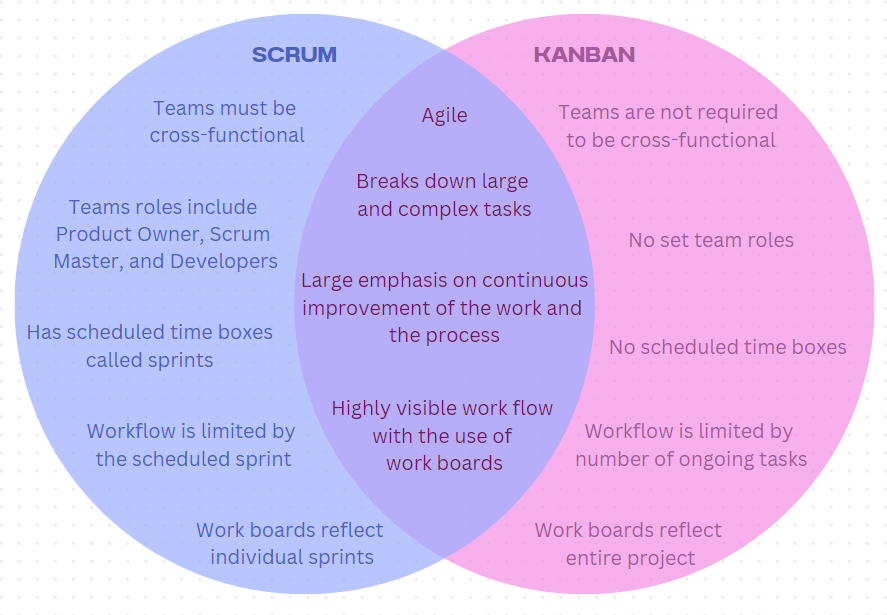
The first step down my professional development path to become Agile involves understanding different Agile methodologies. The two most popular being Scrum and Kanban. Cassidy Knight does a great job comparing the two Agile methodologies in her blog, “3 Differences Between Scrum and Kanban You Need to Know.” (https://www.cprime.com/resources/blog/3-differences-between-scrum-and-kanban-you-need-to-know/) Knight starts the blog off with an easy to read table illustrating the three main differences are found in team roles, work boards, and the scheduling/cadence of the workflow.  She breaks down Scrum and Kanban individually for better understanding of how they are similar, before diving deeper into the three differences.  The blog finishes up with explaining that there is no clearly defined better methodology, but rather that they each have things that work better for different teams. 

Scrum consists of breaking up large projects into small manageable tasks to be completed through several scheduled iterations called sprints.  During these sprints the Scrum Team, consisting of a Product Owner, Scrum Master, and Developer work together to design and build new features for a project.  Each new feature is broken into story points that are prioritized by the Product Owner in the project backlog.  The Scrum Master then selects what points will be moved to the sprint backlog to be worked on in the following sprint based on the priority and size of each point. 

Story points are tracked through the sprint on the Scrum board. The Scrum board breaks down workflow into columns, starting from the backlog, to work in progress, to completion. Each story point is given a limited amount of time to be worked on during the sprint. Scrum boards only show the work done for that sprint and are wiped clean after each sprint. Work produced by a Scrum team is evaluated at the end of the sprint and is found successful if all of the story points have reached the team’s definition of done.

Kanban, unlike Scrum, does not work in scheduled iterations.  Instead, the workflow in a Kanban is limited by the amount of story points in each column of the work board.  Instead, each team may be made up of specialists that only handle work from the board that suits them.   The work board in a Kanban is like the one found in Scrum with the major difference of each column having limits to how many story points may be in each.  This means a “work in progress” point must be finished before a new one may be opened.

Using Scrum and Kanban Moving Forward

As I continue to learn how to work in agile environments, I will learn what parts form each of these methodologies that work well for me and my team.  Applying practices from many methodologies to create a hybrid methodology may be the best way to move forward. It all depends on the project and the team.

From the blog CS@Worcester – CS Learning by kbourassa18 and used with permission of the author. All other rights reserved by the author.

CS343 – Week 8

API, or application programming interface, is a set of specifications that allow applications to interact with one another. They enable transfer of information and is treated as an intermediary level let companies open their application data to external third-party developers as well as internal departments within the company. An example of how APIs work is third-party payment processing. For instance, when making a payment online and being given an option to “Pay with PayPal”, the connection made between the third-party payment system and the website where the payment is being made is reliant on APIs. When selecting the option, an API calls to retrieve information or request. After processing the request from the application to the web server, the API makes a call to the external program/web server. In this situation, it would be the third-party payment system. The external system then sends the requested information back through the API to transfer to the initial requesting web server.

REST is a set of design principles and stands for “representational state transfer” architectural style. Sometimes referred to as RESTful APIs, they were first defined in 2000 by Dr. Roy Fielding and provides more flexibility and freedom for developers. They can support many different data formats and are required to follow the 6 principles, also known as architectural constraints. The six principles are the following: uniform interface, client-server decoupling, statelessness, cacheability, layered system architecture, and code on demand (optional).

Uniform interface means that all API requests from the same resource should have identical formats to ensure that a piece of data belongs to only one uniform resource identifier (URI). The resource should not be too large while still containing the information the client needs. Client and server applications must be completely independent of each other in REST API design. The client application only needs to know the URI of the requested resource and cannot interact with the server in any other ways. Statelessness means that each request needs to include all the information necessary for processing it, which means REST APIs do not require any server-side sessions. Resources should be cacheable on the client or server side and the server responses should contain the needed information about whether caching is allowed for the delivered resource. The purpose of this is to improve performance on the client side while also increasing scalability on the server side. REST APIs have different layers to them that calls and responses go through. To note, do not always assume the client and server applications connect directly to each other. These APIs need to be designed so that neither the client nor the server can tell whether it communicates with an intermediary or end application. In certain cases, responses can contain executable code when they usually send static resources. In the case that an executable code is added (such as Java applets), the code should only run on-demand.

What is a REST API? | IBM

From the blog CS@Worcester – Jason Lee Computer Science Blog by jlee3811 and used with permission of the author. All other rights reserved by the author.

rest query

As a computer science student, my recent deep dive into REST filters and queries has been an exciting journey, and I’m eager to share my newfound knowledge on my blog. This educational adventure has been made all the more engaging by drawing inspiration from a renowned source, “The Web Developer’s Guide to REST APIs,” an authoritative guide known for its in-depth insights. By harnessing the capabilities of REST filters and queries, I can adeptly extract, manipulate, and interpret data from various real-world APIs, offering invaluable insights for my web development endeavors.

The power of REST filters and queries becomes abundantly clear when applied to an API or database. These tools empower me to refine, categorize, sort, and arrange data with utmost precision. A simple yet potent filter allows me to isolate a specific subset of data, such as products falling within the “Beverages” category, using a query like: /products?filter=category eq 'Beverages'. This not only trims down the dataset returned but also permits a laser focus on the data that is most pertinent to my objectives. Furthermore, I can apply the $orderby parameter to arrange the results in ascending or descending order, perhaps alphabetically or by price, for a comprehensive understanding of the data landscape. This degree of command over data proves instrumental, especially when dealing with voluminous datasets in real-world applications.

REST queries, in addition to their filtering and sorting prowess, offer the capability to conduct intricate data operations. Consider, for instance, the need to identify the top 5 customers who have placed the highest number of orders. By adroitly combining the $filter and $orderby parameters, I can craft a query like: /customers?$filter=orderCount gt 0&$orderby=orderCount desc&$top=5. This flexible and nuanced data manipulation capacity is a linchpin in my decision-making process as a developer and is a skill set crucial for me to master. Consequently, anticipate an insightful journey as I delve deeper into the realms of REST filters and queries, leveraging the wisdom from “The Web Developer’s Guide to REST APIs,” to enhance my data manipulation expertise.

From the blog CS@Worcester – Andres Ovalles by ergonutt and used with permission of the author. All other rights reserved by the author.

Licensing Software

Overview

In order to be able to use someone else’s software for your own software project, you must attain a software license. This license establishes the rights and limitations that you have when using the product owner’s software. Software licenses are attained by licensing agreements, where you sign a contract with the owner of the software to use the patented technology.In that contract contain the rights, responsibilities, and limitations you have as a user. I think if you develop some sort of software, it is crucial that you and your team are recognized as the owners of it, and that outside users don’t use it however they feel like. There are many types of software licenses that have different terms and conditions. An article that I read by Ben Lutkevich went more into depth of what a software license and agreement will usually look like, as well as the different types.

Attaining a License

You are about to sign the licensing agreement to officially be able to use someone else’s software. Here’s what to expect. On it will be basic information about both sides. Your name, your address, contact information, as well as the lending party’s. It will contain when the agreement officially goes into effect, and you are able to use the software. It will contain the duration of how long you are able to use the software. It will include how much you have to pay for the software, how many users are eligible. It will give a disclaimer of warranties, as well as maintenance, upgrades and support. Most importantly, it will include the permissions and limitations on distributing the software, user rights of copying and modifying the software. These licensing agreements may differ depending on the type of software license.

Types of Software Licenses

The most common software licenses you find are Proprietary and FOSS. A proprietary software license is commonly referred to as closed-source. Proprietary licenses do not allow users to freely alter the software. Whereas FOSS (Free and Open-Source Software) is the opposite, where the customer is allowed to use the source code and alter the software. FOSS is commonly referred to as open-source. This is the type of license that we will be using in class. Two other licenses that are familiar are Permissive and Copyleft. Permissive software licenses establish some requirements for distribution or modification of the software, and Copyleft notes that licensed code may be distributed or modified as part of a software application or project if all code involved is distributed under the same license. New products containing old code with a copyleft license have the same restrictions as the old code’s license.

Conclusion

If planning to create a software product, it is a smart idea to establish copyright for it, so you are credited for the work you put in. And if you are using someone else’s product for your own product or project, it is the smart decision to attain a licensing agreement, avoiding any potential lawsuits.

Article URL

https://www.techtarget.com/searchcio/definition/software-license#:~:text=A%20software%20license%20is%20a,the%20software%20without%20violating%20copyrights.

From the blog CS@Worcester – William's Blog by William Cordor and used with permission of the author. All other rights reserved by the author.

Deciphering the Layers of Web Systems: Front End, Back End, and Data Persistence (Week-8)

In the expansive digital landscape, the seamless operation of web systems relies on the harmonious integration of front end, back end, and data persistence layers. Each of these foundational elements plays a pivotal role in delivering the interactive and dynamic experiences we’ve come to expect from modern web applications.

Front End Development: Crafting the User Interface

The front end is the visible part of the iceberg, the user interface that we interact with directly. Front-end developers are like the set designers of a play, creating the visual elements that users engage with—the text, images, buttons, and more. With HTML for structure, CSS for style, and JavaScript for interactivity, they construct responsive and adaptive interfaces that provide a consistent experience across various devices.

Frameworks such as React, Angular, and Vue.js have transformed the landscape of front end development. They offer developers powerful tools to create dynamic interfaces that respond to user interactions in real time. A core principle of front end design is accessibility, ensuring that web applications are inclusive for all users, including those with disabilities.

Resources for Front End Development:

Back End Development: The Engine Behind the Interface

Lurking beneath the surface, the back end is where the application’s core logic resides—the server side. It is the engine room that powers the application, handling data processing, API calls, and server management. The back end is the realm of languages such as Python, Java, Ruby, and server-side frameworks like Node.js, which allows for JavaScript to be used on the server, facilitating full-stack development practices.

The back end manages interactions with the database, business logic, authentication, and serves the appropriate data to the front end. Effective back end development ensures that web applications are fast, secure, and scalable.

Resources for Back End Development:

Data Persistence Layer: The Database

At the base of the web system lies the data persistence layer, akin to the foundation of a building. This layer is where databases live, tasked with storing data so that it remains available for future retrieval. Depending on the application’s requirements, databases may be relational, such as MySQL and PostgreSQL, or non-relational, like MongoDB.

The database is crucial for storing, organizing, and retrieving data efficiently. A well-designed database supports the application’s needs for speed, reliability, and integrity, allowing for high-volume transactions and secure storage of sensitive information.

Resources for Data Persistence:

Conclusion: The Symphony of Web Development

Developing a web system is akin to orchestrating a symphony, where each section plays its part in creating a beautiful harmony. The front end appeals to the senses, the back end conducts the operation, and the data persistence layer ensures the longevity and integrity of the performance. Understanding these distinct layers and their integration is crucial for web developers who aspire to create robust, user-centric, and efficient web applications.

Together, these components form the infrastructure of the digital experiences we encounter daily. A solid grasp of each layer’s role, challenges, and tools not only equips developers with the knowledge to build effective web solutions but also the insight to innovate and push the boundaries of what’s possible in the web’s ever-evolving narrative.

From the blog CS@Worcester – Kadriu's Blog by Arber Kadriu and used with permission of the author. All other rights reserved by the author.

What Is Docker?

And How is it Useful?

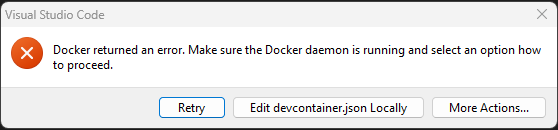
As I work on more and more assignments I am constantly hit with the same error while starting up my work for class:

The fix to this is very simple; Start up Docker. This error simply means that my VS Code is attempting to open a container, but I don’t have Docker running to do that. As this reminder started to get me in the habit of making sure Docker was open before attempting to work in a container, I started to ask myself, “What is Docker actually doing and what is a container?”.

I found an excellent post that breaks down what Docker is and how each of the individual parts of Docker work together. The blog, “Introduction to Containers and Docker” by Liam Mooney (https://endjin.com/blog/2022/01/introduction-to-containers-and-docker) provides great information of how Docker used containers with an example of a dockerfile and how to build your own container.  Mooney starts off with explaining what a container is and how they vary from virtual machines. Containers and virtual machines are both ways of creating an isolated environment on a computer, however, virtual machines are bulky and slow in comparison to containers. This means they can both be used to create stable environments to run software in, however, virtual machines require an image of an OS to be installed on a host computer. This OS also needs to be installed every time you start the virtual machine. This paired with taking up a lot of space and CPU resources by having two OS’s that share a lot of features leads to much longer start up times and slower runtime. Containers use the capabilities and features of the host OS to run the environments. This makes them much lighter, only needing select software and dependencies to be included in the environment.

This blog goes on to explain how Docker is able to use containers to create environments in seconds. Docker uses dockfiles, which are a list of commands the docker daemon will execute to build the image you wish to run for your environment. Docker daemon is a background service that builds, manages, and runs the environment by being the middleman between the container and the host OS. Once the image has been built, it can be opened in any number of containers that are all independent of each other.

The examples given by Mooney are great for understanding exactly how you would create a simple container. Giving me a better look at what Docker is actually doing when I am working in VS code and its opening containers for me to work in. Although I don’t see myself designing my own containers anytime soon, it is great to know how the software is executing and managing these environments.

From the blog CS@Worcester – CS Learning by kbourassa18 and used with permission of the author. All other rights reserved by the author.

What is Refactoring?

Refactoring is the process of restructuring a code without changing or adding to its functionality and external behavior. There are a lot of ways to go about refactoring but it mostly goes towards applying standard basic actions. These changes in the existing code save the software’s functionality and behavior since the changes are so tiny, they are less likely to cause any errors. So, what is the point of refactoring? Well, refactoring is to turn any messy confusing code into a clean understandable one instead. When a code is messy it means that the code is hard to understand and maintain, when it’s time to add a required functionality it causes a lot of problems with the code because it’s confusing already. With a clean code, it’s easier to make any changes and improve on any problems. Also with a clean code anybody who ever works with the code is able to understand the code and can appreciate how organized it is. When a messy code isn’t cleaned up it can affect any feature developments because developers have to take more time to understand the code and track the code so that they can make any changes themselves.

Knowing when to refactor is important and there are different times to refactor your code. Like refactoring, while you’re reviewing the code, reviewing the code before it goes live is the best time to refactor and make any changes you can before pushing it through. You can also schedule certain parts of your day to refactor your code instead of doing it all at once. By cleaning your code you are able to catch any bugs before they create any problems in your code. The main thing about refactoring your code is that cleaning up a dirty code can reduce technical debt. Clean code is easier to read and if anybody else besides the developer works on that code they are also able to easily understand that code as well as maintain and add features to it. The less complicated the code is, it can lead to improved source-code maintenance. With a clean code, the design can be used as a tool for any other developers it can become the basis of a code elsewhere. This is why I believe that refactoring is important because changing just the smallest piece of code can lead to a better functional approach to programming. It helps developers get a better understanding of the code as well as making better design decisions.

From the blog CS@Worcester – Kaylene Noel's Blog by Kaylene Noel and used with permission of the author. All other rights reserved by the author.

Docker and Dev Containers – Understanding the Basics

Over the past few weeks, our in-class activities as well as our last assignment for CS-343 have required running Docker in conjunction with a Dev Container in VSCode. While I was able to follow the instructions given and complete our assignments using these tools, I struggled getting started and navigating through some of the components for in-class activities at times, impeding my ability to work efficiently and keep up with my team. To make things worse, I didn’t have much of an understanding of what each component did and why it’s being used. So, I decided to do some research on these topics, particularly the relevance, benefits and drawbacks of using Dev Containers and how they are connected to VSCode and Docker.

In my search, I found Getting Started With Dev Containers, a blog post by CS professional Dave Storey which clarifies a lot, beginning with addressing why Dev Containers are used. Setting up development environments can be a lengthy and tedious process depending on prerequisites, dependencies or other implementations. Dev Containers utilize the power of containerization – bundling all files, SDKs etc. needed to run an application for several benefits like lower overhead, portability, consistency, and more. 

There are some general advantages and disadvantages of using Dev Containers to be aware of. For starters, they guarantee a consistent development environment regardless of the hardware/operating system being used as long as it can run the container. Similarly, there’s guaranteed consistency across toolsets that each teammate is using, so everyone is familiar and there is no communication or project friction caused by inconsistent setups or toolkits. It’s also quick and easy to integrate a new member to a team/project by instantly setting them up with the same development environment in use by the rest of the team. Dev Containers are reusable and adaptable for other projects, providing long term value by saving time on project set-up.

While there’s lots of advantages, there are also drawbacks that should be considered when strategizing projects and contemplating the use of Dev Containers. There’s an upfront time/cost barrier in setting up the container and its configurations – though available templates make this process easier. To this point, you need to have a basic understanding of Docker and general containerization to set up and maximize benefits from Dev Containers. And, when dependencies and other components become deprecated, maintenance needs to be done to make sure that Dev Containers are up-to-date and usable as they are (usually) not part of main code repositories. 

This helped to clarify things based on what we’ve worked with in class. Dev Containers are using VSCode like an IDE/server which communicates with Git and runs our code in the Docker container. Our implementation in class lets everyone deal with the same tools and environments to leverage these mentioned benefits for group learning projects as well as individual assignments.

Sources:

  1. Getting Started With Dev Containers | by C:\Dave\Storey | Medium
  2. What is a software development kit (SDK)? – Definition from TechTarget

From the blog CS@Worcester – Tech. Worth Talking About by jelbirt and used with permission of the author. All other rights reserved by the author.