Deciphering the Layers of Web Systems: Front End, Back End, and Data Persistence (Week-8)

In the expansive digital landscape, the seamless operation of web systems relies on the harmonious integration of front end, back end, and data persistence layers. Each of these foundational elements plays a pivotal role in delivering the interactive and dynamic experiences we’ve come to expect from modern web applications.

Front End Development: Crafting the User Interface

The front end is the visible part of the iceberg, the user interface that we interact with directly. Front-end developers are like the set designers of a play, creating the visual elements that users engage with—the text, images, buttons, and more. With HTML for structure, CSS for style, and JavaScript for interactivity, they construct responsive and adaptive interfaces that provide a consistent experience across various devices.

Frameworks such as React, Angular, and Vue.js have transformed the landscape of front end development. They offer developers powerful tools to create dynamic interfaces that respond to user interactions in real time. A core principle of front end design is accessibility, ensuring that web applications are inclusive for all users, including those with disabilities.

Resources for Front End Development:

Back End Development: The Engine Behind the Interface

Lurking beneath the surface, the back end is where the application’s core logic resides—the server side. It is the engine room that powers the application, handling data processing, API calls, and server management. The back end is the realm of languages such as Python, Java, Ruby, and server-side frameworks like Node.js, which allows for JavaScript to be used on the server, facilitating full-stack development practices.

The back end manages interactions with the database, business logic, authentication, and serves the appropriate data to the front end. Effective back end development ensures that web applications are fast, secure, and scalable.

Resources for Back End Development:

Data Persistence Layer: The Database

At the base of the web system lies the data persistence layer, akin to the foundation of a building. This layer is where databases live, tasked with storing data so that it remains available for future retrieval. Depending on the application’s requirements, databases may be relational, such as MySQL and PostgreSQL, or non-relational, like MongoDB.

The database is crucial for storing, organizing, and retrieving data efficiently. A well-designed database supports the application’s needs for speed, reliability, and integrity, allowing for high-volume transactions and secure storage of sensitive information.

Resources for Data Persistence:

Conclusion: The Symphony of Web Development

Developing a web system is akin to orchestrating a symphony, where each section plays its part in creating a beautiful harmony. The front end appeals to the senses, the back end conducts the operation, and the data persistence layer ensures the longevity and integrity of the performance. Understanding these distinct layers and their integration is crucial for web developers who aspire to create robust, user-centric, and efficient web applications.

Together, these components form the infrastructure of the digital experiences we encounter daily. A solid grasp of each layer’s role, challenges, and tools not only equips developers with the knowledge to build effective web solutions but also the insight to innovate and push the boundaries of what’s possible in the web’s ever-evolving narrative.

From the blog CS@Worcester – Kadriu's Blog by Arber Kadriu and used with permission of the author. All other rights reserved by the author.
What Is Docker?

And How is it Useful?

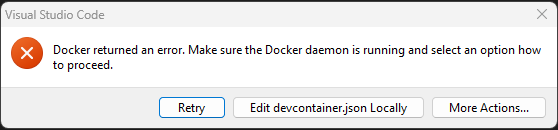
As I work on more and more assignments I am constantly hit with the same error while starting up my work for class:

The fix to this is very simple; Start up Docker. This error simply means that my VS Code is attempting to open a container, but I don’t have Docker running to do that. As this reminder started to get me in the habit of making sure Docker was open before attempting to work in a container, I started to ask myself, “What is Docker actually doing and what is a container?”.

I found an excellent post that breaks down what Docker is and how each of the individual parts of Docker work together. The blog, “Introduction to Containers and Docker” by Liam Mooney (https://endjin.com/blog/2022/01/introduction-to-containers-and-docker) provides great information of how Docker used containers with an example of a dockerfile and how to build your own container.  Mooney starts off with explaining what a container is and how they vary from virtual machines. Containers and virtual machines are both ways of creating an isolated environment on a computer, however, virtual machines are bulky and slow in comparison to containers. This means they can both be used to create stable environments to run software in, however, virtual machines require an image of an OS to be installed on a host computer. This OS also needs to be installed every time you start the virtual machine. This paired with taking up a lot of space and CPU resources by having two OS’s that share a lot of features leads to much longer start up times and slower runtime. Containers use the capabilities and features of the host OS to run the environments. This makes them much lighter, only needing select software and dependencies to be included in the environment.

This blog goes on to explain how Docker is able to use containers to create environments in seconds. Docker uses dockfiles, which are a list of commands the docker daemon will execute to build the image you wish to run for your environment. Docker daemon is a background service that builds, manages, and runs the environment by being the middleman between the container and the host OS. Once the image has been built, it can be opened in any number of containers that are all independent of each other.

The examples given by Mooney are great for understanding exactly how you would create a simple container. Giving me a better look at what Docker is actually doing when I am working in VS code and its opening containers for me to work in. Although I don’t see myself designing my own containers anytime soon, it is great to know how the software is executing and managing these environments.

From the blog CS@Worcester – CS Learning by kbourassa18 and used with permission of the author. All other rights reserved by the author.

What is Refactoring?

Refactoring is the process of restructuring a code without changing or adding to its functionality and external behavior. There are a lot of ways to go about refactoring but it mostly goes towards applying standard basic actions. These changes in the existing code save the software’s functionality and behavior since the changes are so tiny, they are less likely to cause any errors. So, what is the point of refactoring? Well, refactoring is to turn any messy confusing code into a clean understandable one instead. When a code is messy it means that the code is hard to understand and maintain, when it’s time to add a required functionality it causes a lot of problems with the code because it’s confusing already. With a clean code, it’s easier to make any changes and improve on any problems. Also with a clean code anybody who ever works with the code is able to understand the code and can appreciate how organized it is. When a messy code isn’t cleaned up it can affect any feature developments because developers have to take more time to understand the code and track the code so that they can make any changes themselves.

Knowing when to refactor is important and there are different times to refactor your code. Like refactoring, while you’re reviewing the code, reviewing the code before it goes live is the best time to refactor and make any changes you can before pushing it through. You can also schedule certain parts of your day to refactor your code instead of doing it all at once. By cleaning your code you are able to catch any bugs before they create any problems in your code. The main thing about refactoring your code is that cleaning up a dirty code can reduce technical debt. Clean code is easier to read and if anybody else besides the developer works on that code they are also able to easily understand that code as well as maintain and add features to it. The less complicated the code is, it can lead to improved source-code maintenance. With a clean code, the design can be used as a tool for any other developers it can become the basis of a code elsewhere. This is why I believe that refactoring is important because changing just the smallest piece of code can lead to a better functional approach to programming. It helps developers get a better understanding of the code as well as making better design decisions.

From the blog CS@Worcester – Kaylene Noel's Blog by Kaylene Noel and used with permission of the author. All other rights reserved by the author.

Docker and Dev Containers – Understanding the Basics

Over the past few weeks, our in-class activities as well as our last assignment for CS-343 have required running Docker in conjunction with a Dev Container in VSCode. While I was able to follow the instructions given and complete our assignments using these tools, I struggled getting started and navigating through some of the components for in-class activities at times, impeding my ability to work efficiently and keep up with my team. To make things worse, I didn’t have much of an understanding of what each component did and why it’s being used. So, I decided to do some research on these topics, particularly the relevance, benefits and drawbacks of using Dev Containers and how they are connected to VSCode and Docker.

In my search, I found Getting Started With Dev Containers, a blog post by CS professional Dave Storey which clarifies a lot, beginning with addressing why Dev Containers are used. Setting up development environments can be a lengthy and tedious process depending on prerequisites, dependencies or other implementations. Dev Containers utilize the power of containerization – bundling all files, SDKs etc. needed to run an application for several benefits like lower overhead, portability, consistency, and more. 

There are some general advantages and disadvantages of using Dev Containers to be aware of. For starters, they guarantee a consistent development environment regardless of the hardware/operating system being used as long as it can run the container. Similarly, there’s guaranteed consistency across toolsets that each teammate is using, so everyone is familiar and there is no communication or project friction caused by inconsistent setups or toolkits. It’s also quick and easy to integrate a new member to a team/project by instantly setting them up with the same development environment in use by the rest of the team. Dev Containers are reusable and adaptable for other projects, providing long term value by saving time on project set-up.

While there’s lots of advantages, there are also drawbacks that should be considered when strategizing projects and contemplating the use of Dev Containers. There’s an upfront time/cost barrier in setting up the container and its configurations – though available templates make this process easier. To this point, you need to have a basic understanding of Docker and general containerization to set up and maximize benefits from Dev Containers. And, when dependencies and other components become deprecated, maintenance needs to be done to make sure that Dev Containers are up-to-date and usable as they are (usually) not part of main code repositories. 

This helped to clarify things based on what we’ve worked with in class. Dev Containers are using VSCode like an IDE/server which communicates with Git and runs our code in the Docker container. Our implementation in class lets everyone deal with the same tools and environments to leverage these mentioned benefits for group learning projects as well as individual assignments.

Sources:

  1. Getting Started With Dev Containers | by C:\Dave\Storey | Medium
  2. What is a software development kit (SDK)? – Definition from TechTarget

From the blog CS@Worcester – Tech. Worth Talking About by jelbirt and used with permission of the author. All other rights reserved by the author.

CS343 Blog Post for Week of November 30, 2023

This week, I wanted to continue writing about the SOLID software design principles. The next principle I have to cover is the Liskov substitution principle. This principle expands upon the Open/Closed principle I wrote about the previous week, providing a guideline on how a superclass and its child classes should behave.

This principle was first defined by Barbara Liskov in 1987, and later adopted by Robert C. Martin. From a paper that Barbara Liskov cowrote with Jeanette Wing, they defined the Liskov substitution principle as a mathematical property: “Let Φ(x) be a property provable about objects x of type T. Then Φ(y) should be true for objects y of type S where S is a subtype of T.”

Translated into plain English, this principle states that instances of a superclass in a program should be able to be replaced by one of its subclasses without breaking the program. Overridden methods from a subclass must accept the same input as the superclass’s original method, and the return value of a subclass’s method must be able to be used the same way as the value returned by a superclass’s original method.

Creating code that abides by this principle isn’t simple, as the compiler can only verify that the structure of your code is correct, not that any specific behavior of your code always executes when desired. Creating robust test classes and cases is the best way to check if your code is following the Liskov substitution principle, checking portions of your program using all subclasses of a particular component to ensure there are no resulting errors or loss in performance.

The author of this article series has included another code example representing a coffee machine to illustrate this design principle, as they have done in their previous articles. They present the problem of creating different subclasses of coffee machines from a generic parent class, with two classes with an “addCoffee()” method that accepts two different types of objects, CoffeeBean and GroundCoffee. The author suggests two solutions, either creating a common Coffee class that can be utilized by both the BasicCoffeeMachine class and the PremiumCoffeeMachine class, or create a common implementation of a “brewCoffee()” method that also appears in both CoffeeMachine classes. The first solution would violate the Liskov substitution principle, because each CoffeeMachine class would need to validate that they are receiving the correct input type for the addCoffee() method, as the BasicCoffeeMachine class can only use the GroundCoffee type, and not the CoffeeBean type. The author’s preferred solution is to remove the addCoffee() method from both CoffeeMachine classes and implement a common brewCoffee() method in the CoffeeMachine interface implemented by BasicCoffeeMachine and PremiumCoffeeMachine. Since all CoffeeMachines are expected to brew filtered coffee grounds, this brewCoffee() method should have that responsibility.

I want to further understand this principle because in a past project, I made a simple video game that used lots of objects of different subtypes that inherited from a single GameObject parent class. If I want to return to that project, or begin a similar one in the future, I want to make sure that I am not losing any functionality as I design and implement subclasses of a broader parent class.

From the blog CS@Worcester – Michael's Programming Blog by mikesprogrammingblog and used with permission of the author. All other rights reserved by the author.

Week 8

The contents that I have been learning in this week is about the software license and copyright. I found this blog giving the general definition of these contents and in the time Covid-19.

For many instructors who just want to do what is right, the reality that copyright is complicated has been made worse by the significant transition to distant learning. The fact that over 900 individuals took time out of their days to watch the webinar is proof that copyright education is necessary.

Many publishers combined helpful content, offered free teaching aids, and canceled copyright costs for online learning during the pandemic. Many pieces of content were utilized without the copyright owners’ consent; some were used for legal “fair use,” others were used carelessly, and some were exploited for opportunistic purposes.

Five significant developments emerged in the licensing and reuse of protected information between March and June 2020:

  1. Print photocopying vastly increased as students lost access to materials in the classroom.
  2. Online learning platforms and other EdTech tools gained traction.
  3. Publishers created no-cost licenses to enable teaching under these new circumstances.
  4. More assessments moved online.
  5. Teachers taught using materials they copied or posted online, sometimes underpaid or free licenses, sometimes under fair use, and sometimes by committing infringements that rightsholders were willing to ignore.

Remote learning during COVID-19 resulted in an increasing number of queries about copyright, licensing, and practices for universities, schools, and academy centers as they seek to ensure better compliance.

A license is a permission given to use a property or to exercise rights belonging to another under agreed conditions. Copyright is the exclusive right of the creator of a work or her designees to make copies of that work. In order to reach a conclusion that a use was or was not a fair use, the judge has to analyze all the following factors:

  1. The purpose and character of the use, including whether such use is of a commercial nature or is for nonprofit educational purposes.
  2. The nature of copyrighted work.
  3. The amount and substantiality of the portion used in relation to the copyrighted work as a whole.
  4. The effect of the use upon the potential market for or value of the copyrighted work.

This blog provides educators with a deeper understanding of copyright, its relevance to remote learning, and strategies for managing copyright compliance while using published resources in this new paradigm.

From the blog CS@Worcester – Hong Huynh-CS348-WSU by hhuynh3 and used with permission of the author. All other rights reserved by the author.

IndependentStudy:GitKitRefactor4

CS@Worcester

This week I was able to make more progress in refactoring the Git Kit.

I was able to separate kit specific features from general features and I also managed to have deploy.sh read the features from the config.yaml file. Both of these while maintaining functiona
lity of the kit which I tested by deploying on git hub.

When it came to separating kit specific features from general features, I created a new folder to contain the kit specific features in the top-level directory. Afterward changes were made to
the deploy.sh so that it could look for the kit specific features in the kit specific directory rather than the general features directory. After making these adjustments, I deployed the git kit on GitHub and it worked successfully.

Having deploy.sh read the ordered list from the config.yaml file was slightly more challenging. After figuring out the order into which the features are installed, I replicated the same order in the config.yaml file. I separated them based on which function name. The next step was figuring out how yq reads the ordered list. After researching I figured out I could bring the ordered list as an array, I then created a for loop to iterate through the file names and then install the features through the deploy.sh file. After a couple of hours figuring out all this I tested the new structure and it worked!

It was a successful week, and I am glad that I continue to make progress in refactoring Git Kit.

From the blog De Arrow's Webpage by Samuel Njuguna and used with permission of the author. All other rights reserved by the author.

We’re back!

This blog has been down for a bit, but now it’s back.

I’ll look into recovering past posts…

The post We’re back! first appeared on On Becoming an Eccentric Professor.

From the blog On Becoming an Eccentric Professor by Karl Wurst and used with permission of the author. All other rights reserved by the author.

Hello world!

Welcome to WordPress. This is your first post. Edit or delete it, then start writing!

The post Hello world! first appeared on Just another WordPress site.

From the blog Just another WordPress site by blog_i0hl7h and used with permission of the author. All other rights reserved by the author.

Week 8: CS-343

SOLID Design Principles

SOLID is a subcategory of five principles, the first being:

Single Responsibility Principle (SRP)

SRP states that a class, module, or function should only have a singular function.

For example, having a class ‘Animal’ with methods ‘displayAnimalName()’, ‘animalSound()’, ‘feedAnimal()’ would be a violation of SRP because each method has a different function. Creating three separate classes that would each represent a functionality resolves the violation. This entails new classes are created for DisplayName, Sound, and Feeding. Although this may lead to more code overall, having separate classes allows for better maintainability. Without SRP, making changes to one functionality may break another.

Open-Closed Principle (OCP)

OCP states that code should be open for extension, but closed for modification. Therefore the code’s behavior should be extended by adding more code rather than modifying the existing code.

Function ‘getArea()’ calculates the area of a shape using a switch statement where there are cases for a square and circle. To add another shape, the switch statement must be modified to add a case for the new shape, violating OCP. To satisfy OCP, one would create separate classes for each shape that implements the Area interface. Now to add a new shape, one would add a new class and implement the Area interface rather than modify the original switch statement.

Liskov Substitution Principle (LSP)

LSP states that child class objects must be substitutable with objects of the parent class without affecting the correctness of the code.

Imagine a parent class ‘Bird’ with method ‘fly()’, and child classes ‘Penguin’ and ‘Eagle’. Both inherit ‘fly()’ because ‘Penguin’ and ‘Eagle’ are child classes of ‘Bird’. Because penguins cannot fly, the ‘fly()’ method in ‘Penguin’ has been overridden to do nothing. Doing this would violate LSP because objects of ‘Penguin’ would not be substitutable for objects of ‘Bird’.

Interface Segregation Principle (ISP)

ISP states that users should not be forced to implement interfaces they will not use.

Imagine an interface ‘Worker’ that has methods ‘work()’ and ‘eatOfficeLunch()’. Classes ‘FieldWorker’ and ‘OfficeWorker’ both implement the ‘Worker’ interface. Because ‘FieldWorker’ does not eat in office, the method ‘eatOfficeLunch()’ is unnecessary. This violates ISP because ‘FieldWorker’ is forced to implement ‘eatOfficeLunch()’ although the method will not be used.

Dependency Inversion Principle (DIP)

DIP states that high-level modules should not depend on low-level modules, keeping that as separate as possible.

For example, there’s a project with high-level systems (backend logic), that relies on low-level modules (database access). However the project’s team wants to change the database from one type to a different. Because the high-level systems are specifically written and depend on the database type, they would no longer work once the database type changes. Having high-level systems be more abstract and able to be implemented in different ways is ideal.

Conclusion

The article used was chosen because it gave examples with code, making understanding easy. As someone who wishes to have a career in software development, knowing the best practices for designing maintainable code is crucial. I expect to apply these principles to all future projects.

Resources:

https://www.freecodecamp.org/news/solid-design-principles-in-software-development/

From the blog CS@Worcester – Zack's CS Blog by ztram1 and used with permission of the author. All other rights reserved by the author.